Your account executive just booked a meeting with a target account that finally replied. The calendar invite lands for tomorrow morning. Then the scramble starts. Someone exports CRM notes. Someone else pulls call summaries from Gong or Zoom. A sales engineer hunts for product screenshots. Marketing drops in a generic deck template that says almost nothing about the buyer’s actual situation.
That’s the moment where most revenue teams discover the cost of manual work. It’s not only the hours. It’s slower follow-up, weaker relevance, and missed opportunities to turn raw account context into a persuasive asset before the buyer moves on.
AI workflow automation matters because it closes that gap. Done well, it doesn’t just speed up internal tasks. It helps teams turn scattered inputs into useful outputs such as account plans, discovery summaries, presales narratives, and interactive decks that support live selling.
Table of Contents
- Beyond the Buzzword: Introduction to AI Workflows
- What Is AI Workflow Automation Really
- The Core Components of an AI Workflow
- Common Architectures and Integration Patterns
- Implementing Your First AI Workflow
- Actionable Use Cases for Revenue Teams
- Measuring True ROI Beyond Time Saved
- Governance and the Path Forward
Beyond the Buzzword: Introduction to AI Workflows
A lot of teams still hear “AI workflow automation” and think of a chatbot bolted onto a form. That’s too small. In practice, the useful version looks more like a system that gathers context, applies reasoning, creates a deliverable, and routes it to the right human for approval or action.
For revenue teams, the difference is immediate. A seller doesn’t need another isolated summary tool. They need a workflow that can collect account history, read unstructured notes, identify the likely buying committee, draft a point of view, and package it into something usable before a meeting starts. That’s a workflow problem, not a single-prompt problem.
The market is moving in that direction fast. The AI in workflow automation market is expected to grow from $8.9 billion in 2023 to $25.6 billion by 2028, a 23.5% CAGR, according to Gitnux’s AI workflow automation statistics. Adoption is broadening too: workflow-automation adoption among small and mid-sized businesses grew about 40% year over year, and AI-integrated workflow tools grew roughly 35% in adoption, per Gitnux’s workflow automation statistics. That matters because once AI-assisted workflows become a baseline operating capability, teams that still build every customer asset by hand will feel slower in every stage of the sales cycle.
Most revenue teams don’t lose time because they lack data. They lose time because nobody has turned the data into a repeatable operating system.
The strongest implementations focus on outputs the business already values. Proposal drafts. Renewal risk summaries. Executive briefings. Account-based outreach prep. If the workflow produces a business asset that a seller, manager, or presales consultant can use the same day, adoption usually follows.
What Is AI Workflow Automation Really
Traditional automation is a calculator. It’s fast, exact, and limited to the logic you already defined. If a field changes, a record moves. If a form is complete, an email sends. That still matters, but it breaks down as soon as work depends on messy notes, ambiguous buyer language, or context spread across multiple systems.
AI workflow automation is closer to an operating team. One component collects information. Another interprets it. Another creates output. Another decides whether the result is safe to ship, or whether a human needs to step in. The value comes from coordination, not from a single model response.
Agents do the work
Think of agents as specialists. One agent summarizes a discovery call. Another extracts competitor mentions from call transcripts. Another drafts a first-pass proposal narrative. Another structures the final output as JSON so downstream systems can use it.
That’s the important distinction. Good AI workflows don’t stop at text generation. They produce structured artifacts that other systems can validate, enrich, transform, and publish.
Orchestration decides what happens next
The orchestrator acts like a project lead. It decides sequence, retries, branching, approvals, and fallbacks. If CRM data is incomplete, it can route the draft to a human. If a transcript contains enough context, it can generate an account brief automatically. If legal language appears in the output, it can hold the workflow for review.
Practical rule: Don’t ask one model to do everything. Break work into smaller tasks with clear inputs, outputs, and approval logic.
A useful mental model is perceive, reason, act. The workflow perceives inputs from systems and documents, reasons over the context, then acts by creating or routing a result. That’s why AI workflow automation can handle unstructured work that rigid if-then systems struggle with. It can interpret call notes, compare themes across sources, and draft a coherent narrative without relying on a perfectly standardized input.
Data, monitoring, and governance keep it usable
Teams often obsess over prompts and ignore the rest. In production, the workflow succeeds or fails based on data availability, system reliability, and review controls. If the CRM has duplicate contacts, stale opportunity stages, or inconsistent account naming, the workflow will generate polished nonsense faster.
A reliable workflow usually includes:
- Connected inputs: CRM records, transcripts, spreadsheets, documents, product notes, and external research.
- Structured outputs: JSON, templates, presentation payloads, ticket updates, or approved messages.
- Review gates: Human approval for high-risk steps such as buyer-facing outreach or contract-adjacent language.
- Logging: Records of what the system saw, generated, and sent onward.
That’s what AI workflow automation really is. It’s not magic. It’s a coordinated system that lets software handle context-heavy work without pretending every decision should be fully autonomous.
The Core Components of an AI Workflow
An AI workflow works like a digital assembly line. Raw material comes in, specialized workers handle defined tasks, a coordinator moves work between stations, supervisors monitor quality, and guardrails stop bad output from reaching customers. If one of those pieces is missing, the whole system becomes fragile.
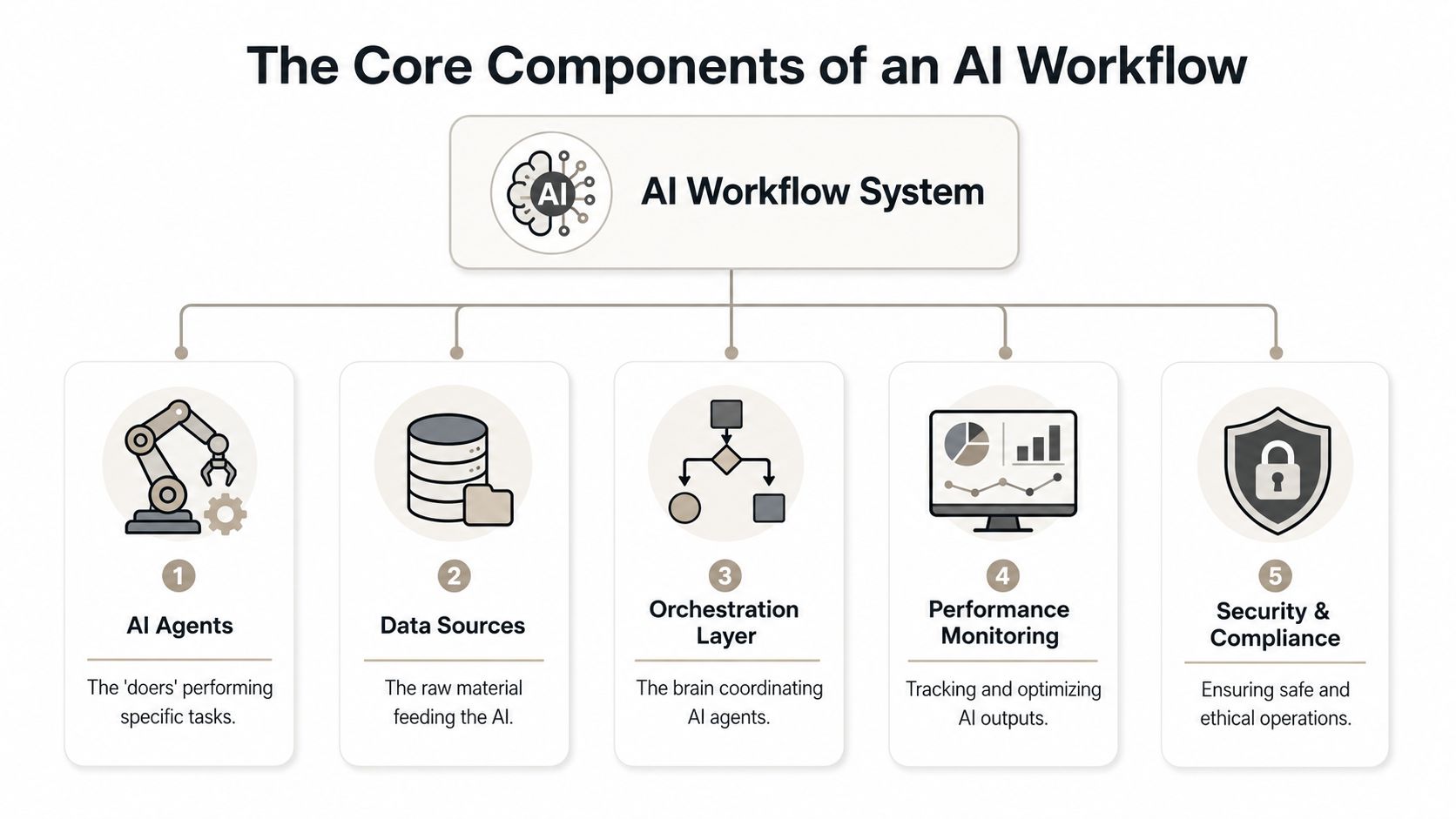
Agents are the doers. In a revenue workflow, that might mean one agent extracts account history, another drafts talk tracks, and another formats output for downstream delivery. Their scope should stay narrow enough that you can test them against historical cases and inspect failures without guessing what went wrong.
If you want a concrete view of how task-specific agents are packaged, Encelade agents show the kind of agent-oriented interfaces teams use when they need outputs that can feed customer-facing assets instead of staying trapped in chat.
Orchestration is the system’s control layer. It knows when to call an agent, when to wait for data, when to branch, and when to escalate to a human. Without orchestration, teams end up with disconnected prompts and brittle handoffs. Many pilots stall here: people build an impressive demo that can write a summary, but they never decide what should happen if required fields are missing, if confidence is low, or if the output touches a sensitive customer topic.
Data sources are the raw material. CRM fields, spreadsheets, transcripts, support notes, pricing files, and product documentation all feed the workflow. If those inputs are inconsistent, the output won’t become more reliable just because a model is involved. Monitoring sits above the system like a production dashboard, telling you whether runs are succeeding, where latency is creeping in, and which prompts or connectors fail under load. Governance adds the final layer: who can approve outputs, what should be logged, and where the workflow must stop for review.
Here’s the five-part model in compact form:
| Component | Job in the workflow | Revenue-team example |
|---|---|---|
| AI agents | Perform specialized tasks | Summarize a call or draft slide copy |
| Data sources | Supply context | CRM, transcripts, product docs, spreadsheets |
| Orchestration layer | Coordinate sequence and branching | Route a proposal draft for manager approval |
| Performance monitoring | Track reliability and quality | Spot failed runs or low-quality outputs |
| Security and compliance | Enforce safe operation | Hold outreach that includes risky claims |
If you can’t explain where data enters, who approves output, and how failures are observed, you don’t have a workflow yet. You have a demo.
Common Architectures and Integration Patterns
The fastest way to disappoint a revenue team is to wire an AI workflow as a single fragile chain and call it production-ready. It may work in a sandbox. It usually fails the first time a dependency slows down, a payload changes shape, or a human needs to intervene halfway through.
Linear chains work until they break
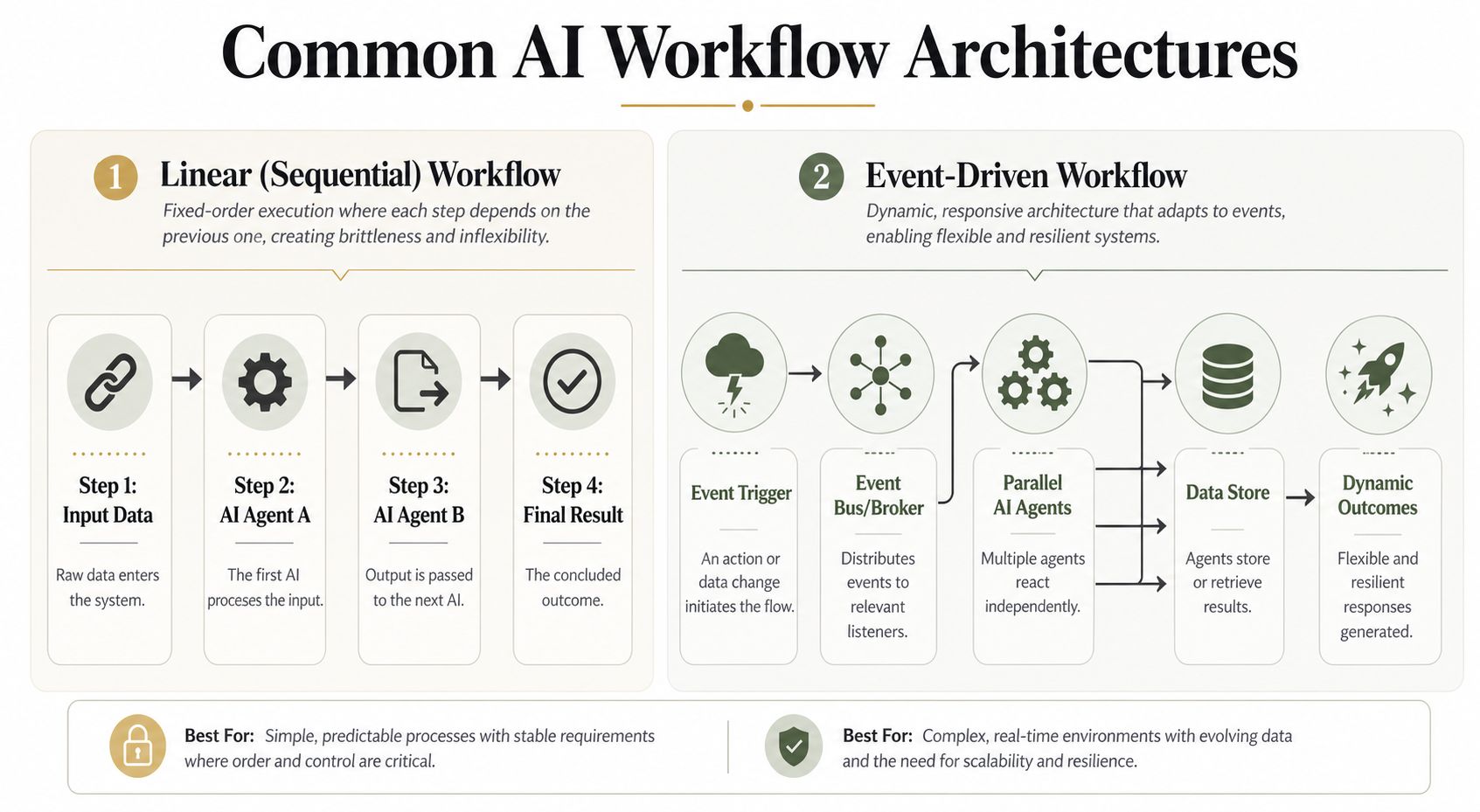
A linear workflow is simple. Step one fetches CRM data. Step two summarizes notes. Step three drafts content. Step four pushes the result into a deliverable. That’s easy to understand and fine for low-risk internal tasks.
The trade-off is brittleness. If one step returns malformed output or times out, everything behind it can fail. Linear chains also make it harder to validate changes safely because replacing one component can affect every downstream step.
Event-driven systems fit revenue work better
Event-driven architecture handles real operating conditions better. A trigger occurs, such as an opportunity stage change or a new meeting booked. That event gets published. Different services react independently. One agent builds an account brief. Another checks data completeness. Another prepares content for a presentation layer. A review service flags anything risky. A notification service alerts the rep when the asset is ready.
This pattern is more resilient because steps are decoupled. Message queues such as Kafka or Pub/Sub keep one service failure from collapsing the whole process. It also supports shadow deployment, where teams can run a new model or prompt path in parallel before promoting it.
According to Tech Daily Shot’s 2026 AI workflow automation playbook, modern workflow systems are built around modular components that react to real-time events, which lets teams swap in new models or microservices without major rewrites. The same source treats human-in-the-loop review not as a fallback but as a core 2026 architectural pattern, routing ambiguous or high-stakes cases to people through confidence thresholds and explainability triggers.
A simple comparison helps:
| Pattern | Where it fits | Main weakness | Main strength |
|---|---|---|---|
| Linear sequential | Small internal flows | One failure can break the chain | Easy to ship quickly |
| Event-driven | Business-critical workflows | More design complexity | Better resilience and validation |
For teams using visual workflow tools, n8n integrations for Encelade are the kind of connector pattern that makes sense here. One branch can generate a presentation, another can poll for status, and a later step can route the share link to Slack, email, or a CRM record without hard-coding every handoff into one brittle script.
Implementing Your First AI Workflow
Most first attempts fail for a predictable reason. The team starts with an ambitious end-to-end vision instead of one painful bottleneck. They try to automate pipeline reviews, outbound research, proposal generation, CRM hygiene, and coaching in one motion. Then nobody trusts the outputs.
Start smaller. Pick one workflow that’s expensive, frequent, and annoying. For revenue teams, that’s often first-draft account plans, meeting prep briefs, or converting call notes into structured follow-up content.
Start with one expensive bottleneck
Map the manual version first. Who touches it. What systems they open. Which inputs are required. Where they make judgment calls. Where errors happen. You need that map before you decide where AI belongs.
The implementation pattern that holds up in practice looks like this:
- Choose a bounded workflow: Select one output with a clear owner and a visible handoff.
- Write the task boundaries: Decide what the AI can draft, infer, or classify, and what it must never finalize alone.
- Insert review points: Put human approval at the places where customer context, pricing, legal language, or executive messaging could go wrong.
- Run historical tests: Feed old examples through the workflow before exposing it to live selling situations.
- Fix the data first: Standardize fields, remove duplicates, and decide which source wins when systems conflict.
Design the workflow before you pick the model
Teams often reverse this. They pick a model, play with prompts, and only later ask how the system should behave. That’s backwards. The workflow design matters more than the model choice in early deployment because the main risks are usually ambiguity, poor inputs, and missing governance.
Red Brick Labs’ workflow automation requirements guidance gets the order right: map the real workflow to identify bottlenecks, define AI task boundaries with explicit human review points, and prioritize data clarity — naming exactly what the system can read, where it writes, and which record wins during a conflict. That matches what shows up in real projects. Bad CRM hygiene breaks more pilots than weak prompting.
A practical first stack often combines visual orchestration with code escape hatches. Tools like n8n or Make are useful when operations teams need to move fast but still want scripting for edge cases. The point isn’t to find one perfect platform. It’s to preserve control over branching, validation, and output formatting as the workflow grows.
Build the smallest version that produces a business asset someone will actually use this week.
Actionable Use Cases for Revenue Teams
The best revenue workflows don’t stop at analysis. They turn agent output into something a seller can send, present, or use in a live conversation.
Sales deck generation from agent output
A common pattern starts after discovery. The workflow pulls CRM notes, transcript highlights, product fit points, and spreadsheet data. An agent structures the result into a payload with slide topics, narrative blocks, and supporting materials. That payload then feeds a presentation system instead of asking a human to rebuild everything by hand. For a deeper walkthrough of that handoff, see our guide on generating presentations from AI agent output.
For sales managers, this matters because the output becomes a reusable business asset rather than one more summary trapped in chat. Sales manager workflows in Encelade fit this pattern because the platform accepts programmatic inputs and renders web-native decks that can stay on-brand, interactive, and current.
A simplified request to the Encelade generation API looks like this:
import requests

response = requests.post(
    "https://www.encelade.ai/api/public/v1/projects/generate",
    headers={
        "x-api-key": "YOUR_API_KEY",
        "Content-Type": "application/json",
    },
    json={
        "topic": "Executive Briefing for Acme Corp",
        "outlineHints": [
            "Account situation and current initiative",
            "Buying committee: RevOps, IT, and Sales Leadership",
            "Key risks and opportunities",
            "Recommended next steps",
        ],
        "supportingMaterials": [
            {
                "title": "Discovery call notes",
                "notes": "Focus on operational efficiency; deck creation is "
                         "slowing follow-up.",
            },
            {
                "title": "Acme account record",
                "kind": "link",
                "url": "https://your-crm.example.com/accounts/acme",
            },
        ],
        "verbosity": "balanced",
        "pageCount": "auto",
    },
)

# Returns a session id you poll until the deck is ready — or register a webhook.
print(response.json())
That pattern is more useful than a static summary because the workflow creates a deliverable the team can present, share by link, update from live data, and export later if needed. After the structure is generated, the team can review tone, remove weak assumptions, and approve the final narrative before it reaches the buyer.
For a broader third-party take on how AI is reshaping sales workflows, this overview is a useful primer:
Two other workflows worth building
The same operating pattern applies to other revenue tasks.
- Dynamic presales demos: A workflow assembles product-specific talking points, current metrics, and technical proof points into a demo narrative tied to a target account.
- Account maps from transcripts: An agent reads discovery calls and meeting notes, extracts stakeholder names, roles, objections, and influence signals, then structures that into an account map for deal review.
- Follow-up asset generation: After a meeting, the workflow drafts recap materials, next-step summaries, and presentation updates adapted to the latest conversation context.
The useful output isn’t the model response. It’s the approved asset the revenue team can use in front of a buyer.
Measuring True ROI Beyond Time Saved
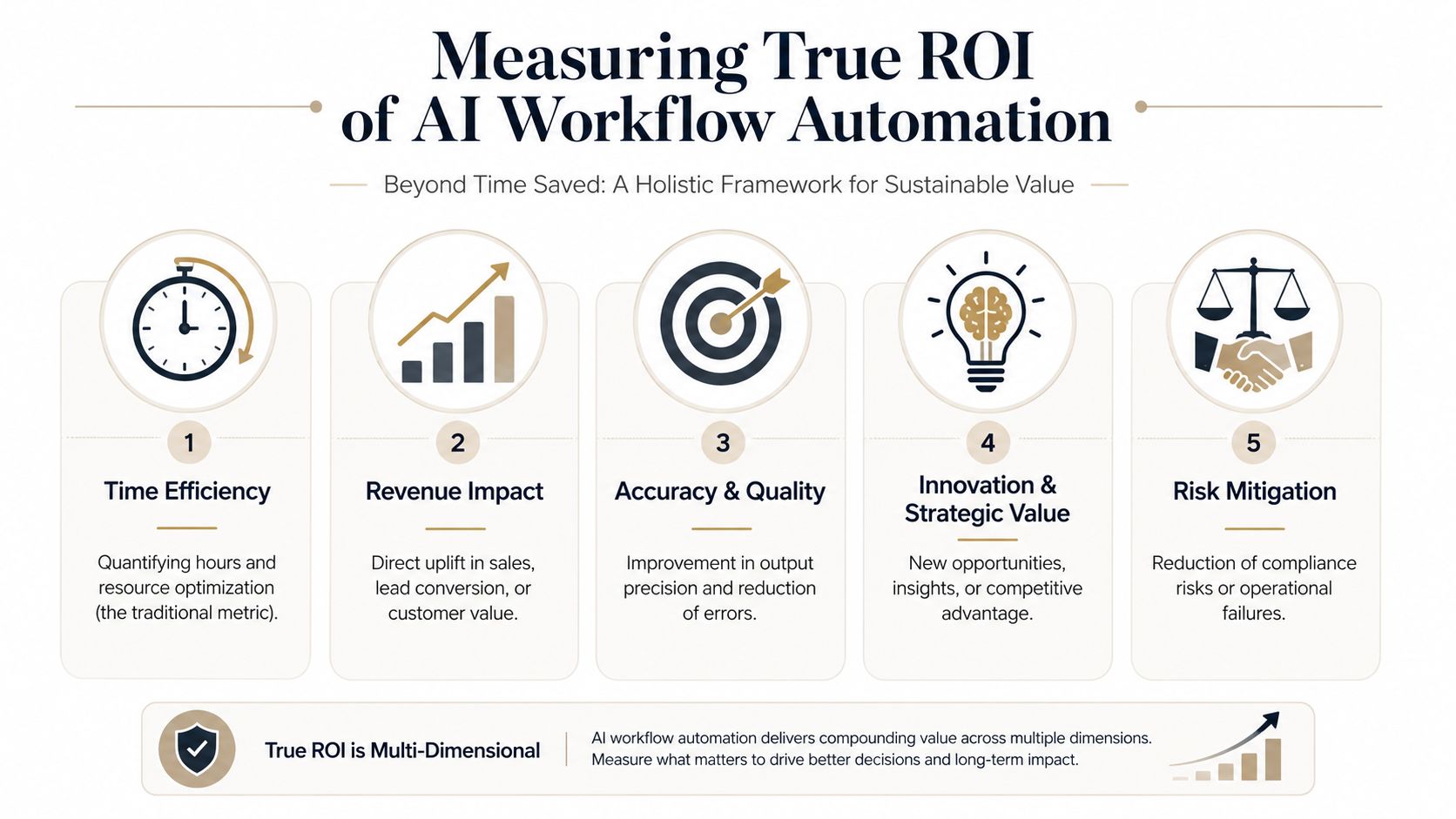
Time saved is easy to report and easy to overvalue. Finance leaders don’t fund workflow projects because a team feels faster. They fund them when the workflow improves business outcomes that show up in revenue, customer experience, or operating cost.
Build a measurement window that finance can trust
The strongest approach is simple and disciplined. Establish a baseline before deployment, then compare actual post-launch performance against that baseline with fixed checkpoints. The Kuse framework for intelligent workflow automation is directionally right here: align workflows to measurable business KPIs and visualize ROI in real time, tracking operational gains such as 30–50% faster cycle times and 20–40% lower operating costs. For a revenue team, the natural next step is to connect those operational gains to pipeline outcomes like meeting-to-next-step progression.
For more operational proof, pair that with a tight pilot design. Autofuse’s guidance on proving AI process automation ROI within 90 days recommends running a limited workflow in shadow mode for 3 to 4 weeks and tracking metrics like cycle time, accuracy, escalation frequency, and cost per transaction from system-generated events.
Track business impact not just activity
A useful scorecard for revenue workflows includes both operating and business metrics:
- Deal velocity: Time from qualified opportunity to proposal-ready asset.
- Conversion quality: Whether better preparation improves meeting-to-next-step progression.
- Output accuracy: Error reduction in generated summaries, structured fields, or asset content.
- Escalation behavior: How often the workflow needs human review and where.
- Cost profile: Labor cost change relative to tooling cost.
A common cadence, echoed in this walkthrough on measuring AI progress, is to baseline KPIs for about four weeks before launch and then re-measure at 30, 60, and 90 days. That cadence is useful because it stops teams from declaring victory after a good week or abandoning a promising workflow before the process stabilizes.
The key shift is mental. Don’t ask, “How many hours did we save?” Ask, “Did the workflow help the team move revenue work forward with higher quality and less friction?”
Governance and the Path Forward
The most dangerous AI workflow in revenue isn’t the one that fails loudly. It’s the one that sounds plausible, acts automatically, and pushes a bad assumption into a customer-facing moment.
Human review belongs in revenue workflows
Revenue work carries uneven risk. Lead scoring and internal summarization can tolerate more automation. Enterprise outreach, pricing language, refund decisions, and contract-adjacent content cannot. Those steps need explicit review logic.
Digital Applied’s analysis of AI marketing workflows makes the same point: keep human oversight on strategic, high-value decisions and route enterprise or VIP outputs through approval workflows before execution. The scale of the blind spot is measurable — Gravitee’s 2026 State of AI Agent Security report found that only about half of enterprise AI agents are actively monitored, meaning roughly half run without oversight even as deployment outpaces governance. That gap is what leaders should remember when someone proposes removing approvals too early.
A workable governance model usually includes:
- Risk tiers: Separate low-risk internal tasks from high-risk buyer-facing outputs.
- Approval triggers: Route outputs for review when confidence is low, source data conflicts, or sensitive topics appear.
- Traceability: Log the prompt context, retrieved inputs, generated output, and final human decision.
- Brand controls: Ensure final assets match approved positioning and style.
The path forward is controlled autonomy
The goal isn’t full autonomy. The goal is useful autonomy inside clear boundaries. Good AI workflow automation takes repetitive synthesis and formatting work off the team’s plate, while preserving human judgment where account nuance, commercial risk, and relationship quality still matter most.
That’s why the most effective revenue teams treat workflows as force multipliers. Reps spend less time assembling decks. Managers spend less time chasing status. Sales engineers spend less time rebuilding the same narrative from scratch. Humans still own the deal. The system handles the drudgery, the structuring, and the first draft.
If your team is trying to turn research, CRM notes, spreadsheets, and agent output into buyer-ready presentation assets, Encelade is one option to evaluate. It gives revenue teams a web-based presentation layer plus developer interfaces for generating, styling, and sharing interactive decks from workflow outputs, which makes it a practical endpoint for AI-driven sales and presales processes.