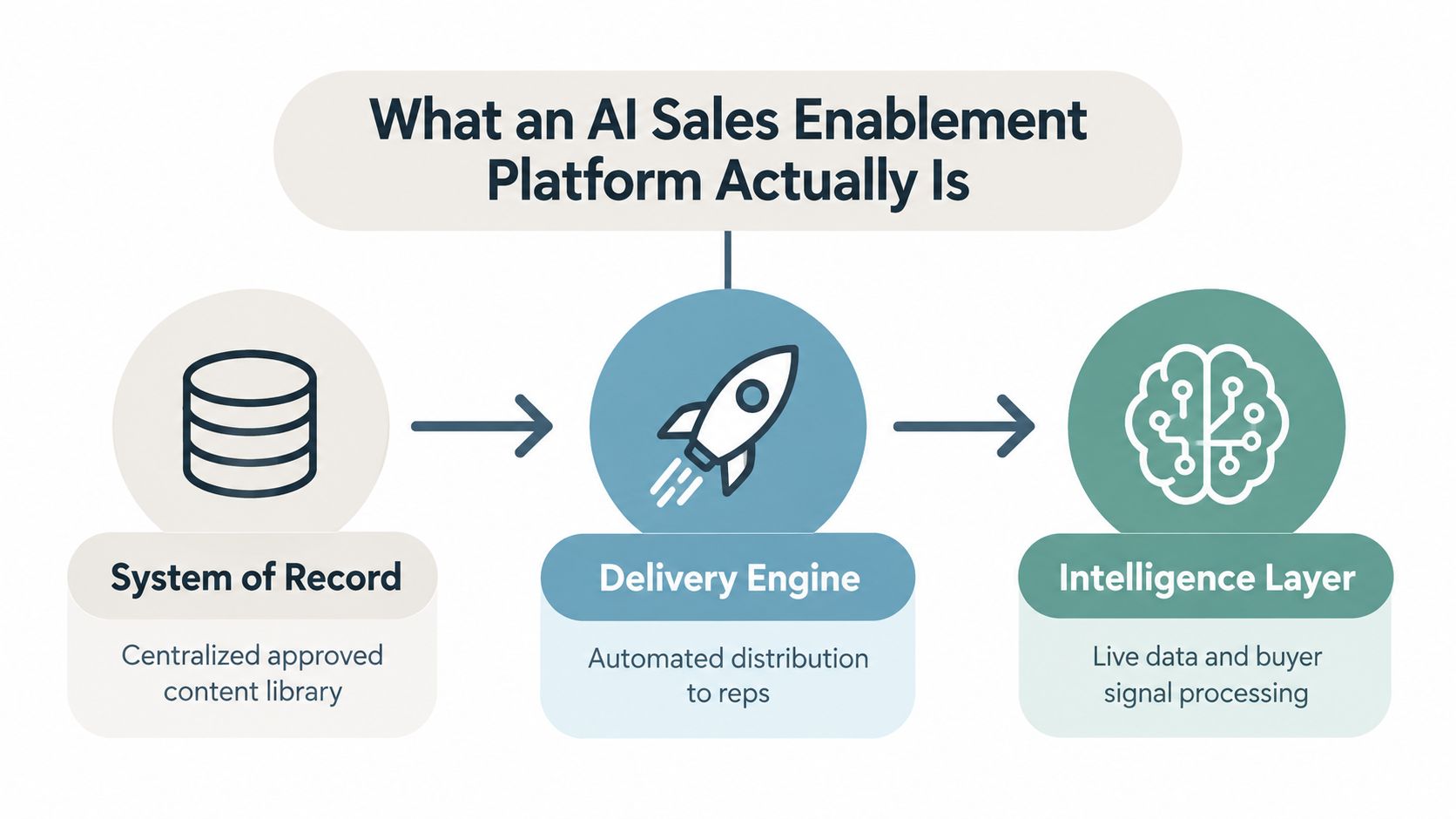
Your team probably has all the familiar symptoms already.
A sales rep sends QBR_Final_v3_APPROVED.pdf to a prospect. Marketing updates the pricing sheet later that afternoon. Customer success opens a different copy from a shared drive. Legal asks which version was approved. Everyone has a file. Nobody has certainty.
That’s the core reason version control for documents matters. It isn’t clerical hygiene. It’s operational control. If your team can’t tell which document is current, who changed it, and whether the numbers inside it still match the source system, you don’t have a documentation process. You have document drift with nicer file names.
What Is Document Version Control Really?
A master recipe, not a pile of files
The easiest way to explain version control for documents is a kitchen analogy. In a professional kitchen, the team doesn’t keep five slightly different recipe cards and hope the right one gets used during dinner service. They keep one master recipe, update it deliberately, and make sure everyone cooks from the same source.
Documents work the same way. A version control system exists to preserve a single source of truth. That’s the practical definition that matters. If your process still depends on people guessing whether Final, Final 2, or Final Approved is the right file, you’re archiving chaos, not controlling versions.
Version control has deep roots in digital work. The history of SCCS and CVS traces a path from the Source Code Control System, developed in 1972 at Bell Laboratories for file change tracking, to CVS in 1990, which enabled multiple users to work on files from different locations. That shift from single-user control to collaborative versioning is what made modern document governance possible.
Practical rule: If two people can answer “what’s the latest approved version?” differently, you don’t have version control yet.
What a trustworthy system must answer
A good system should answer four questions without anyone digging through email:
- Which version is current. Teams need one accepted working copy, not several competing “latest” files.
- Who changed it. Accountability matters, especially when sales, legal, product, and compliance all touch the same asset.
- What changed. A useful log says more than “updated.” It explains the actual revision.
- When it changed. Timing matters in approvals, renewals, and audits.
That’s why a version history isn’t just administrative overhead. It keeps teams aligned when stakes are high. In regulated documentation, NCCIH-style versioning guidance summarized here draws a hard line between draft iterations like v0.1 and v0.2, and the first approved baseline at 1.0. Once a version is approved for signature, that file is frozen. Later edits require a new version such as v2.0 rather than overwriting the approved copy.
Many teams get it wrong. They think version control for documents means naming discipline. Naming helps, but it doesn’t solve trust. Trust comes from a controlled process that preserves approved baselines, exposes history, and removes ambiguity about what’s official.
The Two Worlds of Version Control Architecture
Centralized and distributed systems
Most document systems fall into one of two architectural camps.
Centralized version control keeps the authoritative history on one server or platform. SharePoint is the familiar business example. The upside is control. Admins can manage permissions, retention, and access in one place. The downside is dependency on the central environment. If the process around that hub is slow or rigid, the whole team feels it.
Distributed version control gives each contributor a full copy of the repository and its history. Git is the obvious example. That model is powerful when teams need branching, merging, rollback, and independent workstreams. It’s especially useful when documentation changes alongside product or engineering changes.
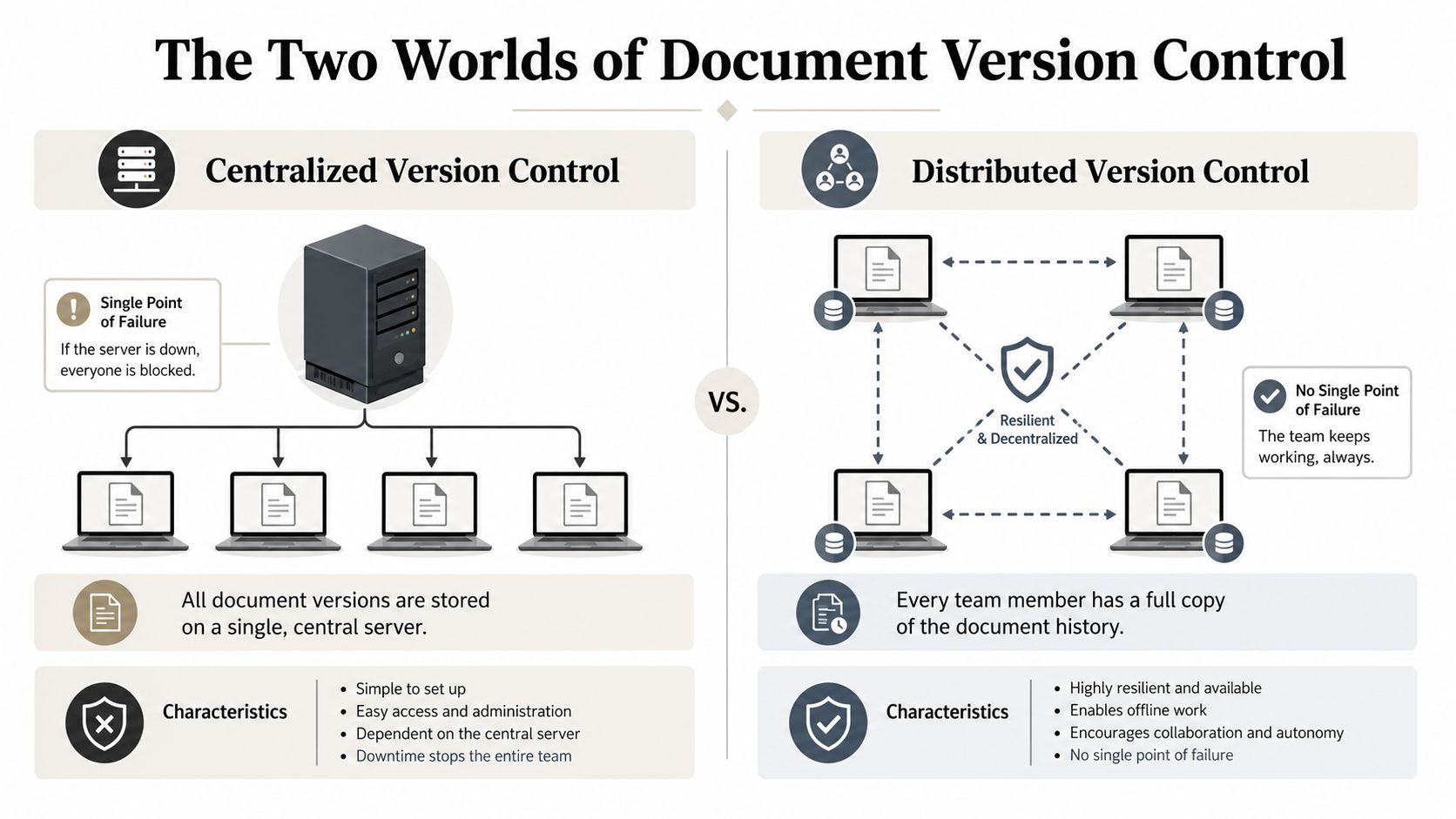
The architectural choice changes team behavior.
| Model | What it optimizes | Where it struggles |
|---|---|---|
| Centralized | Governance, permissions, formal approval flows | Speed when many people need to edit fast |
| Distributed | Parallel work, detailed history, rollback | Accessibility for non-technical contributors |
A sales org rarely needs every proposal in Git. A product documentation team often benefits from it. A compliance-heavy legal team usually wants a central system of record. The mistake is treating one architecture as universally superior.
Check-in and check-out versus live collaboration
The second split is how editing happens.
Check-in and check-out is the library-book model. One person takes control of the file, edits it, then returns it. This works when precision matters more than speed. It’s useful for policies, signed agreements, controlled SOPs, and any document where simultaneous editing creates risk.
Live collaboration is the shared-whiteboard model. Several people edit at once, comments move quickly, and the team converges in real time. Google Docs popularized this style for everyday business work because it reduces waiting and makes quick cycles possible.
The architecture should match the cost of a mistake. If the cost is low, optimize for speed. If the cost is high, optimize for control.
Neither method is automatically superior. Check-in and check-out protects integrity but can frustrate teams under deadline. Live collaboration is fast but can blur accountability if there’s no approval discipline layered on top. In practice, mature teams use both. They draft collaboratively, then lock and approve formally.
Comparing Four Common Versioning Approaches
How these tools behave in real teams
Teams typically don’t choose version control for documents from a blank slate. They inherit whatever the company already pays for. That’s why it helps to evaluate common systems by workflow fit, not by vendor checklist.
Google Docs works well for speed. Sales, marketing, and operations teams can edit together, comment inline, and avoid emailing attachments. It’s usually the fastest option for drafting. Its weak spot appears later, when a live collaborative draft needs a controlled approval state, external distribution rules, or stronger governance around release.
SharePoint is stronger when the organization needs a formal home for approved documents. It supports centralized control and usually fits Microsoft-heavy environments. The trade-off is friction. Teams often end up with better governance and worse day-to-day usability, especially if folder design and permissions become more complex than the work itself.
Git-based workflows are the most capable for technical documentation. They support branching, merging, rollback, and review discipline. Git-based documentation practices with QA pipelines and CI catch issues early in the commit process, support parallel work through branching, and encourage clear commit messages that link documentation updates to code changes. That’s excellent for developer docs, release notes, and API documentation. It’s usually the wrong fit for a field sales team trying to assemble a proposal before a customer call.
Document management systems (DMS) sit closer to enterprise governance. They’re useful where retention, approval workflows, and auditability are central requirements. Their main weakness is that many deployments still treat documents as static files moving through controlled stages, which can leave fast-moving commercial teams working around the system instead of in it.
Document Version Control System Comparison
| System Type | Best For | Key Strength | Primary Weakness |
|---|---|---|---|
| Google Docs | Fast collaborative drafting | Real-time editing and comments | Weak formal approval control if used alone |
| SharePoint | Centralized business documentation | Permissions and controlled storage | Can add process friction for everyday users |
| Git | Technical docs and developer-adjacent teams | Branching, merging, rollback, review discipline | Steep learning curve for non-technical teams |
| DMS | Compliance-heavy document lifecycles | Auditability, workflow, retention | Often built around static file handling |
A practical pattern works better than tool absolutism:
- Use Google Docs for early-stage collaboration when the goal is speed and rough consensus.
- Use SharePoint or a DMS for approved records when the document needs tighter distribution and retention control.
- Use Git for documentation tied to product releases where branching and commit history matter.
- Don’t force one tool across every document class. Proposals, signed contracts, enablement docs, and engineering manuals don’t have the same failure modes.
That’s the key trade-off. The right system depends less on brand preference and more on whether the document is collaborative, controlled, technical, or regulated.
The Hidden Risk of Data Drift in Static Documents
A clean file name can still hide bad data
The common perception is that version control breaks down at the file level. That’s only half true.
A file can be perfectly named, properly stored, and formally approved, yet still be wrong. The problem is data drift. The numbers inside a static document stop matching the system those numbers came from.
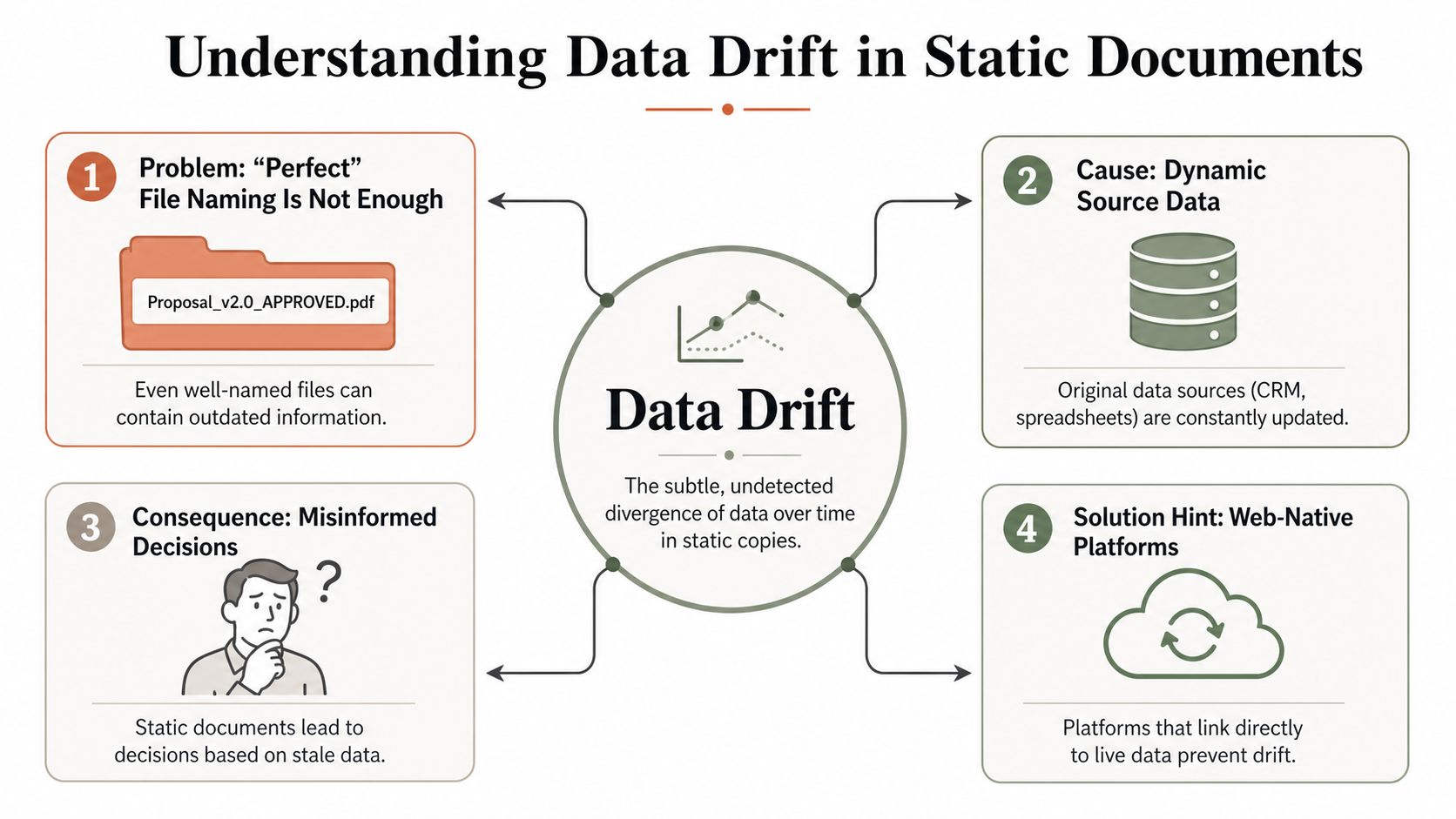
That gap is badly under-discussed. Most guidance treats version control as static file naming and archiving, while missing the harder problem of real-time data synchronization in client-facing documents — a point worth weighing against the broader case for version control laid out in DocuWare’s overview of why version control matters. When every data update requires a manual save and re-upload, teams create a hidden risk: the approved file no longer matches the source data.
A sales proposal shows pipeline impact pulled from a spreadsheet last week. A QBR deck includes an old churn number copied before customer status changed. A pricing slide reflects the prior quarter because someone duplicated last month’s presentation and updated only half the fields. The version history of the file may be immaculate. The business content is still stale.
A document can be the latest version of itself and still be the wrong version of reality.
Why this hits revenue teams first
Revenue teams feel data drift earlier than most departments because their documents face customers directly and their inputs change constantly. CRM fields update. Product usage numbers move. Inventory shifts. Forecast categories get revised. Pricing exceptions expire.
That’s why static exports are dangerous in commercial workflows. They freeze a moment in time, then keep circulating as if the context hasn’t changed. If your team builds decks manually from spreadsheets, you don’t just need better file naming. You need a better relationship between the document and the underlying data.
Teams moving toward interactive, web-based materials usually discover this quickly. If you’re rethinking static presentations, this guide on how to make interactive slides is useful because it pushes the conversation beyond exported files and toward documents that stay useful after they’re shared.
Three signs data drift is already costing you:
- Sales reps ask which metrics are current before sending a deck.
- Managers review the same slide twice because they don’t trust copied numbers.
- Clients see one figure in a proposal and another in follow-up because the source system changed after export.
Traditional version control solves file confusion. It does not solve stale data inside static files.
Actionable Workflows for Modern Revenue Teams
Replace file handoffs with shared systems
If your team works in proposals, decks, one-pagers, and account plans, the first operational fix is simple. Stop treating every customer-facing asset as a file that gets duplicated, attached, and resent.
Use a shared, web-native document or presentation workflow where the team distributes a link instead of a downloaded attachment. That changes the failure mode. You no longer have five copies of the same deck in email chains. You have one current asset with controlled access, visible updates, and a cleaner path to “latest version” behavior.
This matters most for revenue work because customer-facing content decays fast. Product messaging changes. Account details change. Metrics change. When the asset lives behind a shared link, the rep, manager, and buyer can all land on the same current version without another export cycle.
Use live inputs where data changes often
The next fix is to separate presentation structure from changing data.
Keep narrative, positioning, and approved wording under normal editorial control. Connect volatile elements such as charts, KPIs, territory numbers, inventory snapshots, and account metrics to live sources like Google Sheets or APIs. That doesn’t remove versioning. It moves versioning to the right layer. You version the template logic and narrative, while the live data stays synced to its source.
That’s the practical answer to data drift in commercial documents.
A workable operating model looks like this:
- Lock the core template so brand, layout, and approved messaging don’t get rewritten by every rep.
- Link high-volatility fields to source systems instead of pasting values manually.
- Share by URL so recipients open the current asset, not a stale attachment.
- Export only when needed for archive, procurement, or signature workflows.
For teams building more dynamic customer materials, programmatic generation becomes useful too. This walkthrough on generating presentations from AI agent output shows the model clearly. An agent or script can pull structured inputs, assemble a deck, and keep output consistent with system data and brand rules.
Generate repeatable documents from system data
Manual slide building creates two kinds of inconsistency. People change the message, and people copy the wrong data.
Programmatic generation reduces both. When the CRM, spreadsheet, or internal system is the input, the team can generate proposals, account plans, and review decks from the same data foundation each time. That doesn’t eliminate human review. It removes the repetitive assembly work that introduces preventable errors.
A short demo helps show what a modern workflow looks like in practice.
Field-tested advice: For revenue content, keep approvals on the narrative layer and synchronization on the data layer. When teams mix those two jobs into one static file, they create drift and rework.
Creating a Governance and Rollout Plan
Use a simple versioning policy
Good governance fails when it’s too complicated to follow during a busy week. Keep the rules short.
Use major.minor.patch when the audience needs to understand the scope of change at a glance. The document semantic versioning model described here uses 1.0 for the first approved release, 1.1 or 1.2 for minor approved changes, and 2.0 for a major revision. That’s enough structure for most business teams.
For controlled documents, add a version table at the front. The University of Aberdeen version control guidance specifies four fields that matter: version number, author name, summary of changes, and exact date. That table is what people consult when they need context quickly.
A rollout checklist should include:
- Define document classes. Separate customer-facing decks, contracts, policies, enablement content, and technical docs because they shouldn’t all follow the same workflow.
- Assign one system of record per class. Don’t let the same type of document live half in email, half in local drives, and half in a shared platform.
- Freeze approved baselines. Once approved, don’t overwrite. Publish a new version.
- Name an owner. Every important document needs one accountable person, even if many people contribute.
Set review rules people will actually follow
Review cadence should reflect how fast the document becomes obsolete. The guidance on review frequency for volatile and stable documents makes this distinction clearly. Fast-moving documents that decay quickly should be reviewed every quarter, while stable decision records may stay valid indefinitely without further review.
That’s a better rule than forcing every document into the same calendar cycle.
For revenue operations teams, this is usually the right starting point:
- Quarterly review for pitch decks, pricing collateral, battlecards, and KPI-heavy customer materials.
- Event-based review for proposals and account plans when pricing, scope, or packaging changes.
- No routine review for historical decision records unless the business context changes.
If you’re formalizing this across sales, enablement, and operations, a dedicated RevOps workflow approach can help turn version control from a document habit into a managed operating process.
Version control for documents works best when the team stops thinking about files and starts thinking about systems of truth. If you need a web-native way to build, share, and keep customer-facing decks aligned with live data, Encelade is built for that workflow.