You’re probably in one of two situations right now. Your roadmap has a feature customers already expect, but your team doesn’t have the time to build it cleanly. Or you see a new market opening, and the fastest route isn’t inventing a product from zero, it’s packaging proven capability under your own brand.
That’s where white label solutions stop being a shortcut and start becoming strategy. The right partner can compress launch timelines, protect engineering focus, and let you sell a more complete product sooner. The wrong one creates the opposite outcome: a branded shell over someone else’s rigid tool, with weak integration, shallow customization, and support tickets your team can’t control.
For product leaders, this isn’t a branding discussion first. It’s a strategic decision. Which parts of the stack should you own because they define your differentiation, and which parts should you license because your customers care more about outcomes than your internal build story?
Accelerating Growth with White Label Solutions
A product manager gets the same uncomfortable brief every quarter. Sales wants a new capability because prospects keep asking for it. Leadership wants it launched fast. Engineering wants to avoid another rushed subsystem that turns into permanent maintenance.
White label solutions exist for exactly that tension.
A retailer adding analytics to a customer portal, a SaaS company embedding reporting, or a revenue platform introducing presentation generation all face the same build versus buy decision. If the capability isn’t the company’s core intellectual property, building it in-house can be a prestige project with weak economics. The smarter move is often to license mature functionality, brand it properly, and invest internal effort where the company wins: positioning, workflow design, onboarding, and go-to-market.
This model isn’t niche. White label products already account for approximately 20% of all consumer packaged goods sold by U.S. retailers, meaning one out of every five packaged goods items on a shelf is white label, according to QL2’s guide to white label products. That matters because it shows the model has already moved into the operational core of mainstream commerce.
Practical rule: If customers buy your experience, distribution, and trust layer more than your underlying machinery, white labeling deserves a serious look.
In B2B, the same logic applies. You don’t need to own every component to own the customer relationship. You need control over how the product is branded, integrated, sold, and supported.
That’s why modern teams use white labeling to enter adjacent categories without derailing the main roadmap. A company can add new product lines, test a market, or package services for a new segment while preserving headcount for its primary platform. Teams evaluating white-labeled product experiences for go-to-market expansion usually find the biggest payoff isn’t just speed. It’s strategic focus.
What works in practice
- Own the customer context: Keep discovery, onboarding, pricing, and support under your brand.
- License the commodity layer: Use partners for mature capabilities that don’t define your competitive edge.
- Design the workflow, not just the wrapper: Customers notice whether the feature feels native.
What usually fails
- Shallow branding: A logo swap doesn’t fix a clunky third-party experience.
- No operating model: If support, provisioning, and escalation are vague, customers will feel the seams.
- Buying before scoping: Teams often shop vendors before they define what must remain under internal control.
What Are White Label Solutions
A product team is under pressure to ship a new capability this quarter, but the roadmap is already full. Building from scratch would burn months of engineering time and still leave open questions around support, uptime, and adoption. A white label solution changes that decision. It lets the team bring a proven product to market under its own brand while keeping internal effort focused on the parts of the experience that drive differentiation.
At its simplest, a white label solution is a product built by one company and sold by another under the buyer’s brand. The vendor owns the underlying system. The buyer owns the customer-facing experience, commercial packaging, and go-to-market motion.
That definition is still useful, but it is too narrow for modern software.
In B2B SaaS, strong white labeling goes well beyond swapping logos and colors. The buyer may control onboarding flows, permissions, domain configuration, embedded UI, data connections, and workflow triggers. In stronger implementations, the white-labeled product becomes part of a broader operating layer. It can pass context into other systems, trigger automations, and support AI-driven agentic workflows that act on customer data inside the buyer’s environment. A web-native presentation platform such as Encelade is a good example of how this model has evolved. The value is not limited to branded output. It comes from fitting presentations, data, and workflow logic into a larger product experience.
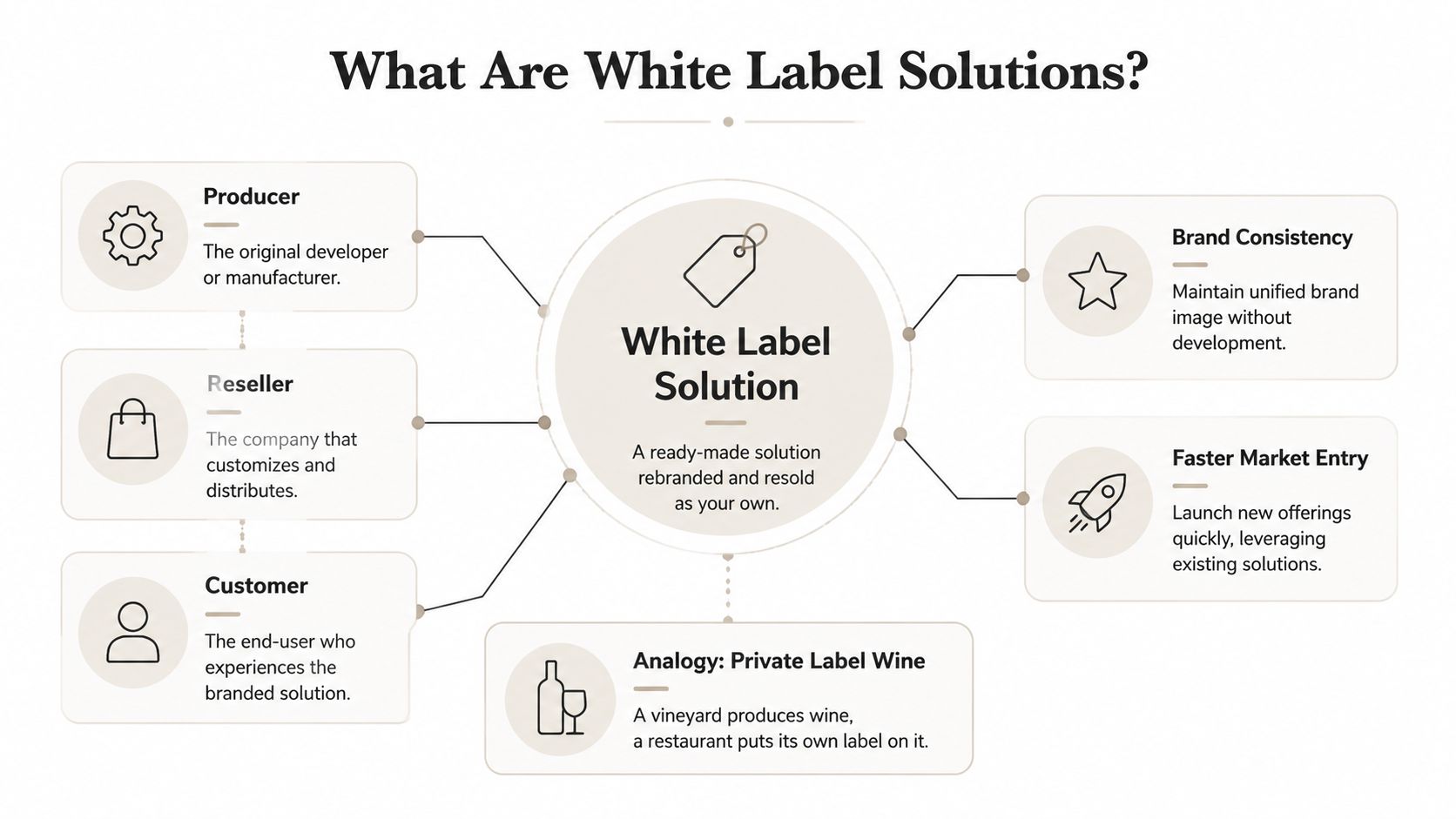
How the model works in B2B software
The commercial structure is straightforward. A vendor builds and runs the core application. A buyer licenses it, configures the parts exposed for customization, connects it to internal systems, and sells it as part of its own offer.
The product reality is harder.
A white label product only works when customers experience it as native to the host platform. That usually requires control across several layers at once:
- Brand layer: logos, colors, fonts, domains, and login experience
- Product layer: navigation, roles, templates, feature access, and UI placement
- Data layer: customer data inputs, system outputs, and permissions boundaries
- Workflow layer: APIs, webhooks, embedded actions, and automation handoffs
That fourth layer is where many teams now get the most value. A white-labeled feature that can trigger downstream actions, feed AI agents, or generate customer-ready assets inside an existing workflow is far more useful than one that offers only an on-brand appearance.
What buyers are actually purchasing
Buyers are not just purchasing software. They are purchasing a faster path to a marketable outcome.
That usually includes:
- Working capability: a feature set that has already been built, tested, and maintained
- Roadmap relief: less pressure on internal engineering teams to build commodity functionality
- Brand control: the ability to present the capability as part of a unified customer experience
- Integration potential: hooks into the buyer’s stack so the product can participate in broader workflows
- Operational transfer: infrastructure, updates, and much of the maintenance stay with the vendor
This is why mature buyers evaluate white label products less like templates and more like platform components. The strategic question is not “Can we put our brand on it?” The better question is “Can this component fit our customer journey, data model, and service design without creating friction?”
What white label doesn’t mean
White labeling does not give the buyer complete product ownership. The vendor still controls the core architecture, release cycle, and technical constraints. That is the trade-off for speed.
| What buyers often assume | What’s usually true |
|---|---|
| They can change anything | They can change what the vendor exposes through settings, APIs, embedding options, and theming |
| The product is fully theirs | They own the customer relationship, but the vendor still operates the underlying system |
| Branding creates differentiation | Differentiation usually comes from workflow design, proprietary data, service quality, and distribution |
The practical implication is simple. Cosmetic control matters, but it is rarely the deciding factor. If the product cannot fit your identity model, your security requirements, your customer data flows, or your automation stack, it will feel bolted on no matter how polished the interface looks.
White Label vs Private Label and Reselling
These models get mixed together constantly, and the confusion leads to bad buying decisions. A team says it wants a white label solution when it really wants an exclusive product. Another says it wants resale revenue when it needs brand ownership.
The cleanest way to separate them is by control, exclusivity, and who owns the customer experience.
The practical difference
White label means a provider offers a product that multiple businesses can brand and distribute as their own.
Private label usually means a product is made for one business, often with more exclusive specifications or packaging choices.
Reselling means you sell another company’s product, but the original brand remains visible and central.
If the original vendor stays obvious to the customer, you’re usually in reseller territory, not white label.
White Label vs. Private Label vs. Reseller Model Comparison
| Attribute | White Label | Private Label | Reseller |
|---|---|---|---|
| Brand shown to customer | Your brand | Your brand | Vendor brand, sometimes alongside yours |
| Exclusivity | Usually non-exclusive | Often more exclusive | Non-exclusive |
| Product control | Moderate, based on configuration and integrations | Higher influence on specs or packaging | Limited |
| Speed to launch | Fast | Moderate | Fast |
| Engineering burden | Lower than building | Varies by product type | Very low |
| Differentiation source | UX, workflow, service, integrations | Product specs plus brand | Sales motion, support, pricing |
| Best fit | Expanding product lines quickly | Owning a more distinct offer | Adding revenue with minimal product ownership |
Where teams get this wrong
A lot of software buyers want the economics of white labeling with the control of custom development. That’s not realistic. White label works best when your advantage comes from customer access, domain expertise, and packaging, not from inventing new infrastructure.
Private label makes more sense when product specification itself matters deeply to the business. Reselling makes sense when speed and simplicity matter more than ownership of experience.
A fast decision filter
Use this if you’re deciding between the three:
- Choose white label when you need a branded capability inside your existing product and you can accept shared underlying infrastructure.
- Choose private label when exclusivity or product specification matters enough to justify more negotiation and less speed.
- Choose reseller when you want quick monetization without absorbing product responsibility.
The mistake isn’t choosing the “wrong” model in theory. It’s choosing one that doesn’t match how your company wins customers.
Core Business and Technical Benefits
A common product meeting goes like this. Sales wants analytics, customer success wants a client-facing workspace, and leadership wants AI features on the roadmap this year. Engineering can build all of it, but not at the same time, and not without pushing core roadmap work out by quarters. White label solves that prioritization problem when the goal is to add proven capability fast while keeping internal teams focused on the parts of the product customers judge you on.
That matters more now because white labeling is no longer limited to swapping logos on a generic module. The stronger platforms support deep embedding, event-driven integrations, and workflow orchestration that can feel native inside your product. In presentation and content operations, a web-native platform like Encelade can sit inside a larger SaaS experience as a branded layer for creating, updating, and distributing materials, while still connecting to your identity model, data sources, and approval flows. The same pattern now extends into AI. Teams are white labeling components that trigger agentic workflows, generate assets, route approvals, or personalize outputs without building every service from scratch.
Business gains that matter
Speed still matters, but the strategic value is sequencing.
White labeling lets a company test a category before committing to a full internal build. That changes the risk profile. Instead of spending two or three quarters creating infrastructure for reporting, document generation, partner portals, or presentation workflows, the team can launch, sell, and learn first. If demand is real, the product team can expand the integration and take ownership of the areas that drive margin or retention.
Focus is the second gain, and in practice it is often the bigger one. Strong teams win on distribution, packaging, onboarding, and workflow fit. They do not win because they rebuilt a commodity rendering engine or a permissions system that already exists elsewhere.
That shifts effort toward the decisions that affect revenue:
- Packaging: Which segments get the feature, and at what price point
- Positioning: How the capability supports a clear business outcome
- Adoption design: How users encounter it inside the product and reach value fast
- Expansion paths: Which adjacent use cases can turn a single feature into a broader account footprint
Technical advantage without the build burden
The technical case is not about avoiding hard work. It is about choosing where hard work belongs.
Building embedded analytics, collaborative presentation tooling, or AI-assisted workflow infrastructure internally means taking on frontend rendering, access control, audit trails, data connectors, reliability, upgrade paths, and support. That stack becomes even heavier when enterprise customers want the feature to behave like a native part of your application across web sessions, SSO, APIs, and tenant-specific settings.
A mature white label platform removes a large share of that undifferentiated engineering load. Your team still owns integration quality, user experience, and governance. The vendor owns much of the base platform complexity.
For product leaders, the better question is simple. Will maintaining this capability make us more competitive next year, or just busier?
Where the model creates real upside
The pattern works best when the external platform is stable and your differentiation comes from how you connect it to your product.
| Strong fit | Weak fit |
|---|---|
| Embedded analytics, reporting, presentation layers, document workflows, and repeatable AI-assisted processes | Features that depend on proprietary logic at the core of the user experience |
| Companies with clear distribution, customer trust, and a defined point of view on packaging | Companies assuming branding alone will create product differentiation |
| Teams that can integrate deeply through identity, APIs, and workflow triggers | Teams expecting the vendor to decide roadmap, positioning, or implementation scope |
The modern version of white labeling creates a second layer of upside. It gives product teams a way to compose new offers from connected services. A SaaS company can combine a white-labeled presentation workspace, CRM data, and an AI agent that assembles account-specific materials automatically. Another can add a branded analytics surface that feeds alerts into customer success workflows. In both cases, the value is not the surface branding by itself. The value is that the branded capability becomes part of a larger product system.
The trade-off experienced teams accept
White labeling always involves a control trade-off.
You gain speed, lower platform burden, and faster entry into adjacent categories. You give up some architectural freedom and some influence over the underlying roadmap. That is usually a good trade when the capability is important to customers but not unique enough to justify years of internal ownership.
Used well, white label is a sequencing decision. It helps companies enter markets sooner, validate demand with less risk, and reserve internal build capacity for the workflows, data models, and AI experiences that set the product apart.
Essential Enterprise Requirements for Success
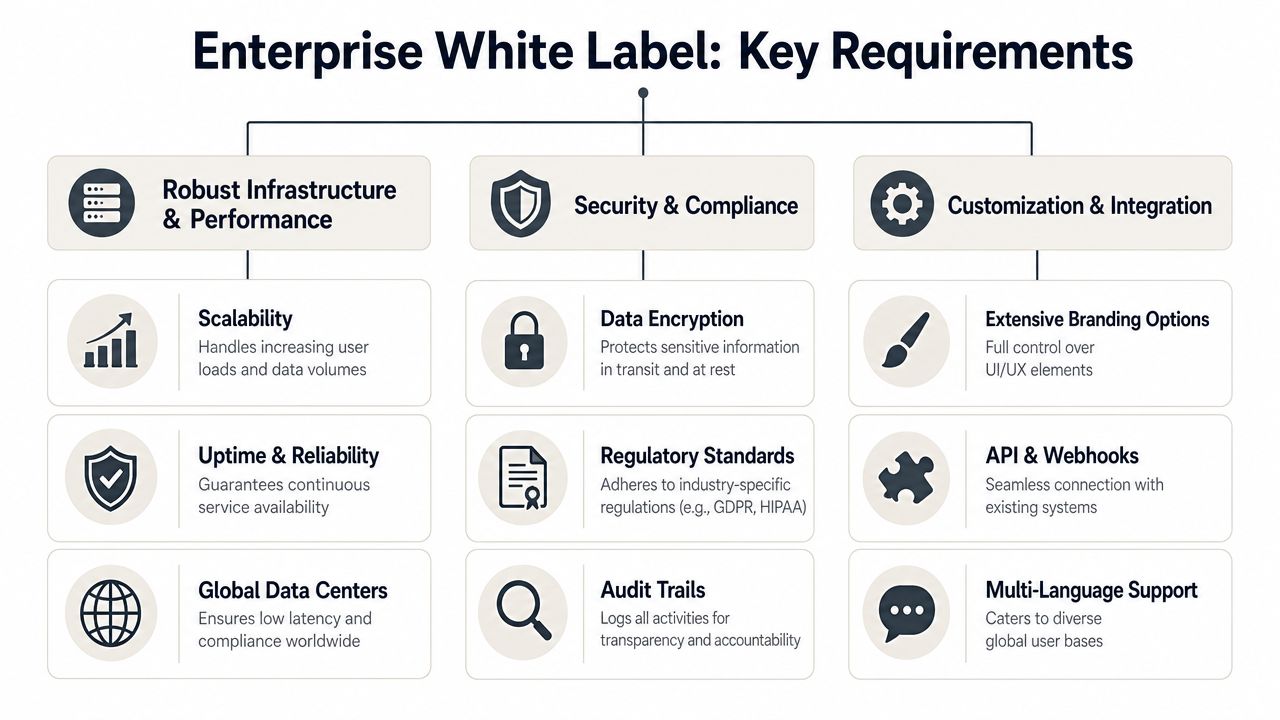
Enterprise buyers don’t care that a tool is “white labeled.” They care whether it behaves like a first-class part of your product. That means reliability, security, tenant isolation, and customization depth have to be built into the architecture, not patched in after a sales call.
Infrastructure that can survive scale
A serious B2B white label platform needs separation between shared core services and tenant-specific configuration. White-label SaaS platforms typically use a stateless, microservices-oriented architecture to isolate core services from tenant-specific configurations, which helps maintain horizontal scalability so one noisy tenant doesn’t degrade the rest of the system, according to Developex on scalable white label SaaS.
That technical choice matters for product leaders because it affects customer trust in visible ways. If one customer’s reporting job slows everyone else down, your brand takes the hit.
Key checks include:
- Tenant isolation: Data, permissions, and requests should be scoped to a client identifier by default.
- Provisioning: New environments shouldn’t require manual setup every time you close a deal.
- Performance safeguards: Heavy reporting or rendering work should be offloaded so the core app stays responsive.
Security and brand governance
Brand erosion in white label software rarely comes from typography mistakes. It comes from security seams, generic workflows, and inconsistent experience across tenants.
A concern many buyers raise is brand dilution through weak implementation. That’s why the enterprise conversation has to include:
- Multi-tenant API security
- Real-time data sovereignty controls
- Dynamic workflow customization
- Auditability and access controls
- SAML or SSO support where enterprise accounts expect it
These aren’t “nice to have” capabilities. They’re the line between a polished platform extension and a vendor dependency your customers never fully trust.
A white label product stops feeling native the moment users encounter the wrong data, the wrong workflow, or the wrong login experience.
Customization beyond superficial theming
Deep branding means more than color palettes. Enterprise buyers often need account-specific menus, embedded modules, role-aware interfaces, and localized experiences. In multi-tenant BI, the platform has to support customer-specific visual customization without breaking core functionality, plus client-specific responses and security evaluation on each function, as detailed in Domo’s explanation of white-labeled BI tools.
That’s the standard to hold vendors against. Ask whether custom fields, tenant logic, and UI changes are configuration-driven or require code forks. If the answer is “our team can hard-code it for you,” you’re not looking at a scalable enterprise model. You’re looking at future operational debt.
Your White Label Implementation Checklist
A white label rollout usually goes off track long before customers see it. The warning signs show up in planning: nobody has decided who owns support, how tenant provisioning works, what happens during vendor outages, or how far branding can go before the product starts to fracture. By launch week, the team is no longer evaluating strategy. It is patching gaps.
Use the checklist below to catch those problems while they are still cheap to fix.
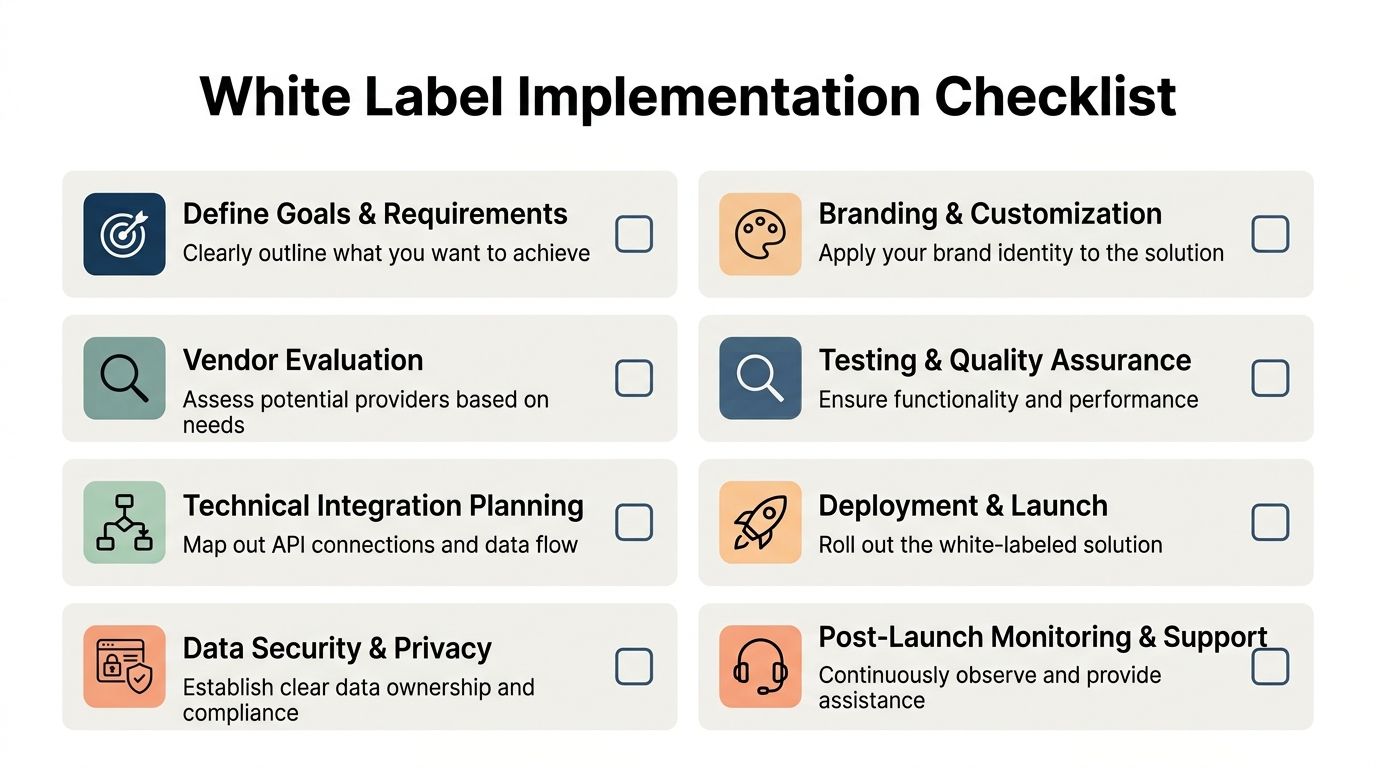
Vet the operating model before the interface
Start with accountability, not screens. If the commercial model is clear but the day-to-day model is vague, the vendor will keep shipping software while your team absorbs customer confusion.
Check these points first:
- Define ownership: Set clear lines for provisioning, support tiers, incident response, billing questions, and customer communications.
- Map tenant operations: Document how accounts are created, how permissions are assigned, and how data moves between tenants.
- Review release handling: Ask how updates are tested, announced, and rolled back if a branded environment breaks.
Brand damage usually comes from operational mistakes, not from logos or color mismatches. N-able’s discussion of white labeling without fear makes that practical point well. Buyers should verify the controls around customer trust first, especially security, data handling, and workflow flexibility, as noted in N-able’s discussion of white labeling without fear.
Check the integration path in detail
Modern white labeling begins to separate from simple rebranding. If the product needs to sit inside your roadmap, feed your data model, and support AI-driven workflows later, the integration surface matters more than the initial demo.
Work through the integration path in order:
- Read the API docs early. Sales demos hide edge cases. API references expose them.
- Test authentication flows. SSO, token refresh, service accounts, and user provisioning need a working plan before contracts harden into delivery dates.
- Choose a system of record. Decide which platform owns users, accounts, permissions, content, and event data.
- Check extensibility limits. Confirm what your team can configure directly and what still depends on vendor engineering.
- Inspect automation support. If you expect to generate assets programmatically, route outputs into downstream systems, or add agentic steps later, verify those actions now.
For teams evaluating API-first presentation infrastructure, a useful reference point is this presentation API for programmatic deck generation and embedding. It shows the kind of surface area that matters when white label output needs to plug into sales systems, onboarding flows, or AI content pipelines instead of living as a standalone app.
Due diligence check: Ask the vendor to explain versioning, rollback, and tenant-specific permissions in plain language. If the answer stays abstract, the implementation risk is still high.
Test what customers will actually experience
Run acceptance testing against real customer journeys, not just feature checklists.
That means checking the first login, invitation emails, password resets, account switching, branded navigation, reporting context, and support paths. It also means testing failure states. A white label product feels foreign fastest when users hit the wrong hostname, see generic vendor emails, or land in a workflow that reflects the vendor’s assumptions instead of your own.
Use sample tenants that mirror actual customer complexity. Include one with strict permissions, one with localization needs, and one with custom workflow rules. That is usually where hidden product constraints show up.
Decide where not to customize
The fastest white label launches have discipline around what stays standard. Teams that customize every visible element often create upgrade friction, QA overhead, and a support burden that keeps growing after launch.
Keep your effort focused on the areas that shape customer perception and strategic fit:
- Identity and entry points
- Navigation and account context
- Workflow steps tied to your product model
- Reporting views and branded outputs
- Automation hooks for future integrations
That last point matters more now than it did a few years ago. White label products increasingly serve as infrastructure inside larger systems, including AI-assisted proposal generation, onboarding agents, and account-specific content workflows. A vendor that supports branding but limits orchestration will slow your next roadmap phase.
A good implementation feels native to customers and manageable to your team. That balance matters more than perfect customization.
Use Cases From SaaS to AI Agent Pipelines
White label solutions are easiest to understand when you stop treating them as abstract packaging and look at concrete workloads. In software, the common examples are embedded analytics, customer portals, payment flows, reporting modules, and content production layers.
A newer category is presentation infrastructure.
Where modern white labeling gets interesting
Revenue teams often need customer-facing assets that are branded, account-specific, and fast to produce. Static slide workflows are a poor fit for that. They create version drift, stale numbers, and too much manual design work.
Web-native presentation platforms change the model. They can connect to live data, render interactive content, and generate decks programmatically. In this category, enterprise-grade white-label output and multi-tenant API capabilities enable B2B revenue teams to deliver fully branded, account-specific presentations with embedded widgets and native 3D, and to surface engagement through view and time-on-slide analytics, according to Encelade’s product information.
That opens up a practical white label use case for SaaS vendors, agencies, revenue platforms, and internal enablement teams. Instead of sending generic files, they can embed presentation generation inside their own workflow and keep the output on brand.
From software feature to agent workflow
This gets more powerful when AI agents are involved.
An agent can pull CRM notes, spreadsheet data, research snippets, and account context, then call a presentation API to generate a client-ready deck. If the platform supports widgets, live data, and broad customization, the output stops looking like a templated slideshow and starts behaving like a lightweight application.
A developer building this kind of flow might connect orchestration tools through LangChain presentation integrations so the agent can generate, restyle, and update decks as part of a broader account workflow.
Here’s a short product walk-through showing that kind of delivery in action:
Use cases that fit this model well
- Sales platforms: Generate proposal decks from CRM opportunities and discovery notes
- Marketing teams: Produce campaign review decks with live connected metrics
- Agencies: Deliver client-branded reports without rebuilding layouts manually
- Presales teams: Create interactive product narratives with embedded demos or 3D assets
The strategic point is bigger than presentations. White labeling now extends into agentic workflows where branded output is generated on demand, tied to account data, and delivered inside a native product experience. That’s a meaningful shift from old-school rebranding. It turns white label from a packaging tactic into an integration layer for new product capabilities.
If you’re exploring white label solutions that go beyond cosmetic rebranding, Encelade is one option for teams that need web-native, branded presentation output through an application interface. It fits well when your roadmap calls for interactive decks, live data, and agent-driven generation without building that presentation layer from scratch.