Share a link
Publish a presentation and send a live link that anyone can open in their browser — no account or download needed.
The fastest way to get a deck in front of someone is a shareable link. Publishing creates a public URL that opens the deck in any browser, on any device.
Publish and share
Open Share
In the editor's top bar, click Share.
Publish the presentation
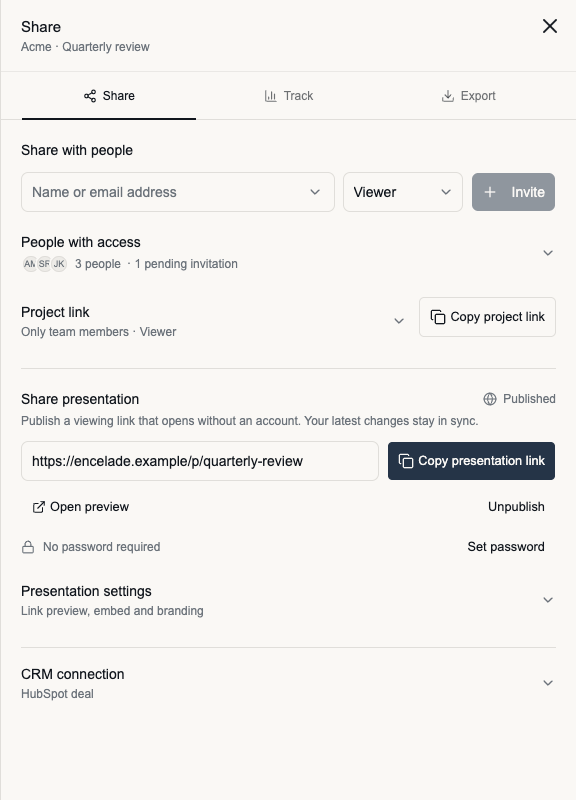
Under Share presentation, click Publish presentation. Publishing generates a public link (a /p/... URL). Anyone with the link can open the presentation — they don't need an Encelade account.
The published link stays in sync with your deck. When you edit and the deck is published, viewers see the current version the next time they open the link.
Copy and send the link
Click Copy presentation link and share it however you like — email, chat, or embedded in another page. Recipients open it in the browser and page through the deck.
Invite people to the project
Under Share with people, enter a name or email address, choose a role, and click Invite. The default role is Viewer. Expand People with access to manage collaborators and pending invitations.
Copy project link opens the project using its project access settings. Expand Project link to review who can use it and what they can do. Use Copy presentation link when you want to send the published viewing experience.
Protect or stop sharing a presentation
Click Set password to require a password for the published presentation. Password protection requires Pro or higher and can be configured before publishing. Enter 8–128 characters and click Save. Share the password with your recipients separately.
Presentation passwords protect the published presentation link. They do not change access through the separate project link or individual invitations.
Click Unpublish to stop access through the published presentation link. Project collaborators retain their existing access.
Additional sharing options
Expand Presentation settings to edit and save the link-preview description, copy embed code for a published presentation, or adjust branding. CRM connections and proposal-specific sharing controls appear below these settings.
The Track and Export tabs stay at the top of the sheet. Use Track for named tracking links, or Export when you need a PDF or PowerPoint file.
Presenting live
To present yourself rather than send a link, click Present in the top bar. This opens full-screen presenter mode with your speaker notes. Use the arrow keys or on-screen controls to advance.
What's next
- Export to PDF or PowerPoint — when you need a file instead of a link.
- Edit your deck — make changes before you share.