A rep walks into a late-stage call with the right logo on the first slide, the latest pricing copied in from last week’s sheet, and a PDF proposal attached in the chat. Ten minutes in, the buyer asks for a regional breakout. The rep flips to a backup slide that doesn’t quite fit. Someone notices a stale metric. Another stakeholder asks where to click to request a demo adapted to their needs. The meeting keeps going, but momentum is gone.
That scene is familiar because static decks force sales teams into one-way delivery. They make the seller choose between brevity and flexibility, polish and relevance, speed and accuracy. In practice, they often fail on all four.
Interactive presentation software changes the job. Instead of marching through fixed slides, teams can guide a live conversation, adapt the path based on questions, and keep numbers current without rebuilding the deck before every meeting. That matters because buyers don’t make decisions from slide aesthetics. They move when the discussion stays relevant, credible, and easy to act on.
From Static Slides to Dynamic Conversations
The difference between a weak pitch and a productive buying conversation usually isn’t the rep’s effort. It’s the format.
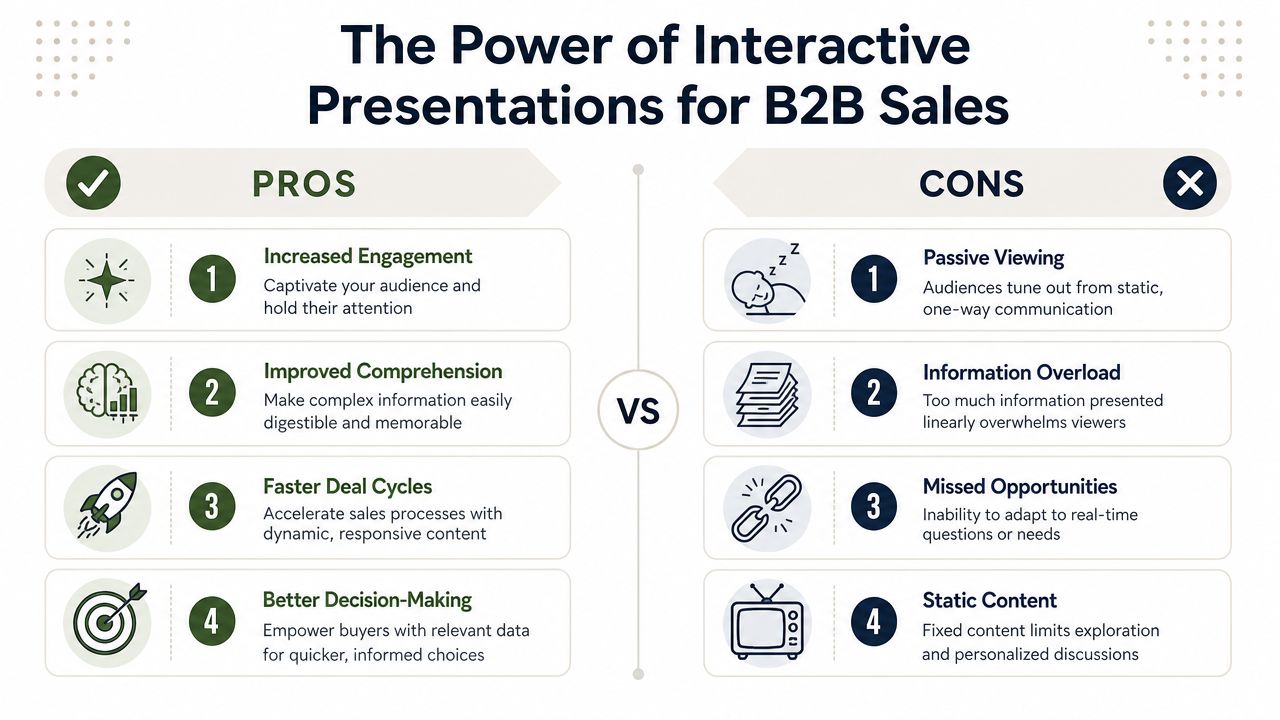
A static deck assumes the presenter already knows the exact order, depth, and proof the buyer will need. That’s rarely true in B2B sales. A CFO wants cost logic. An operations leader wants process fit. A technical evaluator wants to inspect how the product functions. If the presentation can’t bend in real time, the seller either talks around the question or jumps awkwardly between files, tabs, and hidden slides.
What static decks get wrong
PDFs and exported slide files lock the team into yesterday’s thinking. They also lock in yesterday’s data. Once a deck becomes an attachment, it starts drifting away from the current story, the current account context, and the current state of the pipeline.
The more complex the deal, the more painful that becomes. Sales engineers carry screenshots for features that should be shown live. Account executives maintain multiple proposal versions for different stakeholders. Managers spend time reviewing formatting instead of coaching the substance of the pitch.
Static slides turn a conversation into a script. Buyers notice the difference immediately.
Interactive presentation software fixes that by making the presentation responsive. The seller can branch based on the buyer’s role, reveal detail only when needed, and pull in current information without rebuilding the deck. That changes the rhythm of the meeting. The audience stops watching a sequence and starts exploring a case for change.
Why this shift is not temporary
This isn’t a niche category anymore. The global presentation software market was valued at approximately USD 8.91 billion in 2026 and is projected to reach USD 27.8 billion by 2035, growing at a CAGR of 13.48%, reflecting a shift away from static slide formats toward dynamic, interactive solutions, according to Business Research Insights on the presentation software market.
That growth matters because it signals a broader operating change. Teams aren’t just asking for prettier slides. They’re replacing one-way content delivery with systems built for live data, richer media, and collaboration. Sales organizations that keep treating presentations as files will feel slower than competitors that treat them as responsive buyer experiences.
Why Interactivity Matters for B2B Revenue Teams
Revenue teams don’t need novelty. They need tools that help reps answer questions faster, tailor the message without extra prep, and make next steps easy to take.
That’s why interactive presentation software matters. It improves the mechanics of selling. A buyer asks about a use case, and the rep can branch into the relevant proof instead of saying, “I’ll send that after the call.” A stakeholder wants to compare options, and the team can guide that discussion in the same workspace instead of switching to spreadsheets and separate docs.
Revenue impact shows up in small moments
Most sales friction isn’t dramatic. It’s cumulative. It shows up when reps pause to find the right appendix slide, when pricing context sits in a separate calculator, or when the buyer leaves a meeting without a clear action to take.
Interactive formats reduce that friction in a few practical ways:
- They keep attention tied to decisions: Buyers can engage with the content instead of sitting through a fixed sequence.
- They support sharper qualification: Reps can use guided paths and embedded questions to learn what matters most in the room.
- They reduce follow-up lag: The presentation itself can carry the next step, whether that’s a demo request, pricing path, or stakeholder handoff.
- They improve consistency across the team: Managers can standardize the flow without forcing every call into the same script.
The market has already moved
This isn’t a future-state discussion. Over 271,007 companies globally use presentation tools, and a single web-native platform, Canva, accounts for close to 60% of that market (roughly 59.83% in current 6sense data), which shows that web-native, interactive capabilities are becoming standard for business communication, according to 6sense market data on presentation tools.
For a sales manager, that matters for two reasons. First, buyers already expect web-native experiences. Second, your reps are already comparing your tool stack to easier, faster systems they use elsewhere. If your team still relies on file-based decks alone, you’re asking them to work around the process instead of through it.
Practical rule: If a rep regularly has to leave the deck to answer an important question, the deck isn’t supporting revenue. It’s slowing it down.
For managers building more disciplined workflows, it’s worth looking at systems built for rep execution and coaching, not just design. Teams evaluating tools for frontline leaders often start with resources focused on sales manager workflows and enablement needs.
Core Capabilities of Modern Presentation Platforms
A modern platform should do more than display slides in a browser. It should solve the operational problems that static decks create.
That starts with knowing which capabilities matter. Many tools advertise interactivity, but not all interactivity is useful in a sales motion. Revenue teams need features that improve timing, relevance, and execution under pressure.
Live data that removes stale numbers
One of the fastest ways to lose credibility is to show a metric that everyone in the room knows is outdated. Static decks make that risk routine because someone has to remember to update charts, copy values, export the file again, and distribute the latest version.
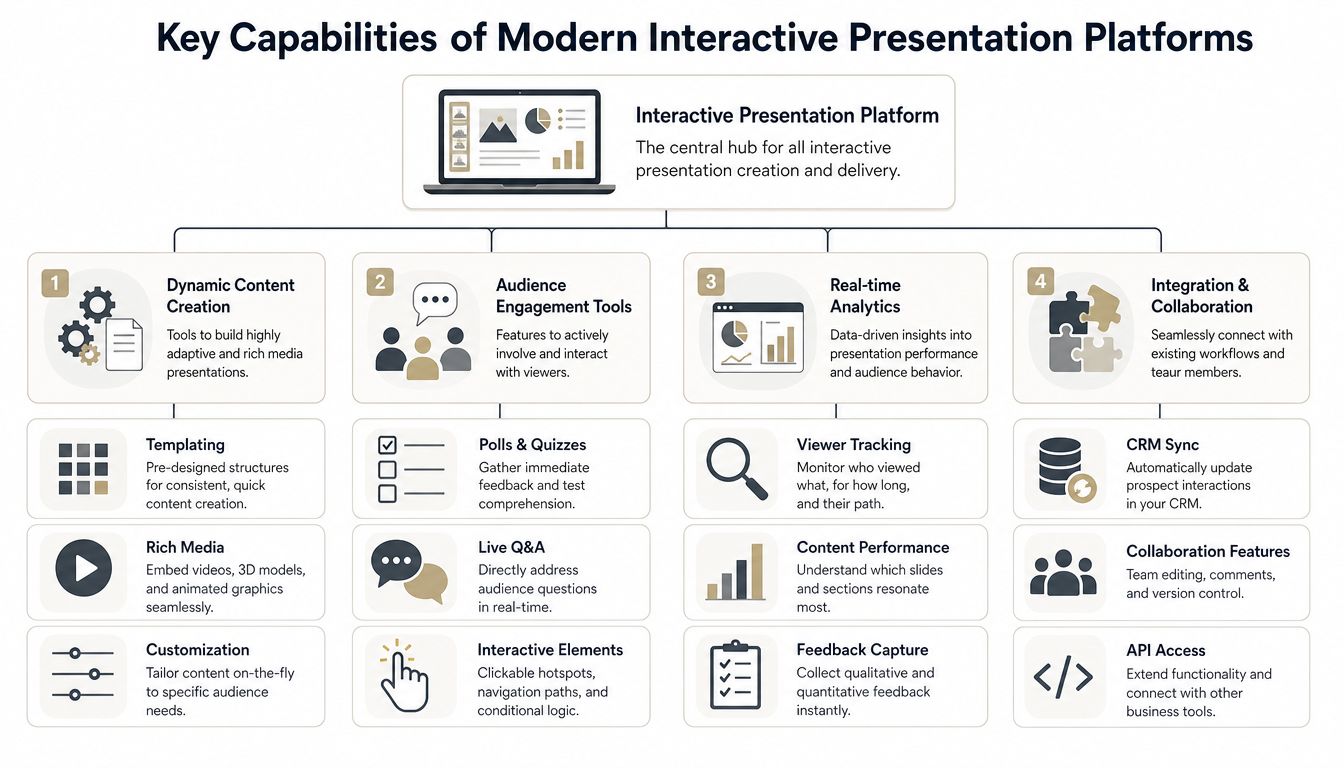
Software that pulls in real-time data reduces metric obsolescence by enabling auto-updating figures, eliminating manual refresh steps and ensuring decision-makers always view current data, as explained in Intuiface’s discussion of interactive presentation tooling. Encelade takes the same idea further by connecting decks to live sources such as REST APIs and Google Sheets, so figures update themselves instead of waiting on a manual refresh.
For revenue teams, that affects more than polish. It changes how confidently reps can use numbers in live conversations.
- Pipeline reviews stay current: Managers don’t waste time debating whether the slide or the CRM is right.
- Customer proposals stay aligned: Usage, pricing inputs, or implementation assumptions can remain current without rebuilding the whole deck.
- Follow-up assets age better: Shared links keep presenting current information instead of freezing a moment in time.
Interactive controls that shape the meeting
Useful interactivity isn’t about animation. It’s about control. The rep should be able to move non-linearly, reveal proof when needed, and give the buyer clear ways to engage.
The strongest platforms typically include:
| Capability | What it does in practice | Why sales teams care |
|---|---|---|
| Clickable navigation | Lets reps jump to relevant sections quickly | Keeps meetings responsive |
| Embedded forms or buttons | Creates direct next-step paths inside the deck | Reduces friction after interest peaks |
| Polls and guided inputs | Captures audience signals in real time | Helps reps tailor the conversation |
| Shared editing and comments | Lets teams prepare and revise together | Speeds handoffs across sales, SE, and marketing |
Rich media that supports evaluation
Product screenshots help at the top of the funnel. They’re weaker in evaluation. Buyers want to inspect, compare, and understand, not just watch a narrated sequence.
That’s where modern presentation platforms stand apart from slideware. They can combine video, embedded widgets, maps, calculators, code blocks, and browser-based interactive objects in one environment. One option in this category is Encelade’s Presentation API, which supports programmatic deck generation alongside interactive web-native delivery.
Teams don’t need every feature. They need the small set that removes rep friction and keeps buyer momentum intact.
Collaboration and governance that managers actually need
A platform also has to work operationally. Can managers lock themes? Can sales enablement maintain approved templates? Can reps reuse good content without cloning old decks forever? Can comments, permissions, and exports fit the way the team already works?
These questions matter more than feature lists. A flashy editor that creates version chaos won’t help. A rigid enterprise system that reps avoid won’t help either. The right interactive presentation software sits between those extremes. It gives teams enough flexibility to sell naturally, while keeping content controlled enough to scale.
Actionable Use Cases That Drive Sales Results
Features matter only when they change behavior in the funnel. The ultimate test is whether the platform helps the team sell better at each stage, from first meeting to final proposal.
A practical sales motion usually starts with a broad story, narrows into proof, and ends with a clear commercial path. Interactive presentation software can support each phase without forcing the team to create separate assets for every call.
Early-stage discovery and tailored demos
In the first call, the goal isn’t to show everything. It’s to identify what matters and guide the buyer into the most relevant narrative. Interactive slides help reps do that without over-preparing multiple versions of the same deck.
A rep can open with a high-level story, then move into one of several paths based on the buyer’s priorities. If the conversation shifts from operational efficiency to deployment complexity, the deck can shift with it. That sounds simple, but it changes the quality of discovery because the rep isn’t forced to choose one static path before the meeting starts.
Comparative polling can also help segment the audience during larger sessions, and action buttons can turn interest into immediate next steps. As noted in Prezlab’s overview of interactive presentations, action buttons embedded in slides can link directly to pricing configurators or demo forms at the moment of peak interest, while comparative polling allows presenters to segment audiences and tailor content dynamically, improving conversion rates.
A useful way to think about use cases is by stage:
- Discovery calls: Use branching content to match industry, team size, or pain point.
- Solution demos: Embed guided paths so reps can go deeper without opening extra tools.
- Proposal reviews: Add direct actions such as request forms or pricing exploration.
- Executive updates: Keep the story concise while letting stakeholders drill into detail only when they want it.
For teams looking for more examples, this collection of presentation interaction ideas for customer-facing content is a good reference point.
Mid-funnel proof and stakeholder alignment
Many deals slow down. The champion understands the message, but other stakeholders haven’t seen the same conversation. Static files don’t travel well across that gap. They lose context fast.
Interactive decks work better because they hold multiple layers of explanation in one place. A business buyer can review the value story. A technical stakeholder can open deeper product detail. A procurement contact can jump to commercial terms. The team sends one link instead of a package of loosely related files.
The best sales content doesn’t answer every question in order. It lets each stakeholder find the answer they need without breaking the narrative.
Later in the process, video can help reinforce the walkthrough asynchronously when not every stakeholder can join live.
Final-stage proposals that reduce friction
The last mile matters. Buyers need confidence at this point, not more attachment management.
A strong interactive proposal can combine business case, implementation approach, stakeholder-specific sections, and direct actions in one environment. Reps don’t have to send the calculator separately, then explain pricing over email, then route prospects to a different form to request the next workshop. The path is already there.
What works is simple. Reduce clicks. Reduce version confusion. Reduce the amount of translation the buyer has to do after the meeting. Interactive presentation software does that when it’s built into the motion, not used as decoration.
How to Evaluate and Choose the Right Software
Teams often buy the wrong platform for one of two reasons. They either pick based on visual polish, or they pick based on a giant enterprise checklist that ignores rep behavior. Both approaches create adoption problems.
The better approach is to evaluate the software the way you evaluate sales process changes. Start with the moments where your team loses momentum, then test whether the platform removes those points of friction.
Start with your actual sales motion
A platform for a product-led SaaS demo is different from one used in enterprise solution selling. If your team runs discovery, solution design, stakeholder reviews, and proposal walkthroughs, the software has to support branching, role-specific views, and easy updates. If your motion is more event-driven or education-focused, other features may matter more.
Ask your team practical questions:
- Where do reps leave the deck most often: Those exits usually reveal missing capabilities.
- Which content changes constantly: That points to a need for live data or easier updates.
- Who contributes to customer-facing decks: Sales, presales, marketing, and rev ops may all need different permissions.
- How are presentations shared after the meeting: Link-based delivery, exports, and analytics affect follow-through.
Check the capabilities that affect evaluation quality
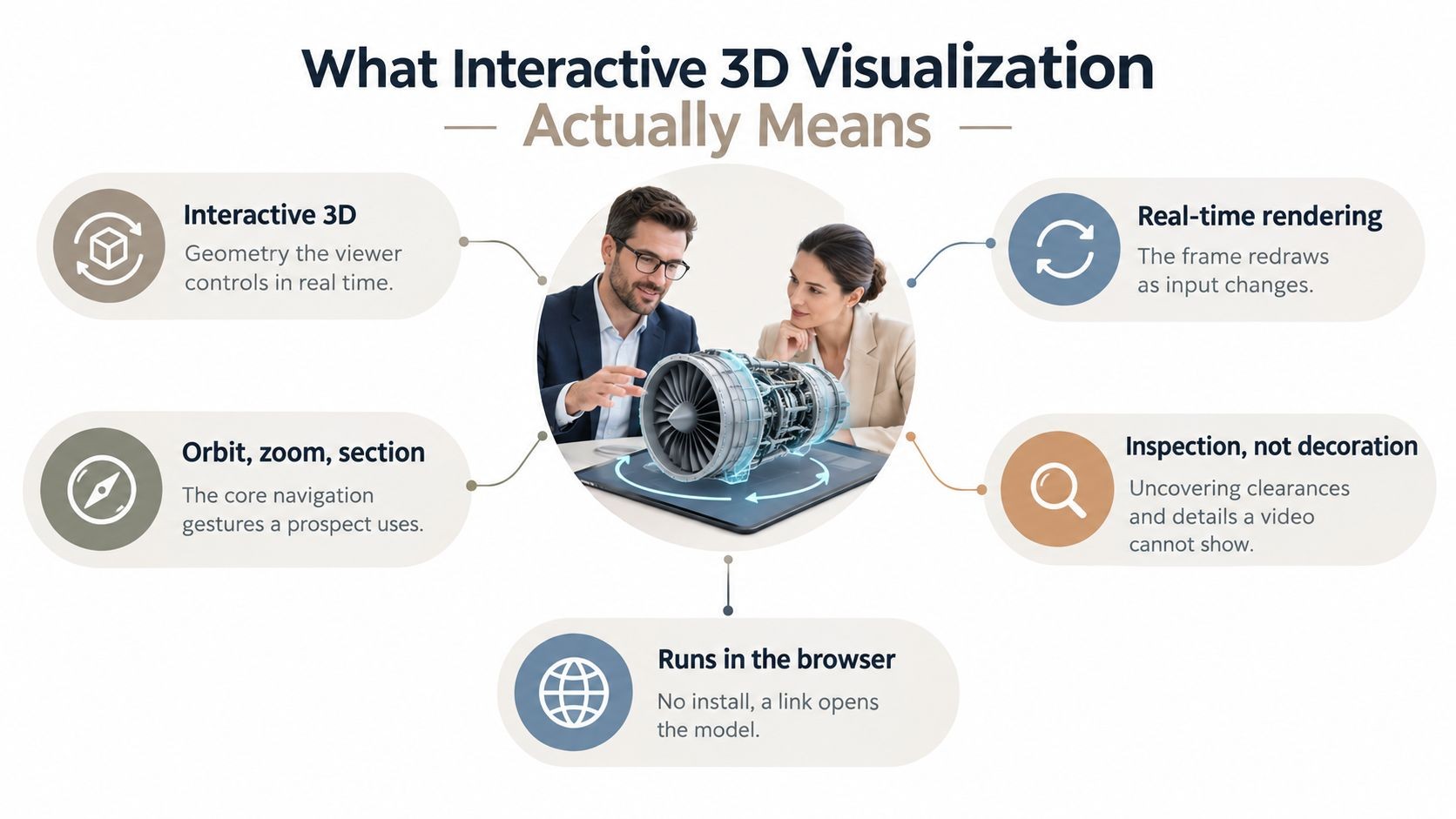
One feature worth testing directly is native 3D support. During product evaluation, screenshots often force the rep to narrate what the buyer should be seeing. That’s weaker than letting the buyer inspect the object directly. Native 3D support using .glb and .gltf models enables in-browser rotation and zoom without plugins, turning passive product demos into interactive walkthroughs that foster deeper, hands-on understanding. If your team sells physical products, spatial layouts, devices, or anything that benefits from visual inspection, that capability is worth serious attention — we cover it in more depth in this guide to 3D product visualization in B2B sales.
Use a buyer’s checklist, not a feature dump
| Category | Feature / Capability | Why It Matters |
|---|---|---|
| Content creation | Easy editor with reusable templates | Reps need speed without rebuilding from scratch |
| Interactivity | Click paths, buttons, embedded inputs | Keeps meetings adaptive instead of linear |
| Data integrity | Live Sheets or API-fed content | Reduces stale metrics and manual updates |
| Rich media | Video, widgets, native 3D support | Improves evaluation quality for complex offerings |
| Collaboration | Comments, permissions, shared workspaces | Supports work across sales, SE, and marketing |
| Analytics | View tracking and slide-level engagement | Helps teams understand what buyers actually review |
| Sharing | Link-based delivery plus PDF or PPTX export | Covers both modern workflows and offline requirements |
| Governance | Themes, branding controls, approval structure | Protects consistency as usage spreads |
| Enterprise readiness | SSO, access controls, support model | Matters for security, procurement, and scale |
| Developer options | API or programmatic generation | Useful when presentations are generated from systems or agents |
Don’t let a vendor demo drive the buying process. Make them show how your team would handle a real discovery call, a live proposal update, and an asynchronous follow-up.
Watch the trade-off between simplicity and extensibility
Some tools are easy for reps but shallow for operations. Others are powerful but too technical for frontline use. You need to know where your team sits.
If reps build and customize most customer-facing decks themselves, editor usability matters more. If your organization generates decks from CRM notes, spreadsheets, or workflow automation, API depth matters more. Many teams need both. In that case, don’t settle for a platform that treats one side as an afterthought.
Implementation and Team Adoption Best Practices
Buying the platform is the easy part. Getting reps to change how they present is harder.
The teams that succeed don’t roll out interactive presentation software as a design upgrade. They roll it out as a selling improvement. That means the first examples need to help reps win meetings, not just admire new templates.
Roll out in phases
Start with a pilot group that has real urgency. Good candidates are sales engineers, experienced account executives, or managers running strategic deals. Give them a narrow set of use cases to solve, such as discovery decks, demo wrappers, or proposal reviews.
Keep the first rollout simple:
- Choose one or two high-friction moments: Don’t try to redesign every deck at once.
- Build approved starting points: Create on-brand templates, reusable sections, and clear guidance on when to use them.
- Train on scenarios, not menus: Show reps how to branch during a live call, update data, and share a post-call link.
- Collect examples from the field: The most useful training asset is often a deck that already worked in a real deal.
Coach usage, not just creation
Managers should review how reps use the presentation in meetings, not only whether the deck looks right. Can the rep move through the content efficiently? Do they know when to skip detail? Are they using interactive elements to move the buyer forward, or just clicking around because the feature exists?
That coaching loop matters because poor usage can make a good tool look bad.
- Create a short call rubric: Focus on responsiveness, relevance, and clarity of next steps.
- Celebrate small wins: When a rep handles objections better because the deck supported the conversation, share that example.
- Protect simplicity: If every team adds its own patterns, adoption gets messy fast.
A platform becomes shelfware when the team treats it as extra work. It sticks when reps feel the first meeting get easier.
Keep governance light but real
Sales enablement should own templates, core narratives, and branding rules. Frontline teams should own account-specific adaptation. That division prevents chaos without forcing every edit through a centralized queue.
Adoption usually improves when the software fits the existing rhythm of the team. If reps can prepare faster, present more flexibly, and follow up with fewer files, they’ll keep using it. If they need a specialist for every change, they won’t.
Conclusion: Your Next Generation of Sales Engagement
Static slides still have a place. They’re fine for archived updates, basic internal reviews, and moments when fixed output matters more than live interaction. But they’re weak tools for modern B2B selling, where each meeting shifts based on buyer role, deal stage, and the questions that surface in real time.
Interactive presentation software gives revenue teams a better operating model. It helps reps adapt without losing structure, keep data current without manual refresh cycles, and turn buyer interest into action without forcing another round of follow-up attachments. That’s the true upgrade. Not prettier decks. Better sales execution.
For new managers, this is one of the clearest process changes worth making because it touches so many levers at once: meeting quality, team efficiency, stakeholder alignment, and post-call momentum. It also exposes weak spots in the current workflow. If your reps constantly leave the deck, send multiple versions, or apologize for stale numbers, the problem isn’t only training. It’s the format.
Take a hard look at how your team presents today. Count the handoffs, the version issues, the patched-together proposal flows, and the moments where buyers have to work too hard to understand or respond. Then compare that to a sales motion built around responsive, web-native, interactive content.
That’s where the next generation of sales engagement is heading. The only real question is how long your team wants to keep selling with tools designed for one-way delivery.
If your team wants to move from file-based decks to interactive, web-native presentations, Encelade is one option to evaluate. It’s built for sales, marketing, and revenue teams that need to turn research, CRM notes, spreadsheets, and documents into shareable presentations with live data, interactive widgets, and native 3D, while still supporting PDF and PPTX export when a deal or stakeholder requires it.