Tired of sales presentations that end with “thanks, we’ll think about it”? The usual advice is part of the problem. Teams frequently still build decks as if the job is to explain the product from slide one to slide last. Buyers don’t need another monologue. They need proof that your team understands their situation and can connect your solution to a real business outcome.
That’s why the best sales presentation examples don’t look like polished brochures. They behave more like guided working sessions. They let buyers test assumptions, explore trade-offs, and see how the numbers change when their own inputs go into the model. Interactive decks are scrolled to the bottom 41% more often, and they generate a 21% longer average reading time than non-interactive versions, according to Storydoc’s presentation statistics roundup. That’s a strong signal that web-native formats hold attention better than static files.
The more popular advice says to start with a generic problem statement and save relevance for later. I think that’s backward for most complex B2B deals. The presentation should earn attention fast, then keep it by making the buyer part of the experience.
These sales presentation examples focus on actionable results. Each one is a practical system you can use to turn discovery notes, CRM context, spreadsheets, and stakeholder priorities into an interactive narrative that moves a deal forward. You’ll see where each framework works, where it breaks, and how to build it so it helps the buyer make a decision instead of just admiring your slides.
1. The Problem-Agitate-Solve Framework for Interactive Demos
The PAS structure still works in B2B sales. What doesn’t work is using it as a static script. In strong sales presentation examples, PAS becomes a live proof sequence where the buyer sees their problem, tests the cost of it, and explores the path out of it during the meeting.

A SaaS AE might open with the prospect’s own support backlog data pulled from a CRM or spreadsheet, then move into a live calculator that estimates time-to-value based on user count, handoff delays, and process inefficiencies. A sales engineer selling implementation-heavy software can agitate the cost of delay with an embedded Gantt view and cost-avoidance model tied to the buyer’s rollout timeline. Procurement teams respond well when they can see risk, timeline, and budget assumptions in one place instead of hearing a generic claim that deployment will be “fast.”
Open with the buyer’s actual pain
One practical framework recommends a before-after-bridge structure that opens on the prospect’s current pain, then walks a tight hook-problem-impact-solution-proof sequence before the CTA, as described in Vibe’s sales presentation ideas. The point is to quantify that “before” with the buyer’s own numbers. A specific figure — say, the hours lost each week to manual ticket routing — lands harder than a generic claim. The trade-off is simple. If you overdo the “agitate” step, the deck starts to feel theatrical. If you quantify the current state cleanly, buyers lean in.
Practical rule: Use no more than three slides to establish the before state. After that, the buyer wants to see movement.
How to make PAS interactive
The simplest build pattern is to anchor the deck around three buyer metrics: revenue impact, time savings, and risk reduction. Then let the buyer adjust one or more inputs themselves. That’s where tools built for interactive slides in Encelade are useful. Sellers can swap static screenshots for widgets, link-based sharing, and live-updating elements without rebuilding the whole narrative every time.
A few habits make this format stronger:
- Prioritize three metrics: Pull the top business measures from discovery before you design the deck.
- Let buyers enter numbers: Use a calculator, simulator, or estimator so the prospect participates in the conclusion.
- Share by link, not attachment: Link-based delivery keeps version control intact and avoids stale exports.
- Review engagement afterward: Time-on-slide and viewing patterns tell you which issue deserves the next call.
2. The MEDDIC Qualification-to-Presentation Pipeline
Organizations often claim to run MEDDIC. In practice, they keep it buried in CRM fields, call notes, and rep memory. That’s a mistake. A better approach is to turn qualification into a living presentation asset that the AE, SDR, sales engineer, and manager can all see and improve.
An AE in a mid-market software team might start a deck right after the first discovery call, with sections for Metrics, Economic Buyer, Decision Criteria, Decision Process, Identify Pain, and Champion. As the deal progresses, the sales engineer adds technical blockers, the SDR adds stakeholder research, and the manager comments on gaps before the next meeting. The result is less rework and a much clearer story when the buyer asks for a recap.
Turn qualification into a shared asset
This format works because it forces discipline. If the economic buyer section is thin, the weakness is visible. If decision criteria are vague, the team can’t hide behind a polished demo. I’ve found that strong sales presentation examples often do one quiet thing well. They make internal ambiguity obvious before it reaches the customer.
A structured B2B presentation model from Mural’s guide to data-driven QBR presentations outlines a five-stage sequence of situation analysis, challenge identification, solution framework, value proposition, and implementation roadmap. That aligns well with MEDDIC because qualification becomes the source material for each stage, rather than a separate exercise.
What strong execution looks like
The deck should evolve with the deal, not wait for proposal stage. If your Salesforce data changes, the presentation should refresh with it. If a new stakeholder appears, the org chart and approval path should update. That’s where collaborative workspaces and API-connected decks matter more than slide polish.
A MEDDIC deck isn’t a customer-facing artifact only. It’s also a coaching surface for managers.
Build it with a few rules:
- Start early: Require a qualification deck by first discovery, not after technical validation.
- Map ownership: Let each role add and maintain the section they influence most.
- Coach in context: Comments inside the deck are better than email threads that get lost.
- Use the final deck externally: When the proposal goes out, attach the qualification narrative as proof you listened.
3. The ROI/TCO Proof Presentation with Live Financial Models
This is one of the most useful sales presentation examples because it replaces a common failure point: the disconnected spreadsheet. Buyers often get a deck in one file and an ROI model in another. That split creates confusion, version drift, and a lot of avoidable friction.
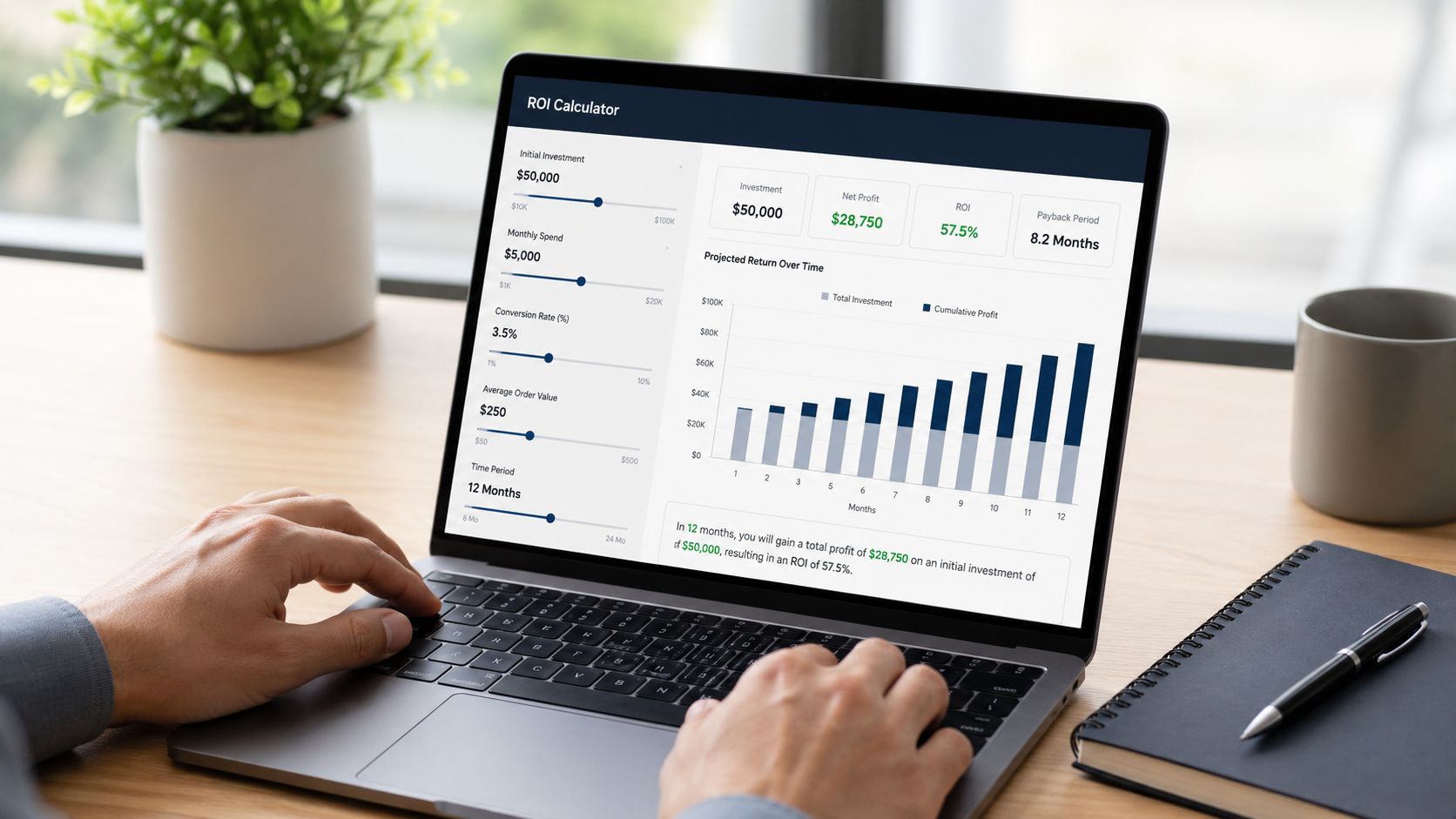
A better model keeps the business case inside the presentation. An enterprise SaaS team can embed a live calculator where the buyer adjusts support costs, headcount, rollout timing, or adoption assumptions and watches the outputs update immediately. A consulting firm can pull cost assumptions from Google Sheets or an API so the TCO model always reflects the latest inputs. HR tech teams often benefit from scenario views, where an operations leader can compare conservative, expected, and full-adoption outcomes without leaving the deck.
Make the math part of the presentation
The production advantage matters too. Sales teams using AI to generate personalized proposals can cut production time from hours to minutes, while web-native decks stay current through live data connections rather than going stale after export, according to Encelade’s platform overview. That’s not just an efficiency gain for reps. It changes the buyer experience because finance, procurement, and operations can review the same up-to-date model.
If you want a practical starting point, use a source-of-truth sheet for assumptions and then present the outputs inside a narrative layer. A good business case template in Encelade helps separate what the buyer can change from what your team should lock.
Where teams get this wrong
The weak version of this presentation hides assumptions or overwhelms the buyer with them. Both kill trust. Good ROI decks explain where inputs came from, which assumptions are buyer-controlled, and which outcomes matter now versus later.
Use a short build standard:
- Document assumptions clearly: Add tooltips or short notes beside every major input.
- Offer quick-select scenarios: Buyers shouldn’t need to type everything from scratch.
- Export a final report: Finance still may want a PDF for circulation or approval workflows.
- Track engagement: If stakeholders spend time on payback logic or implementation cost, refine that section first.
4. The Account-Specific Value Narrative with Research-Fed Storytelling
Generic decks announce that you’ve arrived. Account-specific decks prove you prepared.
The strongest version of this format starts before the meeting. A sales team researches the account, pulls in company context, filters relevant customer stories, and sends a short narrative deck ahead of the call. When buyers open it, they don’t see your company timeline. They see their market, their likely constraints, and the specific outcomes your team believes matter most in their environment.
Lead with relevance, not company history
That matters because many buyers tune out early problem framing when it sounds generic. HubSpot’s sales presentation guidelines flag a common mistake: opening with your company history or a long feature list, when prospects don’t want to sit through a backstory before they understand how you can help them. I agree with the direction of that point. In many accounts, the first useful slide isn’t “the industry challenge.” It’s “what this means for your team now.”
A financial services seller might build a narrative around compliance pressure, internal process bottlenecks, and implementation complexity, then support it with interactive trend visuals and filtered proof from similar firms. A mid-market software rep can send a pre-call deck that auto-populates firmographics and role-specific use cases from CRM and research tools.
Build a narrative buyers can reuse internally
The best research-fed storytelling is portable. The champion should be able to forward it to peers without rewriting the argument. That means tight sections, clean evidence, and simple controls that let people explore only the relevant proof.
Use this structure when building the deck:
- Company profile: Summarize the account without reciting public facts they already know.
- Why now: Tie urgency to current headwinds, timing, or strategic initiatives.
- Use case fit: Show the operational fit in the buyer’s language.
- Proof: Include one or two relevant customer stories, not a logo wall.
- Role relevance: Let each stakeholder toggle to the outcomes that matter to them.
For teams building this repeatedly, a clear system for storytelling in presentations with Encelade helps standardize the narrative without making it feel canned.
5. The Multi-Stakeholder Journey Map with Role-Based Engagement Paths
Complex B2B deals usually stall for a simple reason. One deck tries to speak to everyone, so it speaks clearly to no one.
A CFO wants business impact and risk exposure. A CIO wants architecture, security, and implementation confidence. An operations leader wants process improvement. End users want to know whether the tool will make their day easier. If all of them get the same linear deck, half the content feels irrelevant before they reach the part that matters.
One deck, different paths
A role-based journey map fixes that. The first screen asks who’s viewing. From there, the presentation branches into specific paths without breaking the shared story. Finance sees the ROI and risk case. Technical evaluators get the integration and governance path. Champions get a version they can carry internally.
This isn’t just a personalization preference. As Highspot’s sales pitch examples article puts it, buyers expect companies to deliver personalized interactions, and most get frustrated when that doesn’t happen. That tracks with what most enablement leaders already see in pipeline reviews. Relevance increases participation.
How champions use this format
The most practical use case is champion enablement. After the initial call, the seller sends a shareable link with guided paths for finance, IT, and operations. The champion doesn’t need to reframe the story from scratch. They select the audience path and use the built-in logic.
If a deck can’t help your champion sell internally, it’s probably too seller-centric.
A few execution tips matter:
- Do role-specific discovery: Ask each stakeholder what would make them support the purchase.
- Keep the branch entry simple: Don’t create a maze. One clean role selection is enough.
- Watch underengagement: If the technical buyer never opens the deck, don’t assume alignment.
- Write targeted follow-up: Send the CIO the architecture section. Send the CFO the financial path. Don’t resend the whole thing every time.
6. The Competitive Differentiation Battlecard with Interactive Comparison Widgets
Most competitive battlecards are built for reps, not buyers. They’re packed with feature grids, talking points, and internal messaging. That makes them useful in training and awkward in a live sales process.
A buyer-facing battlecard should help the prospect evaluate fit. That’s different from trying to “win the argument.” If your comparison turns into a vendor chest-thump, buyers start discounting every claim on the screen.
Show fit, not just superiority
The best competitive sales presentation examples frame the choice around deployment model, risk, implementation effort, and business outcomes. A cloud vendor can let the prospect compare cost structures by workload. A software company can show replacement stories filtered by company type or use case. A presales team can embed side-by-side implementation views instead of feature dumps.
Strong case studies matter more here than many organizations realize. Case studies work best when they lead with real, quantified results, and teams should maintain a library of four to six distinct case studies — roughly two for each of your main client types — so there’s always one that matches the buyer in front of you, according to Sales Insights Lab’s case study presentation guidance. That’s exactly what a competitive deck needs. If the prospect is comparing you to an incumbent, show the replacement story that matches their profile.
The battlecard structure that works
Keep the comparison focused on the buyer’s decision criteria. If price matters most, show pricing model differences and cost drivers. If speed matters, show implementation path and operational lift. If risk matters, show where competitors create dependency or complexity.
Use this sequence:
- Decision criteria first: Anchor the comparison to the buyer’s own evaluation logic.
- Fit by scenario: Let the buyer choose the deployment or use case that matches them.
- Proof over claims: Use customer results and concise quotes where you have them.
- Current-state risk: Explain the cost of staying put, not only the gap versus a rival.
- Maintenance discipline: Update battlecards regularly. Old competitive claims destroy credibility fast.
7. The Prescriptive Diagnostic Discovery Deck with Dynamic Assessment Scoring
Discovery calls often fail because the seller asks good questions but leaves the buyer with nothing structured to react to. The conversation feels thoughtful in the room, then evaporates the next day.
A diagnostic deck changes that. Instead of passively gathering pain and promising to follow up, the seller guides the buyer through a scored assessment inside the presentation. The prospect answers targeted questions, sees the implications immediately, and leaves with a clearer picture of where the gaps are.
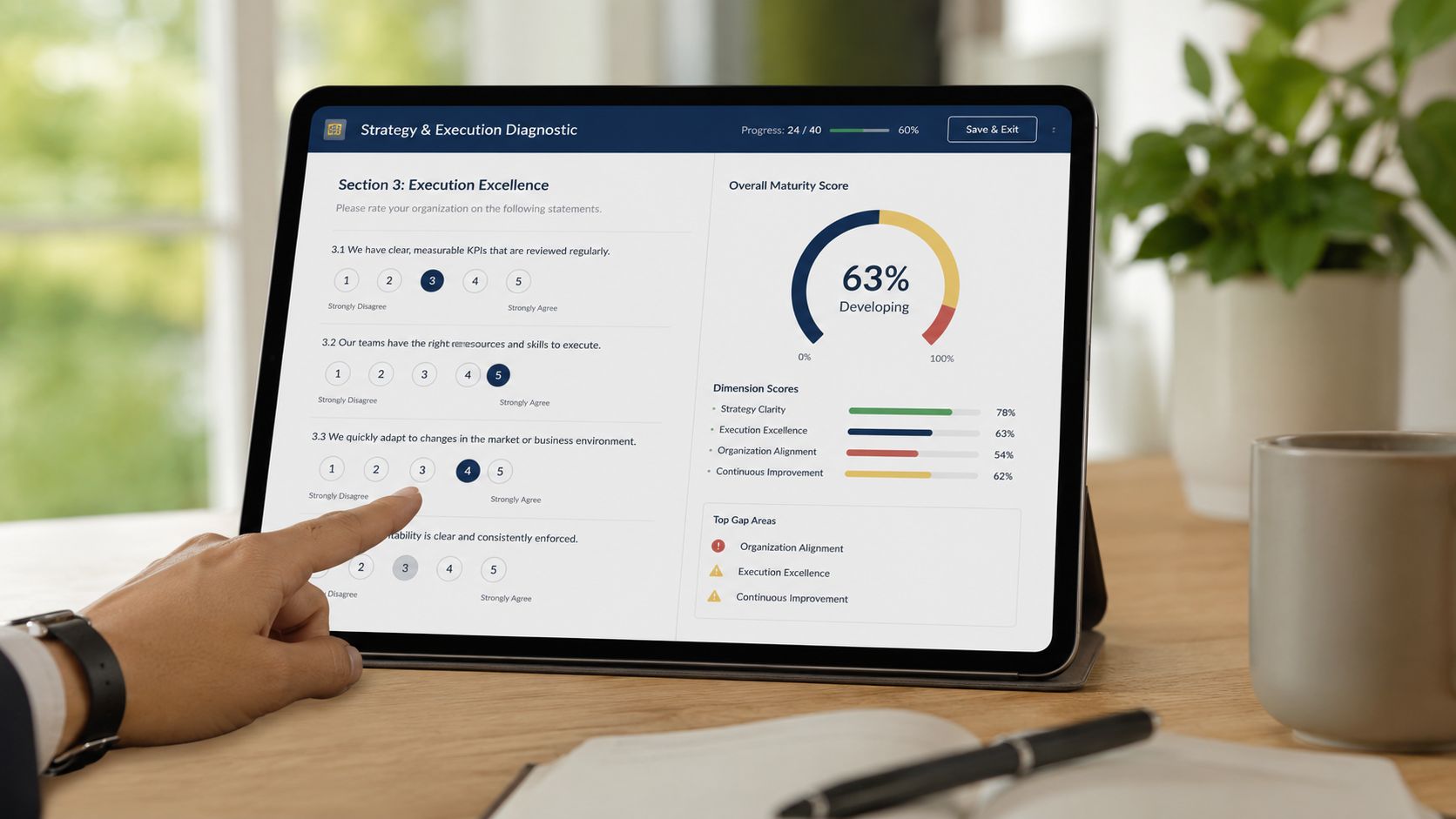
A cybersecurity vendor might score maturity across identity controls, incident response, and patching discipline. A compliance platform might score readiness against the policies and evidence collection steps buyers already struggle to manage. A revenue platform can assess forecasting rigor, pipeline inspection habits, and coaching consistency, then use the results to shape the next-stage presentation.
Turn discovery into self-diagnosis
This format works because buyers trust conclusions they helped produce. The presentation becomes a mirror, not a lecture. It’s especially effective when the selling motion is consultative and the purchase requires internal consensus around current-state gaps.
One practical framework for data-driven sales presentations starts with situation analysis and challenge identification before introducing the solution and quantified value. That sequence, described earlier from the Mural guidance, fits diagnostics well because the assessment gives you real material for the first half of the story without relying on generic assumptions.
Keep the scoring honest
Bad diagnostics feel rigged. Every answer somehow points to “buy our product.” Buyers notice that immediately.
“Show people how the score works. Hidden scoring looks like manipulation.”
Good execution follows a few rules:
- Ask only relevant questions: Every prompt should connect to a problem your offering addresses.
- Explain the score: Show how inputs map to categories or maturity levels.
- Prescribe specific actions: The output should name the next few priorities, not just the overall rating.
- Use results in the proposal: Reference the exact gaps the buyer identified during the assessment.
- Share the diagnostic afterward: The buying group should be able to revisit and discuss it asynchronously.
8. The Executive Sponsor Alignment Brief with Outcome-Based Success Metrics
Executive audiences don’t want a product tour. They want a decision brief.
That’s the mindset behind this format. The presentation strips out most operational detail and focuses on strategic outcomes, financial logic, implementation confidence, and accountability. It’s the right format for late-stage alignment, budget approval, and sponsor activation.
Executives want decisions, not tours
A strong executive brief often follows the same broad sequence as an effective SaaS sales deck: executive summary, buyer challenge, cost of inaction, solution, proof, implementation, pricing or ROI, and next steps. The difference is that every section is translated into executive language. Instead of “feature availability,” the brief talks about operational risk, resource requirements, and expected business movement.
For QBR and renewal settings, a useful benchmark structure starts with prior goals and performance, then shows current insights, and closes with an action plan that assigns ownership and timelines. That pattern, from the earlier Mural guidance, is also effective for executive alignment because it frames the decision around business management rather than vendor promotion.
What to include in the brief
An enterprise software team presenting to a CFO and COO might emphasize resource efficiency, scaling constraints, and milestone ownership. A cloud migration team may focus on TCO logic, resilience, governance, and transition risk. A sales enablement vendor would frame the case around forecast reliability, opportunity management discipline, and the executive commitment required for adoption.
Keep the brief sharp:
- Start from executive priorities: Tie the case to stated strategic initiatives, not generic vendor benefits.
- Show the math: Executives, especially finance leaders, want the assumptions behind ROI claims.
- Name accountable leaders: Success metrics need owners on both sides.
- Address risks directly: Vendor viability, change management, technical debt, and internal bandwidth all belong in the brief.
- Time the review well: Executive approval is easier when the brief lands before budget and planning deadlines, not after them.
8-Point Sales Presentation Comparison
| Template | Implementation Complexity 🔄 | Resource Requirements | Expected Outcomes 📊 | Ideal Use Cases 💡 | Key Advantages ⭐ | Typical Timeline ⚡ |
|---|---|---|---|---|---|---|
| Problem-Agitate-Solve (PAS) for Interactive Demos | Moderate → High: interactive setup and data wiring | Prospect research, CRM/API access, interactive widgets, design time | High engagement; faster conviction; shorter sales cycle | Outcome-driven demos where prospect metrics drive the conversation | Buyer-centered storytelling with real-time proof and differentiation | 2–3h research + 1–2h build; ~15min/account |
| MEDDIC Qualification-to-Presentation Pipeline | Moderate: structured sections + collaboration | Cross-role collaboration, CRM integration, team training | Reduces duplicate work; speeds qualification; better coaching visibility | Qualification-heavy deals and sales ops standardization | Standardizes qualification and surfaces gaps early | 2h template + 20–30min per deal; ongoing updates |
| ROI/TCO Proof with Live Financial Models | Moderate → High: model accuracy & live links required | Financial modeling skill, Sheets/API maintenance, presales support | Faster deal velocity; self-qualification; procurement-ready evidence | CFO-facing deals, procurement negotiations, cloud migrations | Transparent, auditable ROI that reduces objections | 3–4h model + 1–2h embed; ~15min customization |
| Account-Specific Value Narrative with Research-Fed Storytelling | Moderate: research-heavy personalization | Market/company research tools, CRM/API, content & design effort | Higher credibility; fewer objections; stronger pre-demo alignment | Strategic/enterprise accounts and pre-call outreach | Positions seller as advisor with tailored insights | 4–5h research + 1–2h integrations; 20–30min/account |
| Multi-Stakeholder Journey Map with Role-Based Paths | High: branching logic and multi-path content | Role mapping, multiple content tracks, analytics review, testing | Stronger stakeholder engagement; accelerates multi-threaded deals | Complex deals with many decision-makers; champion enablement | Role-specific personalization that aligns stakeholders | 3–4h mapping + 3–4h build + 1h testing |
| Competitive Differentiation Battlecard with Comparison Widgets | Moderate: ongoing intelligence maintenance | Competitive research, legal/compliance review, regular updates | Better win rates; proactive objection handling | Head-to-head competitive scenarios; field enablement | Fact-based differentiation and faster objection handling | 3–4h research + 2–3h build; ~1h/month maintenance |
| Prescriptive Diagnostic Discovery Deck with Assessment Scoring | High: assessment design + benchmarking complexity | Domain experts, benchmark data, scoring logic, maintenance | Drives buyer self-discovery; urgency; increases velocity | Consultative sales, compliance, maturity assessments | Diagnostic-driven urgency and prescriptive next steps | 4–6h design + 2–3h build; 1–2h/month updates |
| Executive Sponsor Alignment Brief with Outcome Metrics | Moderate: translate ops to exec outcomes | Executive interviews, financial models, concise design skills | Faster executive buy-in and budget approval; executive accountability | Large strategic deals requiring C-suite alignment and budget | Speaks executive language; creates measurable ownership | 2–3h priorities + 3–4h build; 1–2h/customize |
Your Next Presentation Is a Revenue Engine
The old model for sales decks is too slow and too passive. A rep gathers notes, opens PowerPoint or Google Slides, rebuilds the same story again, exports a file, and sends a version that starts aging the moment it lands in an inbox. That process doesn’t just waste seller time. It weakens the buying experience because the presentation becomes a static summary instead of an active tool for qualification, persuasion, and alignment.
The better approach is to treat presentations as reusable systems. Each framework in this list solves a different job. PAS helps you turn pain into visible business impact. MEDDIC decks make qualification visible and coachable. ROI and TCO models help finance and procurement work through the business case without leaving the presentation. Account-specific narratives show preparation. Role-based paths help multi-stakeholder buying groups engage on their own terms. Battlecards clarify competitive fit. Diagnostic decks create buyer-owned urgency. Executive briefs turn a sales conversation into a business decision.
That shift matters because modern buyers don’t want more information. They want contextual proof. They want to explore the logic themselves, share it internally, and revisit it later without losing the thread. A good sales presentation example doesn’t impress people with design alone. It helps them make a decision with less friction.
If you’re building a team standard, don’t try to operationalize all eight formats at once. Pick the one that matches your most common deal bottleneck. If finance keeps slowing deals, start with the ROI and TCO framework. If multi-threading is weak, build the stakeholder journey map. If discovery is too shallow, launch a diagnostic deck first. One well-built master template usually does more for pipeline movement than a dozen loosely managed decks sitting in different rep folders.
There’s also a management advantage here. When presentations become structured, interactive assets instead of one-off files, enablement and RevOps can inspect them. Managers can coach on what’s missing. Teams can review engagement patterns. Content owners can update proof, assumptions, branding, and positioning without forcing every rep to start from zero. That creates consistency without flattening relevance.
Encelade fits this model well because it’s built around web-native, link-based presentations with live data, interactive widgets, collaboration, and AI-assisted creation. That combination matters for revenue teams. It reduces the time spent assembling decks by hand, keeps numbers current through connected data sources, and makes it easier to deliver account-specific narratives that don’t break when the deal changes. It also gives buyers a better experience because they can interact with the content instead of paging through another exported file.
Your next presentation shouldn’t be a recap of what you sell. It should be a revenue engine that helps buyers understand, validate, and act.
If your team is still building decks manually and sending static files, Encelade is worth a serious look. It helps sales, presales, enablement, and RevOps teams turn CRM notes, research, spreadsheets, and documents into interactive, web-native presentations with live data, branding controls, collaboration, analytics, and export options when you need them. That’s a better foundation for result-focused sales presentation examples than another folder full of stale slides.