The revenue team is waiting on a deck, the prospect wants it personalized, and the CRM notes are a mess. Someone on the team has account history in Salesforce, someone else has product proof points in a spreadsheet, and the last two discovery questions are buried in email. If you've ever watched an AE scramble to pull all of that into a coherent story before a 4 p.m. call, you already know why how to build AI agents stopped being a novelty and became a practical platform problem.
Agents matter because they can do more than answer. They can read context, take action across systems, recover when a record is missing, and hand a human something usable instead of a chat transcript. That shift from static demos to measurable autonomous behavior accelerated as foundation models expanded through 2023 and 2024, which widened the base model layer available to agent builders: 149 foundation models were released in 2023, more than double the 2022 figure, according to the Stanford AI Index 2024, and by March 2024 the UK Competition and Markets Authority put the known global total at over 330, citing Stanford's Ecosystem Graphs.
By the end, you should be able to design the workflow end to end, pick a model, shape memory, wire tools, test the behavior before launch, deploy it behind scoped credentials, and keep it observable in production. The practical target is a revenue workflow that can research an account, synthesize a narrative, and call a presentation API or MCP endpoint to produce a slide-ready deck while the AE keeps the final review step.
Table of Contents
- Why Build AI Agents in 2026
- The Core Architecture of an AI Agent
- Designing the Agent Before You Code
- Testing and Evaluating Agent Behavior
- A Revenue Team Agent Built With Encelade
- Security, Governance, and Observability in Production
- Your Repeatable Build Workflow
Why Build AI Agents in 2026
A mid-market AE needs a custom discovery deck before a call. The account research lives in one tab, CRM notes in another, market proof points in a third, and the clock is brutal. A prompt-only chatbot can draft language, but it can't reliably reach into live systems, resolve missing context, or turn the result into a presentation object the rep can send.
That's the reason agents belong in revenue workflows. They don't just generate text, they execute a sequence. They can read the CRM, gather public context, draft an outline, and hand the structure to a deck generator, which is exactly the kind of multi-step task that static playbooks keep failing to finish.
Why the model ecosystem changed the game
The historical jump wasn't just bigger models, it was the rise of benchmarked autonomous behavior. By 2024, the field had environments built specifically for agents that act inside real software: AndroidWorld put agents in control of a live Android environment across 116 programmatic tasks, and WorkArena++ defined 682 realistic workplace tasks drawn from the workflows knowledge workers run every day. Earlier task-execution benchmarks like MLAgentBench pushed the discipline toward measurable execution in settings that resemble office workflows and web navigation rather than one-shot question answering.
That matters because agents depend on the quality of the base model, but they fail or succeed in the loop around it. Planning, tool use, memory, and multi-step execution all sit on top of the model, so more capable and more available foundation models widened the technical floor for anyone building production systems.
A useful mental shift is to stop asking whether a model can “chat well enough.” Ask whether the system can complete a job with the right inputs, the right tool calls, and a clean fallback when one step breaks.
Practical rule: If the human workflow involves reading, deciding, and acting across multiple systems, you're probably building an agent, not a chatbot.
What you can build by the end
A revenue-team agent is the clearest example because the failure modes are obvious. The agent should gather account facts, pull relevant CRM history, synthesize a narrative, and create a presentation artifact the AE can review and edit. If the deck generation step fails, it should surface a structured refusal or retry path instead of inventing content.
That same pattern shows up in support, operations, and sales engineering, but the revenue case is easy to validate because the output is concrete. A deck either exists, has the right sections, and reflects the account, or it doesn't.
The Core Architecture of an AI Agent
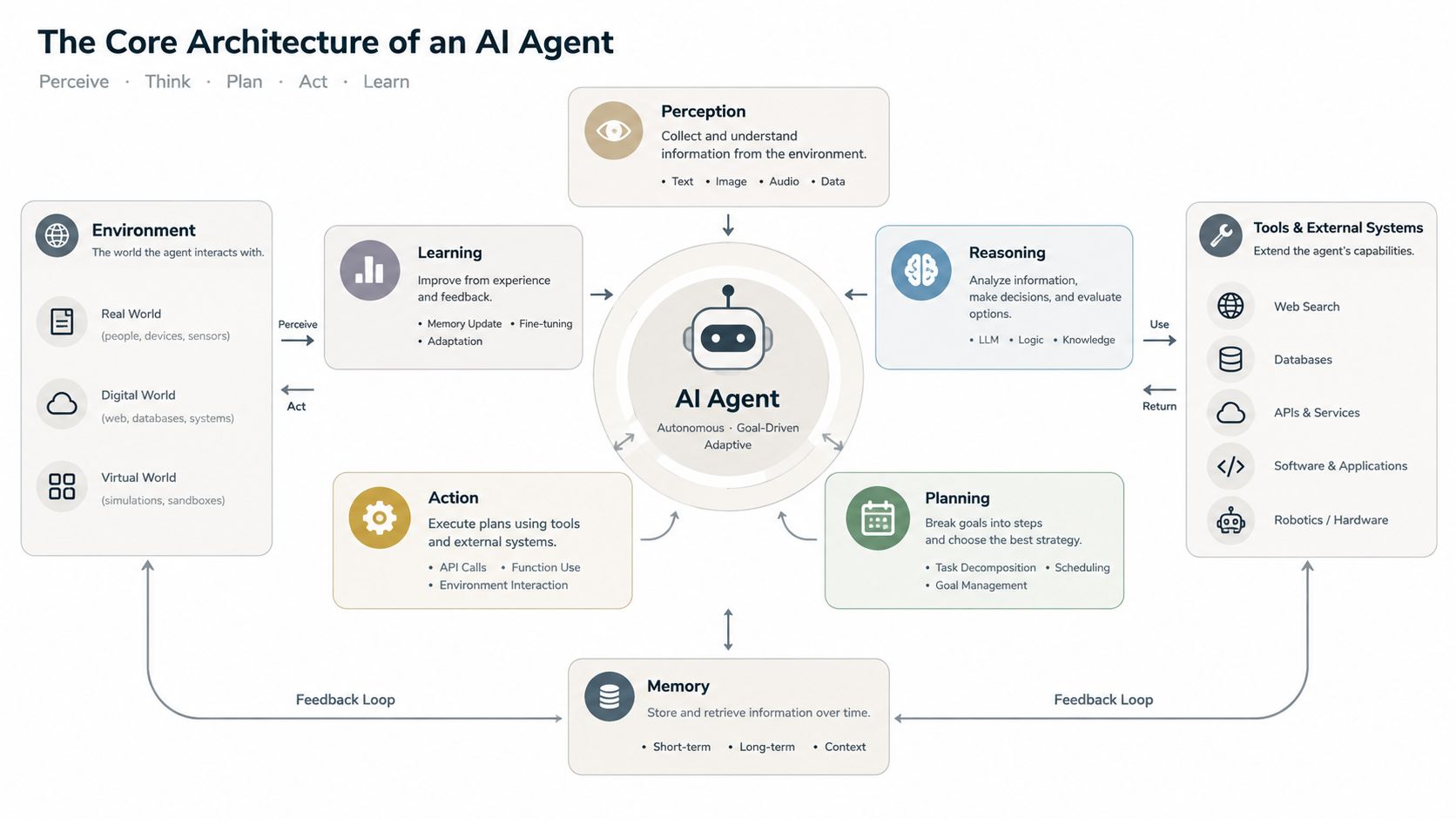
Think about a travel agent, not an airline app. The traveler says where they want to go, the agent checks options, books the pieces, and keeps the itinerary in order when something changes. A software agent works the same way, except its itinerary is a loop across planner, memory, tools, and orchestrator.
Planner, memory, tools, orchestrator
The planner decides what happens next. It reads the current goal, sees the context it has, and chooses the next action, like search CRM, fetch public data, draft outline, or generate slides. The planner is usually the part people overbuild first, but it only works if the environment around it is clean.
Memory has two jobs. It keeps short-term state for the current conversation, and it stores durable facts the agent earned, like account names, buyer preferences, or prior outputs. In practice, this is often a combination of the current context window plus a vector store or document store.
Tools are typed interfaces to the outside world. That could be a REST endpoint, an MCP server, a database query, or a function that validates a payload before the model is allowed to act. Tools are where many production failures happen, because the model can be right in intent and still fail on schema, latency, or permission boundaries.
The orchestrator runs the loop. It handles retries, validates outputs, persists results, and decides when the agent should stop. In shipped systems, this layer often matters more than model choice because it enforces discipline when the model becomes uncertain.
Framework choices without locking yourself in
Different stacks expose the same shape in different ways. LangGraph and CrewAI are common orchestration options, AutoGen fits multi-agent patterns, function-calling schemas from OpenAI and Anthropic define typed tool use, MCP servers standardize tool exposure, and vector stores like pgvector, Weaviate, or Chroma handle retrieval-backed memory.
If you're already integrating with presentation workflows, Encelade's LangChain integration is one example of how the tool layer can stay explicit while still being agent-friendly. The main point is not the library name, it's the separation of concerns.
All four components show up in almost every shipped agent. The difference between frameworks is usually how cleanly they let you swap one piece without rewriting the others.
Designing the Agent Before You Code
The strongest agents start as a design doc, not a prompt draft. Teams that skip this step usually end up tuning behavior after the system is already wired into live data, which is the most expensive time to discover ambiguity.
The five decisions that belong up front
First, define the agent's purpose in one sentence. Use explicit inputs, outputs, and stop conditions. “Build a Q3 review deck for Acme Corp from CRM notes, research, and approved templates, then stop when a draft deck is ready for human review” is much better than “help sales make decks.”
Second, choose a base model by the job, not the leaderboard. Context window, tool-calling reliability, latency budget, and cost per turn all matter because a model that sounds smart but can't make consistent tool calls won't survive production.
Third, shape memory into three tiers. Working context holds the current turn, episodic logs keep past sessions the agent may need to recall, and semantic stores hold stable facts that retrieval can fetch on demand. That split keeps the prompt from becoming a junk drawer.
Practical rule: If the agent needs facts after the current turn, don't bury them in prompt history. Put them in a retrievable store and make the lookup explicit.
Prompts and tools should look like contracts
The fourth and fifth decisions are about interfaces. The system prompt should read like a contract. Define role, tool-use rules, refusal policy, and output schema in plain language. If the presentation must return a structured deck request, spell out the required fields and what happens when one is missing.
Tools need the same discipline. Design them as API-shaped examples with request and response contracts, validation rules, and timeout semantics. A tool that accepts “account” as a vague string is a tool that will eventually fail at 4:55 p.m. when a rep needs the output now.
A quick pre-build checklist helps a lot:
- One-sentence job definition: Clear input, output, and stop condition.
- Model choice rationale: Context, tool reliability, latency, and cost reviewed.
- Memory plan: Working, episodic, and semantic layers defined.
- Prompt contract: Role, tools, refusal behavior, and schema written.
- Tool contracts: Request, response, validation, and timeout specified.
If any of those items feels fuzzy, the implementation will be fuzzy too.
Testing and Evaluating Agent Behavior
Many teams overtrust the demo and underinvest in evaluation. That's why the evaluation conversation needs to start before the agent is wired into production systems, not after a launch postmortem.
Benchmarks versus harnesses
Fixed-task benchmarks like SWE-bench, AgentBench, and τ-bench are useful because they give you external comparisons and a shared language for competence. The downside is obvious to anyone shipping into a revenue workflow, they rarely match your actual tool stack, your prompts, or your failure modes.
Framework-style harnesses such as Inspect AI, DeepEval, and Braintrust are better for replaying traces against scored rubrics. They let you test the agent you built, not a generic proxy.
| Dimension | Fixed-Task Benchmarks | Framework-Style Harnesses |
|---|---|---|
| Best use | Headline comparison across models | Validation of your actual workflow |
| Task shape | Predefined and shared | Custom to your domain |
| Tool stack fit | Often indirect | Directly tied to your APIs |
| Regression testing | Limited | Strong when wired to traces |
| Production relevance | Medium | High |
A hybrid approach works best. Keep benchmark exposure for external context, but build a harness that records every run, scores tool-call accuracy against expected schemas, and grades end-to-end success on tasks derived from your own domain.
The research pattern behind this is consistent. A survey on evaluating LLM-based agents emphasizes capturing full trajectories, user messages, tool calls, and intermediate steps, because coarse end-to-end success metrics miss where agents actually fail. That's why replaying prefixes and checking the next action is often more diagnostic than only scoring pass or fail at the end.
A practical grader for a deck workflow
For a deck-generation agent, the grader shouldn't just ask whether a deck exists. It should parse the job response, confirm a valid session completed, and check that the slide structure contains the required components for that request. If the prompt asked for an 8-slide account review, the harness should verify the response matches that shape and that the payload is well-formed before the deck is rendered.
Score the tool call first, then the final artifact.
That's the right order because a polished output can hide a broken pipeline. Pair offline evaluation with shadow-mode online evaluation before shifting traffic, and keep regression suites attached to every prompt or model change.
A Revenue Team Agent Built With Encelade
A practical revenue agent starts with a narrow job. “Build a Q3 review for Acme Corp” is enough to trigger a planning loop that splits the work into research, synthesis, and presentation generation. The planner doesn't need to invent a strategy, it needs to decompose the work and call the right tools in order.
The tool chain that actually ships
A revenue workflow usually needs three tool classes. First, a CRM connector for Salesforce or HubSpot to fetch account notes, contacts, opportunities, and recent activity. Second, a research step that gathers public context. Third, a presentation generator that turns the synthesized brief into a shareable deck.
Encelade's API and MCP endpoints are one way to handle the final step because the agent can send structured inputs and receive a presentation artifact back without hand-building slides. The reason this matters is simple, the agent stays focused on deciding what the presentation should contain, while the presentation service handles rendering and layout.
The memory layer should carry account facts across turns, especially when the AE asks for edits after the first draft. The orchestration loop needs a bounded retry budget so a single temporary failure doesn't stall the whole flow or trigger endless tool retries.
A simple Python pattern
The shape is usually the same. Post a generation request, poll the run until the deck is ready, then hand the shareable link back to the human for review.
import os
import time
import requests

API_BASE = "https://www.encelade.ai/api/public/v1"

# A scoped key lives in the environment or a vault, never in the prompt or source.
headers = {
    "x-api-key": os.environ["ENCELADE_API_KEY"],
    "Content-Type": "application/json",
}

# 1. Kick off generation in one call. The API returns 202 + a run id
#    and runs the work in the background.
start = requests.post(
    f"{API_BASE}/generation/runs",
    headers=headers,
    json={
        "brief": (
            "Q3 account review for Acme Corp: relationship history and open "
            "opportunities, product proof points that fit Acme's use case, and "
            "recommended next steps.\n\n"
            "Acme CRM notes: Q3 pipeline review, next steps, open risks.\n"
            "Recent announcements: https://news.example.com/acme"
        ),
        "pageCount": "auto",
    },
    timeout=30,
)
start.raise_for_status()  # refuse loudly on 4xx/5xx instead of inventing a deck
run_id = start.json()["runId"]

# 2. Poll the run until it finishes, with a bounded budget so a stuck job
#    can't loop forever.
deadline = time.monotonic() + 15 * 60
while time.monotonic() < deadline:
    response = requests.get(
        f"{API_BASE}/generation/runs/{run_id}", headers=headers, timeout=30
    )
    response.raise_for_status()
    run = response.json()
    if run["status"] == "done":
        deck_url = run["link"]  # the AE opens this to review the deck
        break
    if run["status"] in ("failed", "canceled"):
        raise RuntimeError(f"Generation {run['status']} for run {run_id}")
    time.sleep(10)
else:
    raise TimeoutError(f"Generation did not finish for run {run_id}")

print(deck_url)
The important part isn't the exact client, it's the contract. The agent authenticates with a scoped x-api-key, sends a brief with the account notes and links, then waits for a done run instead of assuming synchronous completion. If the API returns a non-2xx response, raise_for_status() stops the loop so the agent can refuse gracefully, surface the error, and give the rep a recovery path instead of fabricating the deck. For server-to-server use you can register a webhook and skip polling entirely.
For a deeper implementation pattern, see the workflow example in Encelade's agent-to-presentation guide.
Security, Governance, and Observability in Production
The model is the least interesting part of production risk. Identity, tool boundaries, and auditability are what decide whether an agent passes security review.
Control the agent like a system, not a prompt
Scoped credentials should map to specific tools. The agent's presentation key should not also reach the CRM, and secrets should live in a vault, not in prompts. Current agent-authorization guidance points at scoped, short-lived credentials and authentication through OAuth 2.1, using the client credentials grant for autonomous machine-to-machine agents or token exchange (RFC 8693) when an agent acts on behalf of a user. Enterprise MCP deployments push the same idea further, favoring user-delegated OAuth scopes over shared service accounts and routing tool calls through a centralized, observable control plane.
At the tool layer, constrain calls with JSON schemas, allowlist outbound domains, and rate-limit expensive actions like presentation generation. That's where a lot of abuse and accidental spend gets contained.
| Layer | Control |
|---|---|
| Identity | Short-lived OAuth tokens, scoped credentials, vault storage |
| Tool | JSON schema validation, allowlists, tool-specific permissions |
| Action | Rate limits, bounded retries, refusal paths |
| Audit | Prompt, response, tool invocation, and outcome logs |
| Observability | Latency, cost, refusal rate, and failure dashboards |
What to log, what to watch
Persist every tool invocation, prompt, response, and token cost to structured logs so you can replay incidents and attribute spend per deal. That gives revenue ops a way to see where the agent is helping and where it's leaking time or money.
The dashboards that matter are simple. Track latency, cost, and refusal rate, then page on-call when the agent drifts. If tool-call failures rise, the fix might be schema drift, an upstream API issue, or a prompt regression, and you won't know which one without logs.
The production evaluation gap is real too. The parts teams most often under-measure are multi-turn tool-call accuracy, real task coverage, memory use, and regression stability after prompt or model changes, which is why the control plane and the eval harness need to stay tied together.
Your Repeatable Build Workflow
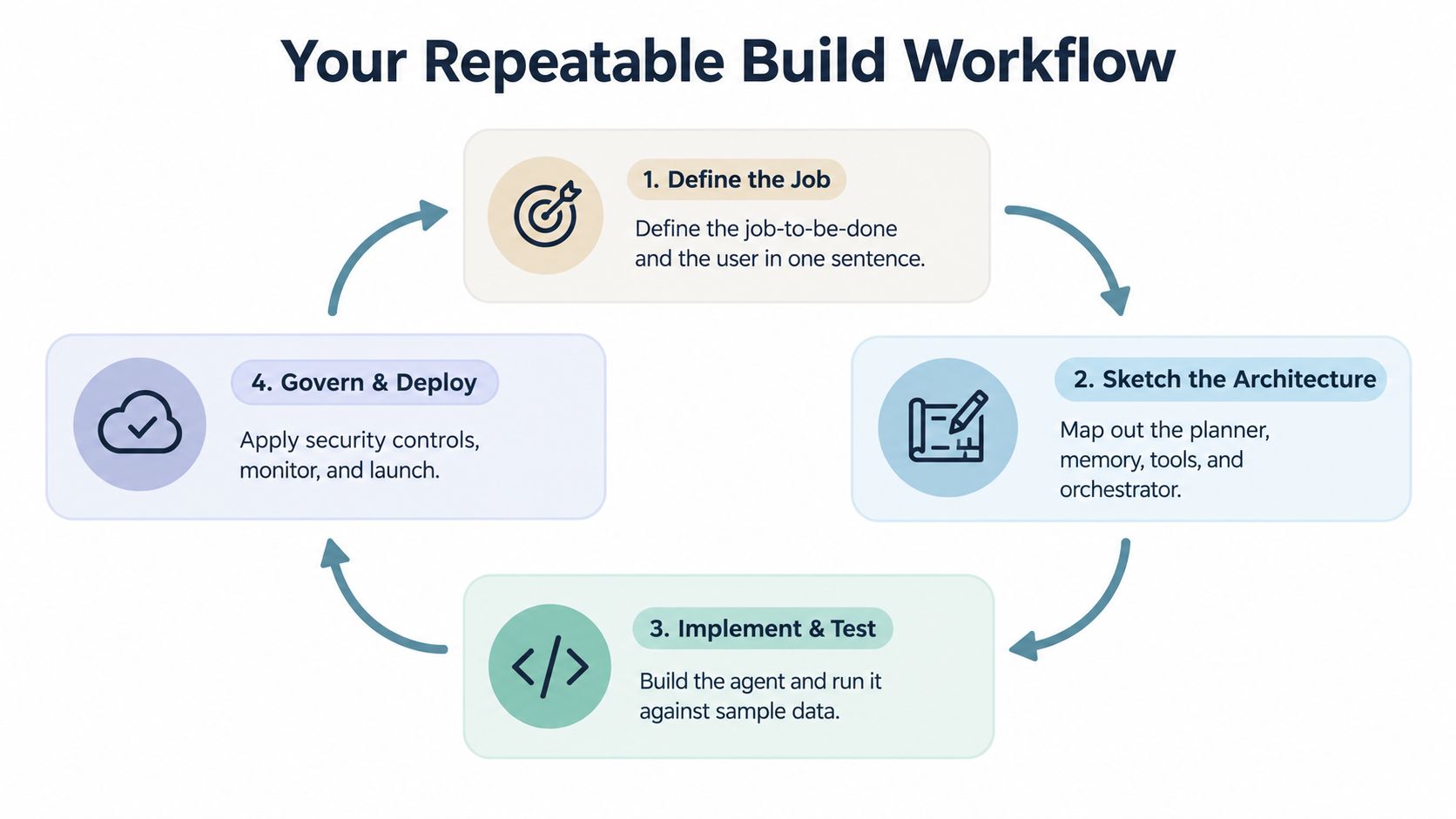
The cleanest way to build agents is to treat the work as a loop, not a one-time launch. Define the job, sketch the architecture, implement against real inputs, test with a task-specific harness, then govern and deploy behind controls that survive a security review.
The loop that keeps teams honest
Step one is the job definition. Write the user, input, output, and stop condition in one sentence. If that sentence still feels fuzzy, the agent's scope is too broad.
Step two is the architecture sketch. Map the planner, memory, tools, and orchestrator, then pick libraries that make each boundary explicit. The internal docs for that layer should live where the engineering team can maintain them, which is why a reference like Encelade's documentation belongs in the workflow, not in someone's head.
Step three is implementation against two or three real inputs. Draft prompts and tool schemas from actual user jobs, not idealized ones. That prevents the first version from only working on the happy path.
Step four is evaluation before deployment. Build a task-specific eval set, replay runs through a hybrid harness, and keep the release blocked until the scores are acceptable. No build should move forward if the eval scenarios aren't written.
Step five is governance and improvement. Ship behind scoped credentials, keep audit logging on, and monitor latency and cost from day one. Then review failures weekly and feed them back into prompts, tools, and evals.
Practical rule: Most teams skip offline evaluation and post-deploy review. Those are the two checkpoints where the system either becomes trustworthy or starts accumulating hidden failure.
Agents are useful when they close a workflow loop that humans keep doing by hand. Start with the job, make the tools explicit, evaluate against real tasks, and keep the control plane tight enough that the agent can survive production.
If you're ready to turn a manual revenue workflow into a controlled agent system, build it with Encelade's presentation API, MCP tools, and web-native deck output, so your team can move from prototype to something production can use.