You already know the feeling. The quarter is over, the numbers are closed, and the room is full of smart people who’ve seen the same slides too many times. Someone asks the one question that matters, “So what do we need to decide today?” and the deck answers with another chart instead of a commitment.
That’s why a strong quarterly business review presentation isn’t a recap. It’s a working meeting that turns performance into decisions, owners, and next steps. Done right, it helps revenue teams align on renewal, expansion, and risk, while giving executives a fast read on what changed and what needs approval. Done poorly, it becomes a polished status report that no one remembers after the call.
Table of Contents
- Why Most Quarterly Business Review Presentations Fail to Drive Action
- Planning Your QBR Timeline and Stakeholder Alignment
- Slide by Slide Structure for a High Impact QBR Deck
- Metrics That Matter and How to Source Them Live
- Turning Your Deck Into an Interactive Decision Session
- Rehearse, Deliver, and Follow Up for Measurable Outcomes
Why Most Quarterly Business Review Presentations Fail to Drive Action
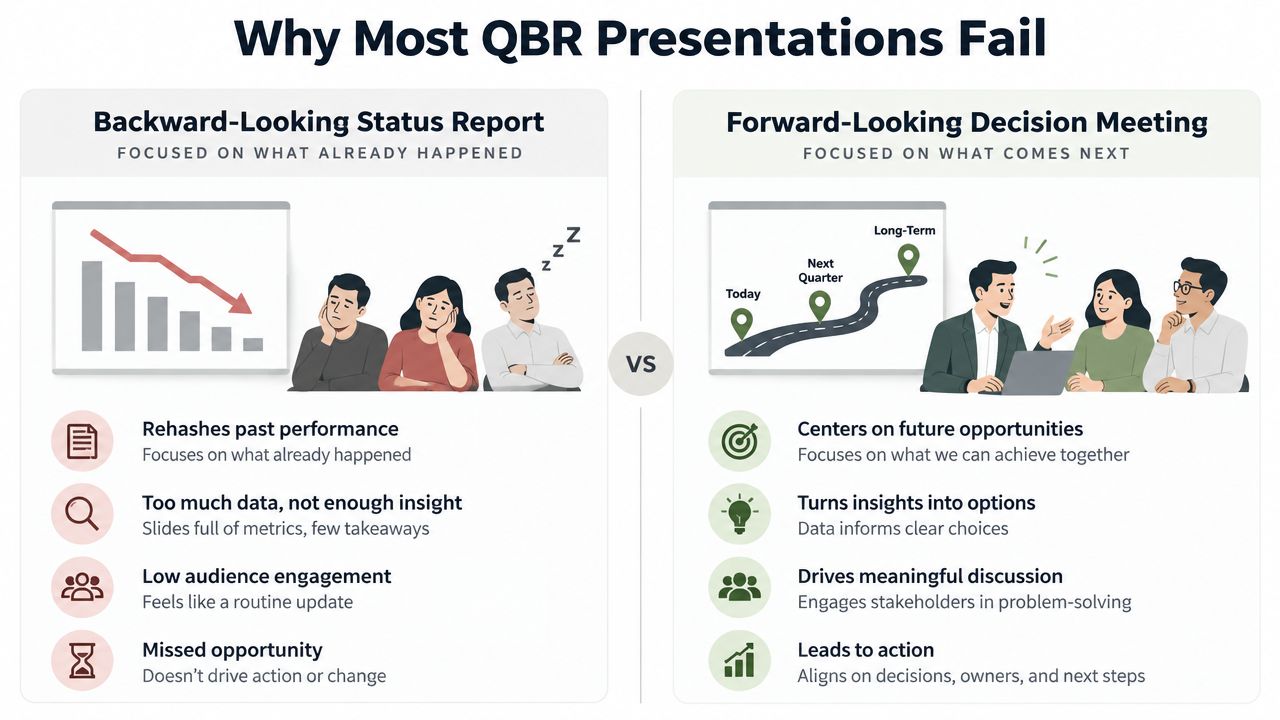
The failure mode is usually obvious. The presenter opens with quarter-over-quarter charts, spends most of the meeting narrating what everyone in the room already knows, then closes with “any questions?” The executive sponsor nods, the customer success lead takes notes, and nothing changes because the deck never asked for a decision.
A better quarterly business review presentation works like a commercial review. Strong quarterly presentations usually center on past performance, current pipeline, and future commitments, with agenda items like attainment, win rate, average sales cycle, slipped deals, pipeline coverage, and next-quarter targets, as Salesloft’s QBR preparation guidance lays out. That structure matters because it moves the room from commentary to action.
Practical rule: if the room can leave without approving, changing, or committing to something, the QBR was probably a report, not a review.
The strongest teams also plan around decision quality. A well-run QBR is a focused session with a data package shared before the meeting and action items sent out after it closes, as ORM Tech describes. That cadence keeps the live discussion on choices, trade-offs, and ownership instead of data gathering.
The cost shows up in the room. When a review only rehearses the past, the audience struggles to see fresh evidence of value, and executives quietly tune out because the deck reads like a status update they could have skimmed in an email. A QBR that spends all its time explaining the past leaves no space to secure the future.
The fix is straightforward in theory and harder in practice. Build the meeting around decisions, keep the narrative tight, and make sure the live discussion produces commitments with clear owners before the room clears.
Planning Your QBR Timeline and Stakeholder Alignment
A QBR falls apart fast when the prep is loose. I’ve watched strong account teams lose executive trust because they tried to validate numbers in the meeting, which turns the session into a scavenger hunt. Lock the data first, then shape the story, then bring decision-makers into a room that is already pointed at a choice.
Start with timing, then work backward
Run the meeting early in the new quarter, after the prior quarter is closed and the numbers are stable. That keeps finance, RevOps, sales, and customer success from debating report hygiene while leaders are trying to decide what happens next.
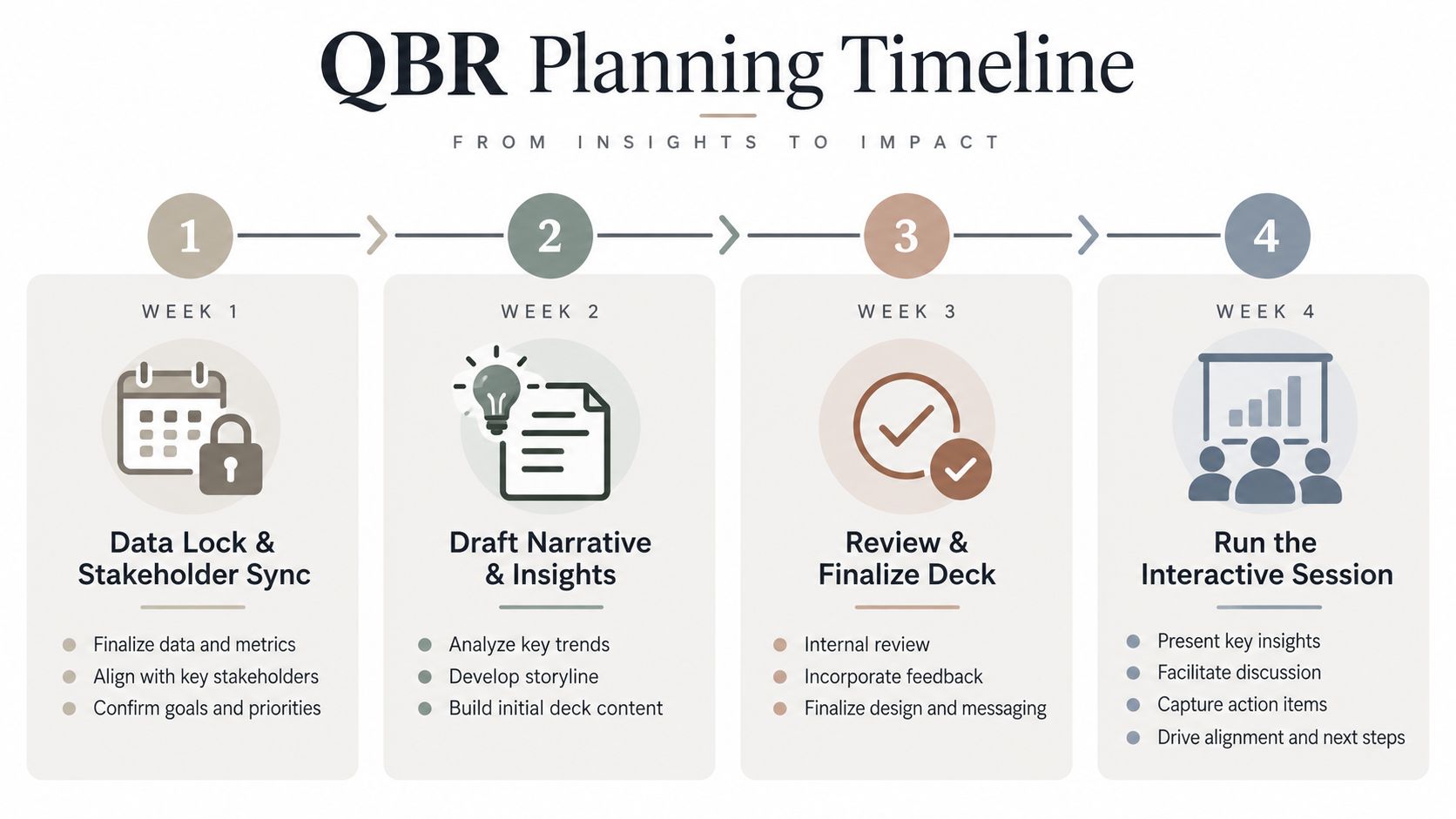
A practical prep rhythm looks like this:
- Week 1: lock the source data and confirm the attendee list.
- Week 2: draft the narrative and decide which metrics deserve airtime.
- Week 3: review the deck with internal stakeholders and cut anything that does not change a decision.
- Week 4: run the interactive session and capture the final asks.
The cleanest QBRs I’ve built had one thing in common, the story was finished before the meeting started.
Align owners before the deck exists
Sales, customer success, and RevOps need to settle three things early. What did the quarter deliver. What decision does the live meeting need to produce. Who owns follow-up if leaders approve a change, budget, or risk response. If those roles are fuzzy, the meeting drifts into polite commentary and nobody leaves with an assignment.
That alignment also gives you room to surface bad news before executives hear it cold. A slipped deal, adoption gap, or expansion opportunity should be pressure-tested internally first, with the people closest to the account or pipeline. Otherwise the room spends time reacting to surprises instead of deciding on the next move.
Use the agenda pre-read to get executive input, not to dump raw metrics. Send materials early enough for people to react to the story, not the formatting. If you wait until the meeting to create context, you give up your best chance to steer the decision.
Slide by Slide Structure for a High Impact QBR Deck
A QBR deck should feel short because each slide earns a decision. The strongest quarterly business review presentation I’ve seen kept the flow tight, stayed within 10 to 15 slides, as 1Point1 recommends, and resisted the urge to turn the meeting into a data dump. One slide, one job.
Open with the executive summary, not a warm-up
Slide 1 should state the quarter’s headline result and the one decision or recommendation that matters most. Executives decide fast whether the room is worth their attention, so the first slide needs to read like a conclusion. If the headline sits behind setup, the meeting starts behind.
Slide 2 should cover the agenda and the outcome you want. Keep it plain. People do not need a decorative roadmap, they need to know what will be decided and what the conversation is supposed to produce.
Build the middle around evidence, not commentary
Slides 3 through 7 should carry the weight. Use a KPI scorecard, wins, challenges, and a short read on what changed. RAG-style scorecards work well for executive eyes because they let leaders scan, react, and move to the decision faster. That is the point of the middle, reduce noise and show where the business needs a call.
A clean structure usually looks like this:
- Executive Summary. One headline, one recommendation.
- KPI Scorecard. The quarter’s core metrics, shown clearly.
- Wins. Outcomes that matter to revenue, retention, or expansion.
- Challenges. Risks, misses, or blockers that need attention.
- Strategic Priorities. The next-quarter focus, tied to ownership.
Spend more of the live meeting on what comes next than on what already happened. A review that only revisits the quarter may feel thorough, but it will not get budget or priority shifts approved. The deck should show enough history to justify the ask, then move quickly into the trade-offs and choices in front of the team.
Useful screen rule: if a slide needs more than one sentence of explanation before the audience gets it, simplify the slide.
Close with owners and decisions
The last slides should turn priorities into commitments. Use a final decisions and actions slide with the owner, the expected outcome, and the deadline for each item. If the meeting ends with vague “we’ll follow up,” accountability is already slipping.
A compact closing set might include:
- Next-Quarter Objectives. Three to five goals tied to business value.
- Owners and Deadlines. Every goal assigned to one person.
- Decisions Needed. The approvals or trade-offs required to move forward.
For presentation craft beyond the QBR itself, this sales presentation guide is useful if your team still needs a stronger narrative baseline. The main point stays the same, the deck should help people decide, not admire the formatting.
Metrics That Matter and How to Source Them Live
A QBR falls flat when it becomes a dump of every available dashboard. Executives do not need more noise, they need the few signals that explain whether the business is on track and what decision the room has to make next. The strongest decks keep the metric set tight, connect it to the original business case, and show live numbers so nobody is arguing over a stale export (Revos AI, Matik).
Pick metrics that answer a business question
For sales and revenue reviews, the core set usually includes attainment, win rate, average sales cycle, slipped deals, and pipeline coverage (Salesloft), often paired with customer health scores when retention is on the line. That set works because each metric answers a different leadership question about revenue, risk, or forecast quality. A slide full of vanity metrics or disconnected operating data rarely earns budget or follow-up.
The better test is simple. Can the metric support a decision in the room? If it cannot, it belongs in the backup material, not on the main stage. Guidance on how to measure business impact is useful here because it keeps the conversation anchored to outcomes that justify the work, not just activity that looks busy.
Recent guidance also points to realized efficiencies and benchmarks against similar organizations as useful value markers, but only when the comparison is credible for the audience and the market. If the room does not trust the benchmark, it creates debate instead of direction.
Keep the number density under control
A practical rule is the Rule of Six, which says never show more than 6 numbers on one slide, as Amolino’s QBR guide puts it. That limit forces the team to choose the numbers that support a decision. If a slide is packed with twelve metrics, the room starts reading instead of responding.
Keep the overall deck high level, with enough detail to support a decision and no more. The QBR is not the analysis layer. It is the executive layer, where the job is to narrow options and secure commitment.
| QBR Metric to Source and Display Live | Source System | Live Display Tip |
|---|---|---|
| Attainment | CRM and forecasting system | Show against target with a simple color status |
| Win rate | CRM | Pair with a short note on deal quality |
| Average sales cycle | CRM | Display trend only if it changes a decision |
| Slipped deals | CRM and pipeline review notes | Surface the top blockers, not every exception |
| Pipeline coverage | CRM and forecast views | Show current coverage versus the next-quarter goal |
| Health scores | Customer success platform | Use a clear status indicator and a one-line reason |
A good live display example is a dashboard tile beside the slide, refreshed from the source system during the meeting. The presenter can keep the headline number on the slide, then open the widget only when someone asks for detail. That keeps the main narrative clean while still giving the room confidence that the numbers are current.
Live widgets also reduce the temptation to overbuild slides. Pulling from Google Sheets, REST APIs, or a connected presentation layer lets the data update without a manual refresh. A tool like Encelade fits that workflow because it supports live data connections and web-native decks, but the point is simpler: the room should be looking at current figures, not yesterday’s export.
If the team is measuring business impact more broadly, the impact measurement guide can help tighten the list of outcomes that deserve airtime. The discipline stays the same: every KPI should trace back to the business case that justified the work in the first place.
Turning Your Deck Into an Interactive Decision Session
A polished deck can still fail if the meeting feels one-way. Executives do not want a monotone recap. They want a room that can handle mixed performance, ask hard questions, and decide what happens next. Treat the QBR as a facilitated session with planned pause points, not a recital that saves questions for the end.

Use pause points to keep the room engaged
A practical live-meeting pattern is to pause every 5 to 7 slides for input, which keeps passive listening from taking over, as Presentations.ai suggests. Those pauses do not need drama. A simple “does this match what you are seeing?” surfaces disagreement while the deck is still flexible.
Use the pauses to force decisions, not just comments. Ask what should change, what needs a follow-up owner, and what can wait until the next review. That keeps the discussion from drifting into commentary that nobody owns.
Handle disagreement in the room, not after it
Mixed performance is normal. What matters is how the facilitator responds when the data does not tell a clean story. If sales says one thing and customer success says another, name the gap, keep the language factual, and route the group back to the decision in front of them.
Interactive presentation formats help because they keep context live while the conversation unfolds. Web-native links, embedded charts, and synced visuals support that flow without adding more slides. For teams exploring deck-level interactivity, the interactive deck builder is one way to think about the format, but the key point is simpler: the conversation should stay tied to commitments, not commentary.
Keep the meeting focused on decisions
Live widgets, charts, maps, and product walkthroughs raise engagement when they replace static screenshots, not when they clutter the meeting. Use them to show what changed, where risk sits, or what a customer or stakeholder needs to approve. Keep the number of moving parts low so the audience can follow the logic.
The live close should sound concrete. Say what you need, name who owns the follow-up, and confirm the deadline before the meeting ends. If the room leaves with only “good discussion,” the QBR has already slipped back into reporting.
Rehearse, Deliver, and Follow Up for Measurable Outcomes
A QBR does not drive outcomes because the slides look polished. It drives outcomes because the presenter has rehearsed the story, controlled the pace, and left the room with a clear record of who owns each next step. Many teams skip that work, then wonder why the meeting felt useful but changed nothing.
Rehearse the executive narrative, not just the clicks
The strongest run-throughs are tight. Time the deck against each agenda block, cut anything that does not support a decision, and practice the transitions so the live session feels intentional. Rehearsal should also test how the story holds up when executives interrupt, because they always do.
Keep the conversation tied to next-quarter priorities, then turn every action into a named owner and a deadline. Weak QBRs often fail because the room leaves with polite agreement instead of clear accountability, and the follow-up never reaches the people who approve renewal or expansion.
If a decision matters, capture it in the meeting. Don’t trust the recap email to do the work.
Share one source of truth after the meeting
Once the session ends, send one link-based version of the deck as the source of truth. That avoids version drift, especially when several stakeholders want to review the numbers or comment on a specific slide. If compliance or archive rules require offline copies, export to PDF or PPTX, but keep the live version as the primary record.
A strong follow-up package should include the decisions made, the open questions, the owner for each action, and the due date. Many teams also review views and time on slide to understand what stakeholders examined after the meeting. That gives a better read on engagement than a polite email reply.
Use the follow-up window
Send the action list within a day of the meeting, while the conversation is still fresh. That timing keeps the commitments from fading into “we’ll revisit it later.” It also gives internal teams a chance to move while the executive signal is still active.
A simple success check looks like this:
- Clear decision captured: the room approved, rejected, or changed something.
- Named owner assigned: every action has one accountable person.
- Deadline recorded: follow-up dates are visible, not implied.
- Source of truth shared: one live deck link exists, with exports only when needed.
- Next review scheduled: the next QBR is already on the calendar.
That is what turns a quarterly business review presentation into a management habit instead of a one-off event.
If you want a QBR format that stays current, interactive, and easy to revisit after the meeting, Encelade gives revenue teams a way to build web-native decks with live data, shareable links, and engagement analytics like views and time on slide. Use it when you need the presentation to stay the current source of truth after the room clears, not a static file that goes stale on someone’s desktop.