You're probably staring at a login mess right now, maybe a sales org where people bounce between six SaaS tools, two VPNs, and a password manager nobody trusts. Password resets keep piling up, offboarding feels shaky, and every new app seems to add one more place for access to drift.
SAML authentication exists to clean up that sprawl. It hands one identity provider the job of verifying the user, then lets that trusted result travel to the apps that need it. That is how admins move from scattered passwords to federated access that actually scales.
Table of Contents
- The Login Problem SAML Authentication Was Built to Solve
- SAML Authentication Core Concepts
- How a SAML SSO Flow Works Step by Step
- Why Enterprises Standardize on SAML for Single Sign-On
- Setting Up SAML SSO in Encelade
- Where SAML Authentication Breaks in the Real World
- SAML Versus OIDC and Choosing the Right Path Forward
The Login Problem SAML Authentication Was Built to Solve
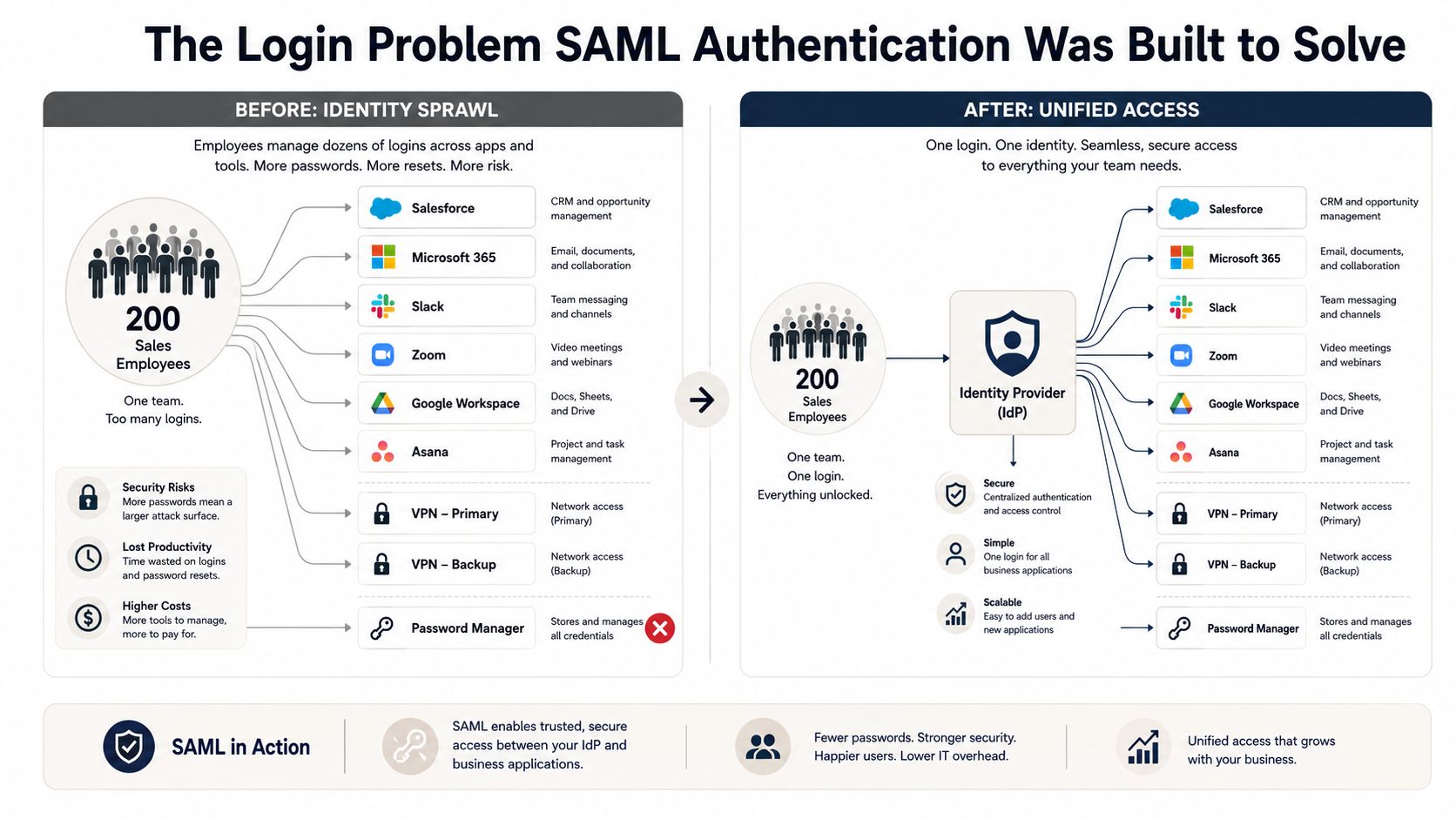
A 200-person sales team doesn't fail because people forget one password. It fails because every rep ends up juggling too many logins, and every system becomes its own little island. One account expires, another gets shared in a spreadsheet, and suddenly IT is spending more time on access cleanup than on real work.
That's the problem SAML authentication was built to solve. Instead of each SaaS app keeping its own separate password store, the company trusts one identity provider to verify the person once, then hands that verified identity to the services that need it.
From password sprawl to federated trust
The shift mattered most as companies moved deeper into cloud apps. A single employee might need CRM access, support tooling, analytics, and internal systems, all of which should respect the same identity decision. SAML turned that mess into a trust relationship between organizations, where the IdP says, “this user is verified,” and the app accepts that statement instead of asking for a fresh password.
Practical rule: If a user shouldn't need to remember a separate password for each business app, SAML is usually the protocol you're looking at.
The operational value is easy to see. Onboarding gets cleaner because access flows from one verified identity. Offboarding gets safer because revoking the central identity blocks the next login everywhere at once, though sessions a user already holds end only when they expire or when you add Single Logout or deprovisioning.
SAML also reduces the hidden cost of credential reuse. When people stop maintaining separate passwords for each app, they're less tempted to recycle weak ones or write them down where they shouldn't. That's why SAML became part of the default enterprise toolbox instead of staying a niche standard.
SAML Authentication Core Concepts
Before you touch a config screen, get four terms clear. If they blur together, setup turns into guesswork, and guesswork is how SSO breaks in production.
The four objects you keep seeing
SAML means Security Assertion Markup Language, an XML-based standard for exchanging identity data between systems. The Identity Provider, or IdP, verifies the person, such as Okta, Azure AD, or Ping. The Service Provider, or SP, is the app that trusts that verification, like Encelade or a SaaS tool your company uses. The SAML Assertion is the signed XML statement that carries the result.
The hotel-keycard analogy works because each piece has a distinct role. The IdP is the front desk, the SP is the room door, and the assertion is the keycard that opens the door after the front desk checks your ID.
| Term | What it does | Hotel analogy |
|---|---|---|
| SAML | The standard for exchanging auth data | The hotel's access system |
| IdP | Verifies the user | Front desk |
| SP | Trusts the verification and grants access | Room door |
| Assertion | Carries the signed login result | Keycard |
Authentication answers, “Who are you?” Authorization answers, “What can you do once you're inside?” SAML carries the authentication decision, and it can also deliver attributes like role or group so the SP can make authorization decisions locally.
The protocol words that matter in setup
You'll keep running into metadata XML, ACS URL, Entity ID, and NameID. Metadata XML is the trust file the IdP and SP exchange. The ACS URL is the endpoint where the response lands. The Entity ID is the stable identifier for each side. NameID is the subject identifier, often the user's email or a persistent account key.
Treat those names as exact values, not labels you can improvise. The two systems use them to recognize each other, and a mismatch usually turns into a login failure.
A SAML setup is a trust handshake with strict labels. Once those pieces make sense, the rest of the flow stops looking mysterious.
How a SAML SSO Flow Works Step by Step
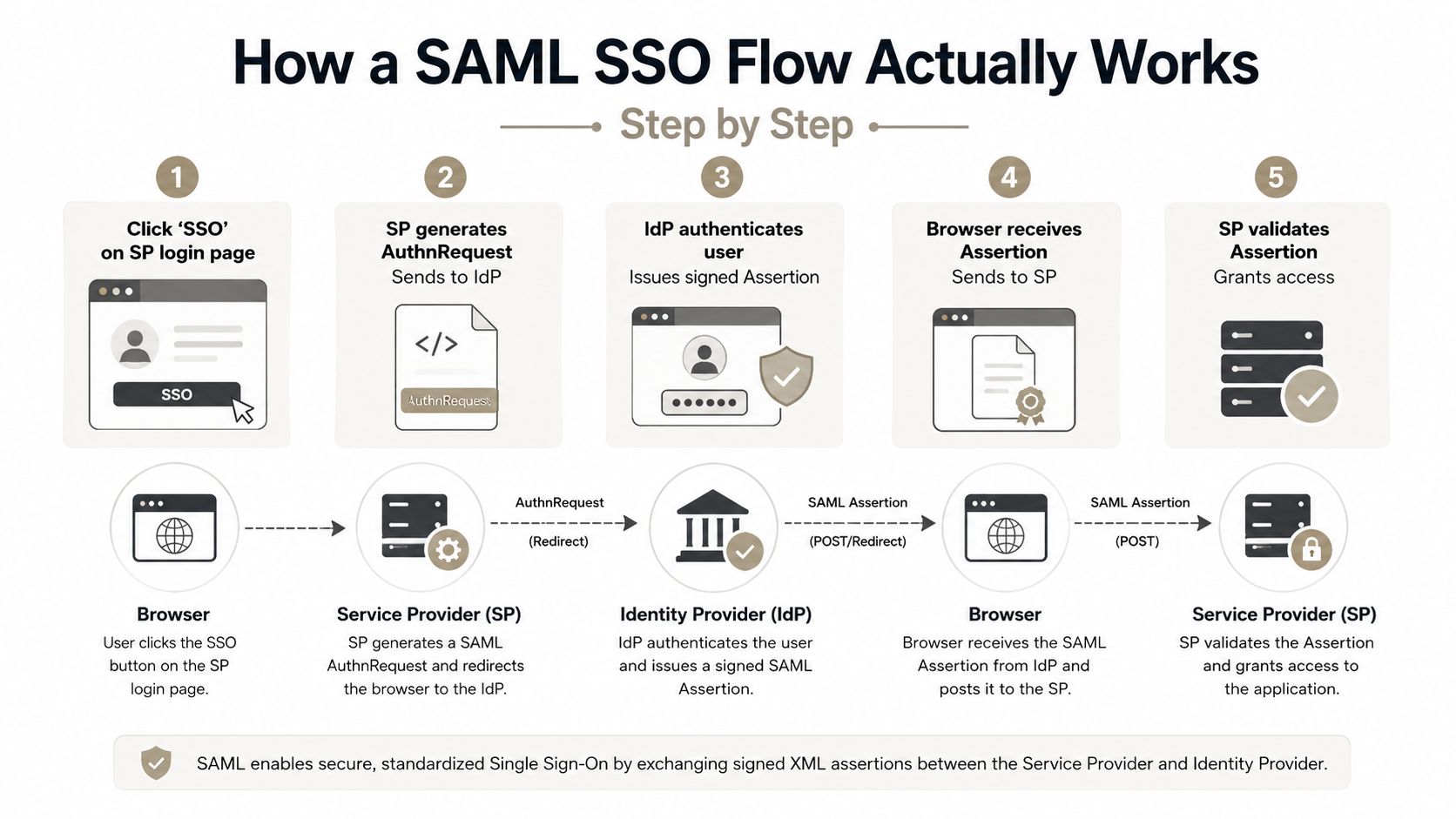
A SAML login starts at the service provider, because the SP asks for proof before it opens the door. The protocol is a structured trust exchange that moves verified identity between systems, rather than transferring passwords.
Step 1 through step 3
In an SP-initiated login, the user starts at the service provider — Encelade, in this example, once SSO is enabled for the tenant. The SP creates a SAML AuthnRequest with a unique request ID, an IssueInstant, and its EntityID, then sends it to the IdP through the browser by HTTP Redirect or HTTP POST. The OASIS technical overview describes this common pattern as Redirect for the <AuthnRequest> and POST for the <Response> carrying the assertion.
The browser is only the courier here. It carries the request to the IdP, and later carries the response back, but the user's IdP credentials never leave the IdP. What passes through the browser is another matter: signing protects an assertion's integrity, not its confidentiality, so an unencrypted assertion is readable in the browser, NameID and attributes included. That is why a SAML tracer can inspect a response, and why sensitive claims belong in an encrypted assertion.
The IdP then authenticates the user on its own terms. That might mean a password, MFA, or a passkey, depending on the organization's rules. SAML doesn't care which method the IdP picks, only that it can vouch for the user afterward.
Step 4 through step 6
After authentication, the IdP builds a signed SAML Response with a SAML Assertion inside it. That assertion normally carries a NameID, optional AttributeStatements such as email, role, or group, plus Conditions like NotBefore, NotOnOrAfter, and AudienceRestriction. If the deployment needs confidentiality beyond the final SP, the SAML 2.0 core specification treats encrypted assertions as the right mechanism for content that passes through intermediaries, using XML Encryption elements such as EncryptedAssertion and EncryptedData.
The IdP posts the response to the SP's ACS URL. The SP validates the signature against the IdP certificate from metadata, checks the conditions and audience, and — for an SP-initiated login — confirms the response's InResponseTo matches an outstanding request and that the recipient and Destination point at this ACS. Only then does it create a local session.
That validation step is where many integrations fail. A response can look valid to a human and still fail because the audience, time window, or certificate does not match what the SP expects.
IdP-initiated flow in two sentences
In an IdP-initiated flow, the user starts at the identity provider and clicks straight into the app from there. It can still work, but the SP has to validate the assertion with extra care, because it never created the original request.
Why Enterprises Standardize on SAML for Single Sign-On
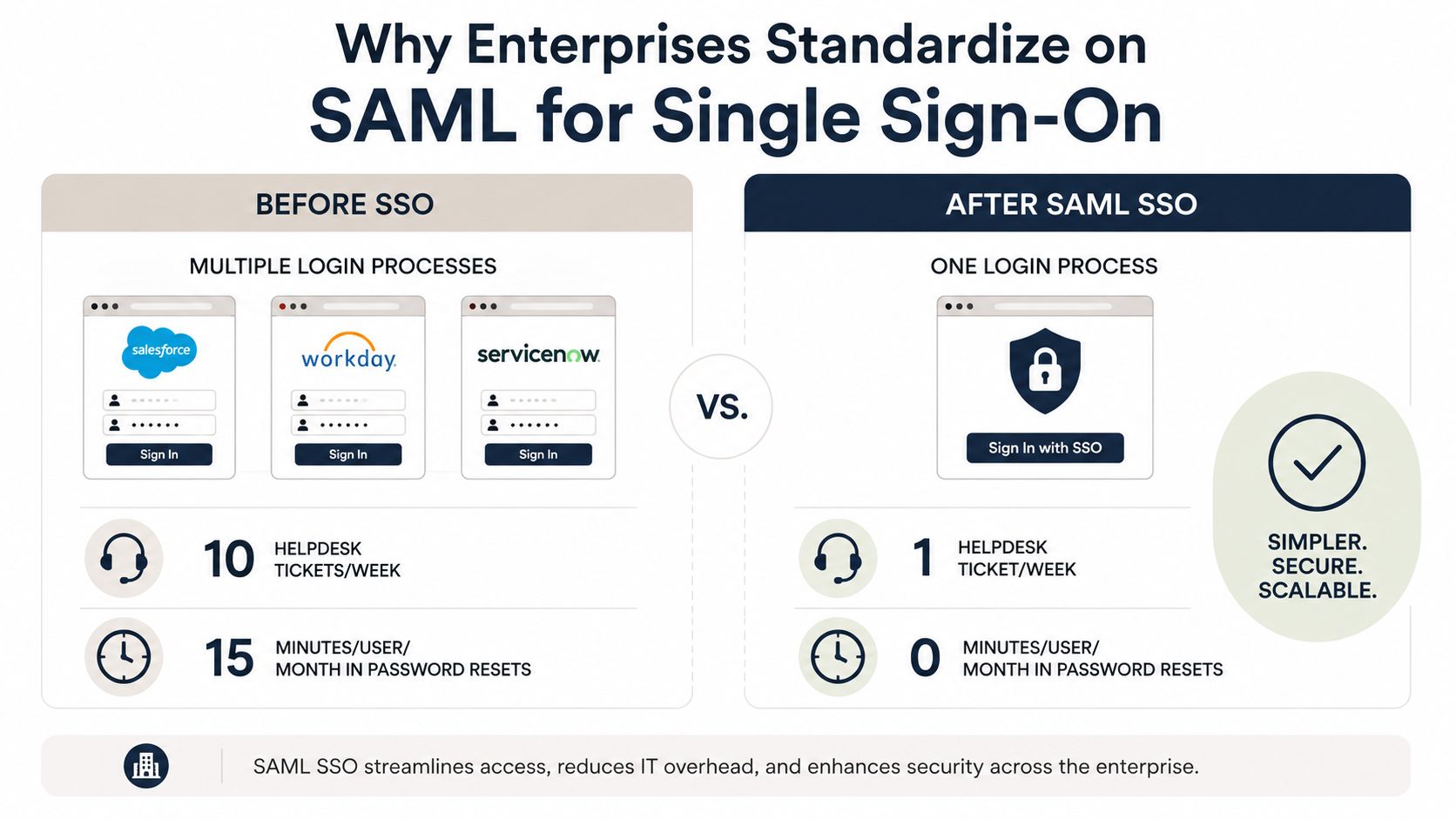
Enterprises don't standardize on SAML because it's fashionable. They standardize on it because one verified identity can provide access to a whole set of business apps without forcing users to log in again and without making each app own the password problem.
What SSO changes operationally
When SAML is in place, the IdP becomes the choke point for login policy. That means MFA, session rules, and identity checks happen once at a controlled layer instead of being re-implemented badly in each app. Teams also get a clearer audit trail because the login event lives in one place instead of being scattered across every service.
The benefits show up in day-to-day admin work. Help desks spend less time on password resets. Offboarding gets less brittle because revoking central access blocks new logins across connected systems at once, even if live sessions still need Single Logout or deprovisioning to end early. Onboarding gets simpler because a new hire can be granted access through the identity system instead of receiving credentials for every tool one by one.
Why SAML still wins in enterprise environments
SAML still has deep vendor support, especially in older SaaS and regulated environments where browser-based federation is the norm. It's also a strong fit when the application expects federation behind reverse proxies or session-aware firewalls, because the login handoff is explicit and well understood.
If you're deciding whether to expose SAML in a product, the trust question is usually more important than the feature checklist. Enterprises want predictable behavior, familiar metadata exchange, and a protocol that their IdP already supports well.
Operational insight: Most SAML value comes from reducing the number of places that can get identity wrong, not from making login screens look nicer.
For teams evaluating secure deployment patterns, Encelade's trust and security overview is a useful reference point for how an enterprise product presents SSO expectations clearly. The bigger lesson is simple, though. SAML becomes valuable when one centralized decision can govern many downstream sessions.
Setting Up SAML SSO in Encelade
A clean rollout starts with metadata, not with user accounts. If the IdP and SP don't recognize each other correctly, the rest of the configuration won't matter.
Start with trust exchange and attributes
SAML SSO is an Enterprise-plan capability in Encelade, so a rollout starts by collecting the SP metadata your identity provider needs, especially the Entity ID, ACS URL, and signing certificate. Import those values into your IdP, whether that's Okta, Microsoft Entra ID, or Ping, and make sure the IdP metadata you exchange back matches the tenant you expect. The stable identifiers need to agree before any user can sign in.
Then map attributes deliberately. Set NameID to a persistent email value if that's how your organization identifies users. You can pass role, department, or group claims too, but treat them as an input to provisioning, not automatic authorization: Encelade resolves permissions from a user's tenant membership, so mapping directory groups onto Encelade roles is part of the enterprise setup rather than a claim the app reads on every login. The cleaner that mapping, the fewer surprises when a user lands with the wrong permissions.
For lifecycle work, treat SSO as the enterprise-onboarding conversation it is, so the setup and provisioning path gets handled with the team rather than self-served from a settings page. If you're using SCIM for account creation or deprovisioning, keep SAML and provisioning aligned so authentication and lifecycle state don't drift apart.
Test before you disable fallback
Pick your signing and encryption strategy before go-live. Signed assertions are the baseline, and encryption is worth considering when you want to reduce exposure of sensitive claim data in transit. Confirm the relay state behavior too, because the user should return to the right place after login rather than landing on a generic page.
Clock skew deserves attention during testing. If the IdP and SP disagree on time too much, valid assertions can fail the NotBefore or NotOnOrAfter checks. That failure is usually annoying, but it's also a sign the validation layer is doing its job.
A practical test sequence looks like this.
- Validate the assertion in a browser tool: Use the IdP's SAML tracer or a similar extension and confirm the response is signed, targeted to the right ACS URL, and tied to the right Entity ID.
- Check the provisioned role inside Encelade: Confirm the user lands with the Encelade role their tenant membership grants, not just basic access. Encelade has no group-membership state, so group-level checks stay in your directory.
- Keep a non-SSO sign-in available until the SSO path is proven: Only turn off the email or Google fallback after the first successful end-to-end login and attribute check.
If the first login works but the role is wrong, the problem is usually mapping, not SAML itself. That distinction saves time and keeps teams from tearing apart a healthy trust flow.
Where SAML Authentication Breaks in the Real World
Most SAML outages stem from trust failures, usually caused by something stale, mismatched, or trusted longer than it should be.
The failures that show up in production
An expired signing certificate can break every login at once, and the error message is often vague enough to burn hours. A stale Entity ID can make one tenant accept assertions meant for another. A bad clock can reject valid assertions because the time window does not line up.
OWASP's SAML Security Cheat Sheet calls out another risk. The SSO Browser Profile is especially exposed to attacks from trusted partners, which is where real integrations live (OWASP SAML Security Cheat Sheet). XML signature wrapping, parser differential bugs, and SP code that trusts too much all become dangerous there.
A SAML deployment is only as strong as the SP's validation path. When the app accepts the wrong assertion shape or skips a check, the identity layer stops acting as a control point.
Replay risk is another blind spot. If an assertion is not tied tightly enough to a one-time session, or if the SP does not track it properly, an attacker may try to reuse it. IdP-initiated flows can make that easier when the SP relaxes audience or request validation because the login did not start in the app.
What to harden and why
Automated certificate rotation removes the problem of one expired file taking down the company. Parser hardening reduces the attack surface around XML handling. Strict AudienceRestriction enforcement keeps assertions from being accepted by the wrong app.
NIST's federation guidance also shows why assurance levels matter. At FAL1, assertions must be signed, audience-restricted, and time-limited. FAL2 hardens them against assertion injection and binds each assertion to a single relying party under a pre-established trust agreement. FAL3 goes further, requiring the subscriber to prove control of a bound authenticator in addition to the assertion, which is stronger but harder to operate. Revision 4 also decoupled assertion encryption from the FAL level: it is required whenever personal data passes through an untrusted party, not as the thing that defines FAL2 (NIST SP 800-63C-4 federation guidance).
That tradeoff is the lesson. Stronger controls can improve security, but they also raise the operational bar for the teams running the IdP and SP. SAML needs monitoring, rotation, and careful validation, because the weakest trust check becomes the failure point.
SAML Versus OIDC and Choosing the Right Path Forward
A new admin usually meets this choice after the first integration request lands. One team wants browser-based workforce SSO, another wants mobile sign-in, and the question becomes which protocol should carry each path without making the identity stack brittle.
SAML and OIDC solve adjacent problems, but they do not fit every environment equally well. SAML fits enterprise federation and browser-based workforce SSO. OIDC fits modern web apps, mobile clients, APIs, and developer-first products.
A practical decision rule
Use SAML when the app sits in a legacy enterprise environment, when the customer already requires SAML, or when workforce federation is the main requirement. Use OIDC when the application is new, API-heavy, mobile-oriented, or built on a modern UI stack that benefits from JSON-based tokens and simpler developer ergonomics.
A hybrid identity layer is often the practical answer when both audiences exist. Many teams keep SAML for workforce SSO and enterprise customers, while using OIDC for adjacent services and newer app surfaces. That split keeps one protocol from carrying every use case.
How migration usually goes
A safe migration begins with an inventory of existing SP integrations. Then run SAML and OIDC in parallel, move one SP at a time, and retire the old auth path only after each tenant proves it can operate on the new flow. The goal is to protect session continuity while the stack changes.
If you are planning a mixed environment, the anchor should be the identity layer, not one protocol alone. Keep the boundary between SAML and OIDC deliberate so the identity stack stays predictable as you add new app surfaces.
Keep SAML for workforce SSO and enterprise customers, use OIDC for APIs and modern app surfaces, and set the boundary between them carefully so authentication stays predictable across both.
Encelade helps enterprise teams turn CRM notes, spreadsheets, and documents into interactive, web-native decks, with SSO/SAML available on the Enterprise plan for teams that need federated access. If SAML SSO is on your requirements list, book a 30-minute demo and we can walk through how it fits your identity stack.