The fastest way to lose a buyer's confidence is to open a deck that looks finished and discover it isn't. The pricing is old, the product screenshots came from last month's release, and someone in marketing has been "just one more pass" editing a different copy for two hours. In revenue work, that kind of drift doesn't just waste time, it makes the team look less coordinated than the buyer expects.
Real-time collaboration matters because it shortens the distance between a change and the moment everyone can trust that change. For sales, that means fewer version disputes, less rework before a customer meeting, and fewer awkward moments when the rep, SE, and marketer are all looking at different truths. The tools only matter when they help a deal move.
Table of Contents
- The Moment a Sales Deck Goes Stale in Front of a Buyer
- What Real-Time Collaboration Actually Means
- How the Underlying Engines Keep Everyone in Sync
- Capabilities That Matter Most for Revenue Teams
- A Live Workflow Inside Encelade for Sales Decks
- Rolling Out Real-Time Collaboration Without Disrupting Deals
- When Synchronous Editing Helps and When Async Wins
- Choosing a Collaboration Stack Revenue Teams Will Use
The Moment a Sales Deck Goes Stale in Front of a Buyer
A rep is halfway through a live review with a prospect, and the room is calm until someone asks about pricing. The slide on screen still reflects last quarter's discount structure, but the manager updated the terms in a separate copy that only exists in chat threads. The SE opens a side channel and starts typing furiously while the buyer waits in silence.
That is where confidence starts leaking out of the deal. Buyers don't usually object because one slide is old, they object because old slides signal that the team doesn't have control of the story. Once that doubt lands, the next meeting often turns into a recovery exercise instead of a decision conversation.
The cost is rarely just the slide
The visible problem is the stale deck, but the hidden problem is the coordination lag around it. Someone has to confirm the right version, another person has to recheck the numbers, and legal or product marketing may need to bless the final wording before it can go back out. That turns a quick fix into a queue.
Practical rule: if a buyer spots a mismatch, assume the internal review process is now part of the deal.
That's why collaboration timing matters more than collaboration presence. A team can be active in Slack, present in a shared workspace, and still be too slow to keep a deck aligned during the buying window. Real-time collaboration earns its keep when it reduces the gap between the first correction and the moment the buyer sees the correction reflected everywhere.
For revenue teams, the test is simple. Can the people who shape the story update it before the next buyer touchpoint, or does every edit require a fresh round of file shuffling, approvals, and apologies? If it takes a synchronous clean-up just to trust the deck again, the team isn't collaborating in real time yet.
What Real-Time Collaboration Actually Means
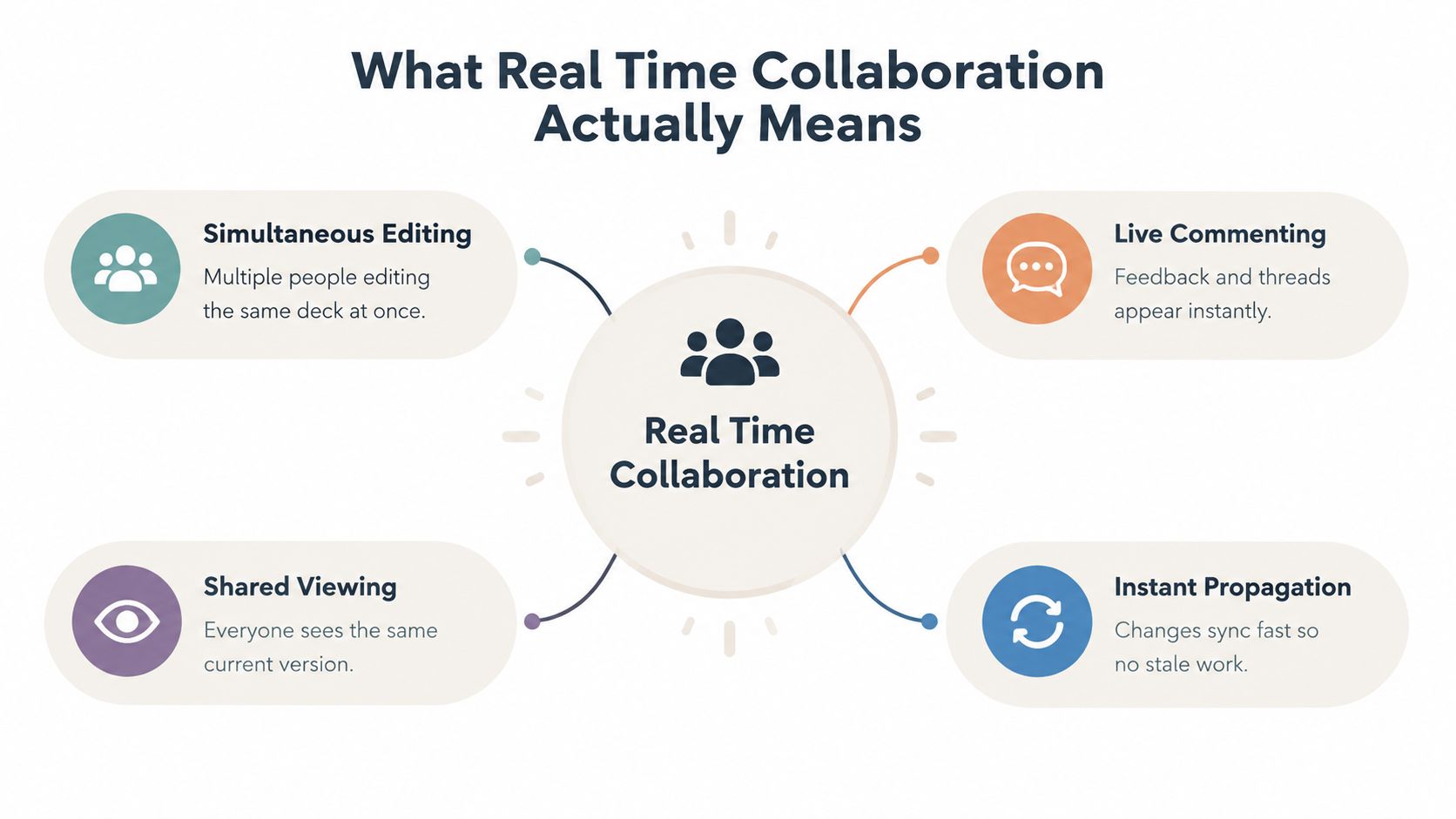
At the working level, real-time collaboration means multiple people can view, edit, comment on, or approve the same artifact and see changes quickly enough that nobody is making decisions from stale information. That's different from tools that only show presence, or systems that refresh after someone saves a file. Presence is useful, but it doesn't stop version drift by itself.
For revenue teams, the threshold is practical. If a second author can update a number on slide seven and the rep who's headed into a buyer meeting ten minutes later sees the same number without hunting for a new export, the workflow is doing something real. If not, the team is just moving files around faster.
The three things buyers of these tools should care about are propagation latency, consistency, and offline behavior. Propagation latency tells you how quickly a change appears elsewhere. Consistency tells you whether everyone ends up on the same version. Offline behavior tells you whether the team can keep working when connectivity gets messy, then reconcile cleanly later.
Read vendor claims through a revenue lens
A platform can look "live" and still behave like a save-and-refresh tool under pressure. That's fine for internal note-taking. It's not fine when pricing, customer logos, or proposal language need to stay aligned across a rep, a manager, and a buyer-facing champion. The question isn't whether the app feels modern, it's whether it prevents the kinds of mistakes that slow a deal.
The easiest way to evaluate a platform is to ask what happens when more than one person touches the same story at once. If the system handles edits, comments, and shared viewing without creating extra cleanup, it's built for collaboration rather than display. If it only looks synchronized when one person is driving, it will fall apart in a real revenue workflow.
How the Underlying Engines Keep Everyone in Sync
A deal team only cares about the result in front of the buyer. If a rep updates pricing, a manager leaves a note, or marketing swaps in a fresh logo, the deck has to stay current fast enough that nobody walks into review with stale material. That is why the collaboration engine matters. In a KTH master's thesis on CRDT-based editing, end-to-end latency is treated as network latency + computation latency + render latency, as set out in this study on end-to-end latency components. In browser-native decks and shared editors, the wire can be quick while reconciliation or re-rendering still slows the room down.
Revenue teams feel that lag as drift, not as a technical metric. A vendor can boast about quick message delivery, but if slide reconciliation or DOM updates trail behind, the rep still waits while the buyer is watching. Server-side apply costs and render time often shape the live experience as much as the network does.
OT and CRDT behave differently under pressure
Operational transformation, or OT, usually centers on a server that mediates edits. CRDTs allow more distributed merging, which helps when editors are scattered or connectivity is uneven. In a Cal Poly thesis, average single-character CRDT edit latency came in around 3.39 ms for insertion and 3.42 ms for deletion, and around 3.01 ms for insertion with two users, while the author still concluded OT was the safer, more reliable choice in that implementation, as reported in this Cal Poly thesis.
That choice shows up in real work on decks. Version control for shared documents helps keep a proposal from splitting into competing copies when a rep, SE, and manager edit at once. The mechanism behind that control shapes whether the team spends the meeting reviewing content or cleaning up version drift.
| Dimension | Operational Transformation | CRDTs |
|---|---|---|
| Edit flow | Usually more server-mediated | Often more distributed |
| Responsiveness under load | Can be strong, depending on implementation | Can be strong when metadata overhead is controlled |
| Reliability trade-off | The cited study judged it more reliable in that setup | Can scale well, but merges need careful handling on structured content |
| Revenue-team fit | Good when governance and central control matter | Good when many people need to work at once without blocking |
When a deck has a lot of structured content, the merge strategy matters as much as the speed.
The practical test is simple. Ask a vendor what happens under real editing pressure, not just in a demo with one person typing. If they cannot explain propagation latency clearly, the tool may still look polished while a live review gets slowed by reconciliation.
For a broader view of sync patterns, see our guide to real-time data sync in collaborative workflows. That lens is useful when you want to separate actual data freshness from presentation polish.
Capabilities That Matter Most for Revenue Teams
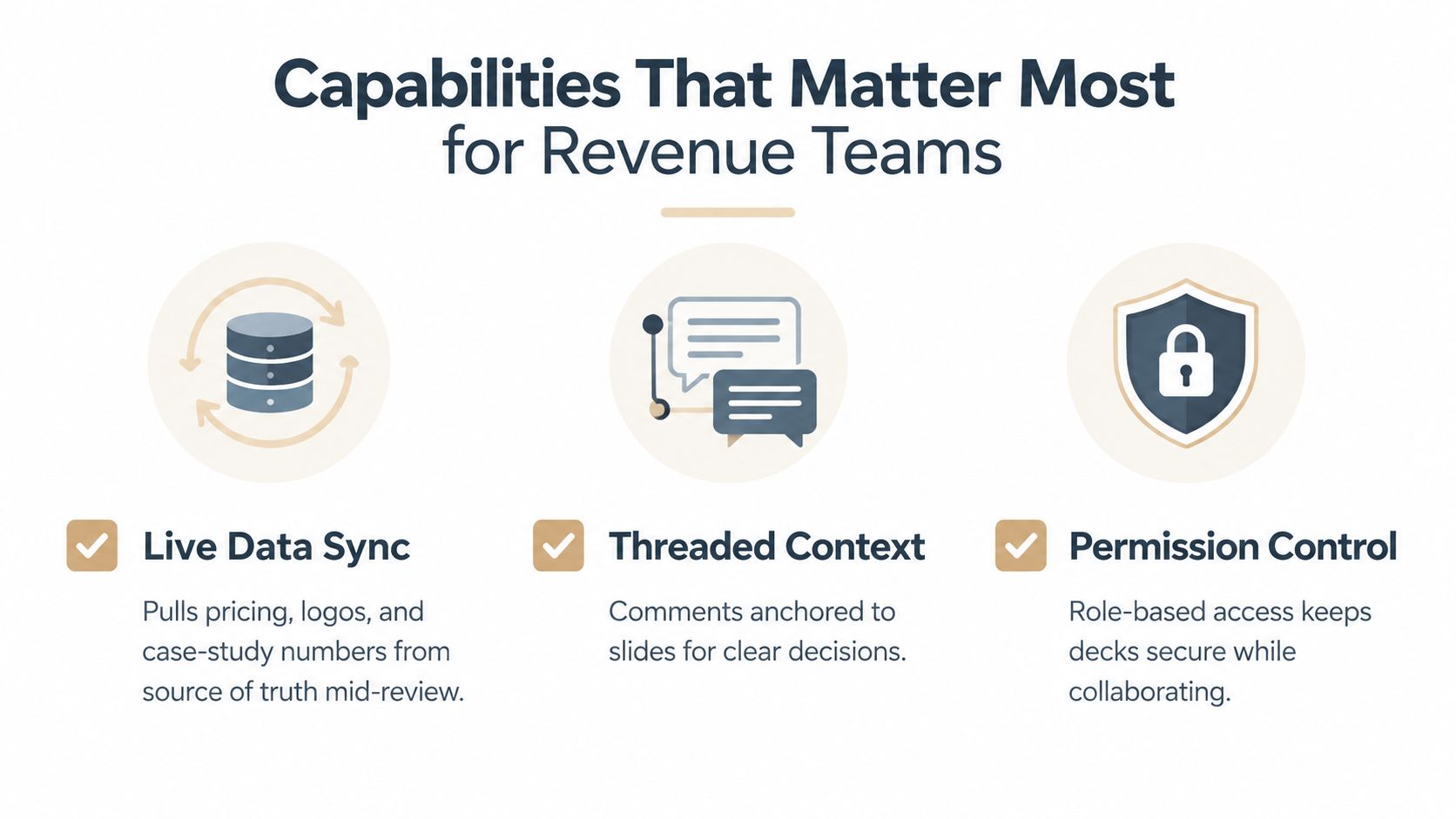
Sales decks don't fail because they lack novelty. They fail because the wrong information, the wrong people, or the wrong permissions slow the handoff from internal review to buyer-ready. The three capabilities that do the most work are live data sync, threaded comments, and role-based permissions.
Live data beats stale screenshots
When pricing, logos, or case-study numbers live inside a deck as screenshots, someone has to remember to refresh them. That's where version drift starts. If the deck pulls data from the source of truth during review, the rep doesn't have to re-open a file or compare a PDF against a spreadsheet before the call.
Comments should stay attached to the decision
Email threads are where objection handling goes to get lost. Threaded comments anchored to a specific slide keep the disagreement visible, and they let a manager, SE, or marketer answer in context instead of restarting the conversation somewhere else. That shortens the loop because nobody has to guess which sentence or number the reviewer meant.
Permissions protect speed, not just compliance
A lot of teams treat permissions as a legal or IT issue. In revenue work, they're also a speed issue. If a rep can share a buyer-facing version, a manager can approve it, and a buyer can view it without exposing draft copy, the team avoids the security review that often delays external sharing.
The side features still matter, but mostly for morale. Presence cursors and emoji reactions make a workspace feel alive, yet they don't close deals by themselves. A deck that syncs live, keeps discussion attached to slides, and separates edit, approve, and view roles will do more to shorten review cycles than any decorative collaboration layer.
Encelade fits into that pattern as one option, since it offers web-based decks with live data, shared workspaces, comments, and roles. That doesn't replace the process, but it can support the workflow when teams need the deck itself to stay current.
A Live Workflow Inside Encelade for Sales Decks
An AE opens a competitive battlecard before a review and invites the SE plus a product marketing reviewer into the same deck. The AE updates the objection-handling slide while a live CRM field in the corner refreshes the prospect's ARR, so the conversation stays tied to the current account context instead of yesterday's export.
The reviewer leaves a comment on slide seven, the SE replies with a cleaner diagram, and the AE publishes a share link for the champion without exporting a new PDF. That sequence matters because every step removes one of the common deal-deck failure points: no more v17-final-final.pptx, no more wondering which version the buyer saw, and no more overnight email chains waiting on legal or brand approval.
The workflow works because the handoffs stay visible
The rep doesn't have to guess whether the deck is current, because the shared link becomes the working artifact. The SE doesn't have to send a screenshot back to the AE, because the slide itself is the conversation surface. The product marketer doesn't need to rebuild context from scratch, because the comments live next to the content they're approving.
The cleanest collaborative workflow is the one where the deck never leaves the room.
For teams that want a more interactive presentation workflow, our guide on building interactive decks is a useful adjacent read. The important part isn't the visual polish, though. It's that the same artifact can move from internal review to buyer-sharing without becoming a new file every time someone touches it.
That's the difference between a deck that behaves like a document and a deck that behaves like a live sales asset. Revenue teams feel the benefit when the deck they're reviewing is the same one the buyer will see, with the same numbers, comments, and permissions attached. Anything else creates another handoff, and handoffs are where cycle time goes to die.
Rolling Out Real-Time Collaboration Without Disrupting Deals
Start with the deck-sharing chain that already exists. Find where versions break, who exports files, who forwards them, and where the team loses confidence about what's current. That audit will show you which handoff creates drift, instead of guessing from complaints.
Pick one renewal or mid-funnel opportunity as the pilot, not a live-quarter retrofitting project. Then migrate that single deck, invite only the two or three people who already touch it, and keep the rest of the field in the old process until the pilot proves itself. That keeps the rollout from becoming the disruption.
Keep the rules small and explicit
Set roles before anyone starts editing. The rep should own the single source-of-truth link, the SE should know where to drop technical edits, and the approver should know what gets locked before a buyer sees it. If CRM still owns the commercial record, keep that relationship intact and let the collaborative deck pull from it rather than replace it.
Measure the time from internal review to buyer-ready, then compare it with the old process. If the pilot doesn't shorten that path, the issue is probably not the tool, it's the workflow around it. If it does, expand gradually and leave forecast week alone.
Don't turn a quarter-close into a rollout project.
A rollout succeeds when the team feels less friction after adoption than before it. That's why the best pilot isn't the flashiest deal, it's the one with enough moving parts to prove the workflow without putting pipeline at risk. If the process reduces the number of version checks and approval hops, you've found something the floor will keep using.
When Synchronous Editing Helps and When Async Wins
Synchronous editing works best when the buyer is in the room. That includes live prospect workshops, exec pricing reviews, and final handoffs where one wrong number or one mismatched claim can derail trust. In those moments, having everyone in the same artifact at the same time is worth the coordination effort.
Async wins anywhere the work depends on reviewers spread across time zones. The practical issue isn't just meetings, it's coordination latency. Teams in distributed roles often span six to ten working hours, which means a real-time tool only helps if the overlap window is large enough to support the work. A tool that depends on a narrow shared window can slow the team down.
Use the mode that matches the deal moment
- Live workshops: Use synchronous editing so the rep, SE, and marketer can react while the buyer is still engaged.
- Pricing approval: Use synchronous review when a small detail could change the outcome of the next conversation.
- Research and enablement updates: Use async plus version history, because the team doesn't need to be online together to improve the material.
- Cross-continent review cycles: Use async comment threads and offline sync so four reviewers don't end up blocking each other.
The failure pattern is easy to spot. Someone tries to force every review into a shared document session, and half the team spends the call waiting for turn-taking instead of adding value. Comment threads, version history, and offline reconciliation carry much of the load when everyone isn't online together.
The simplest heuristic is this. Synchronous when the buyer is in the room, async when the team is. That keeps live collaboration focused on the moments where speed changes revenue outcomes, instead of wasting the live window on work that could have been handled more thoughtfully later.
Choosing a Collaboration Stack Revenue Teams Will Use
The right stack isn't the one with the longest feature list. It's the one that reduces cycle time, kills version drift, and keeps live data fresh in every deck without making reps hate the process. If a tool doesn't improve those three outcomes, it's probably a convenience layer, not a revenue system.
Look at four checkpoints. First, the sync engine has to stay responsive under load. Second, the permissions model has to fit deal-room security without making every share link a governance event. Third, the tool needs clean connections to CRM and source systems so the deck doesn't become another copy of the truth. Fourth, adoption friction has to be low enough that the team uses it without being reminded.
Watch for the procurement traps
Glossy demos often hide the part that matters, latency under a few editors. Enterprise pricing can also bury the features that reps need behind admin tiers. And when RevOps has to govern every share link, the stack starts acting like a control layer instead of a collaboration layer.
The test is more human than technical. Would a rep on day three of a new quarter, under deadline pressure, reach for this tool without being told? If the answer is no, the platform may still be capable, but it isn't operationally natural enough to survive daily revenue work.
A stack that passes that test becomes part of the motion of the deal. A stack that doesn't will end up as another place where people check for the "real" version before they trust what they're sending.
If you're trying to reduce deck drift, speed up review cycles, and keep live revenue data tied to the story buyers see, Encelade gives teams a browser-based way to build, share, and update interactive decks with live sync, comments, and roles. To see whether your current workflow still depends on too many exports, too many versions, and too much manual cleanup, book a 30-minute demo.