Tuesday morning, the deal review opens with a familiar problem. The account deck still shows last quarter's pipeline, the slides feature the wrong product tier, and three people each have a different copy open. The account executive blames CRM hygiene, marketing blames the template, and RevOps gets handed the deck to fix before the customer call.
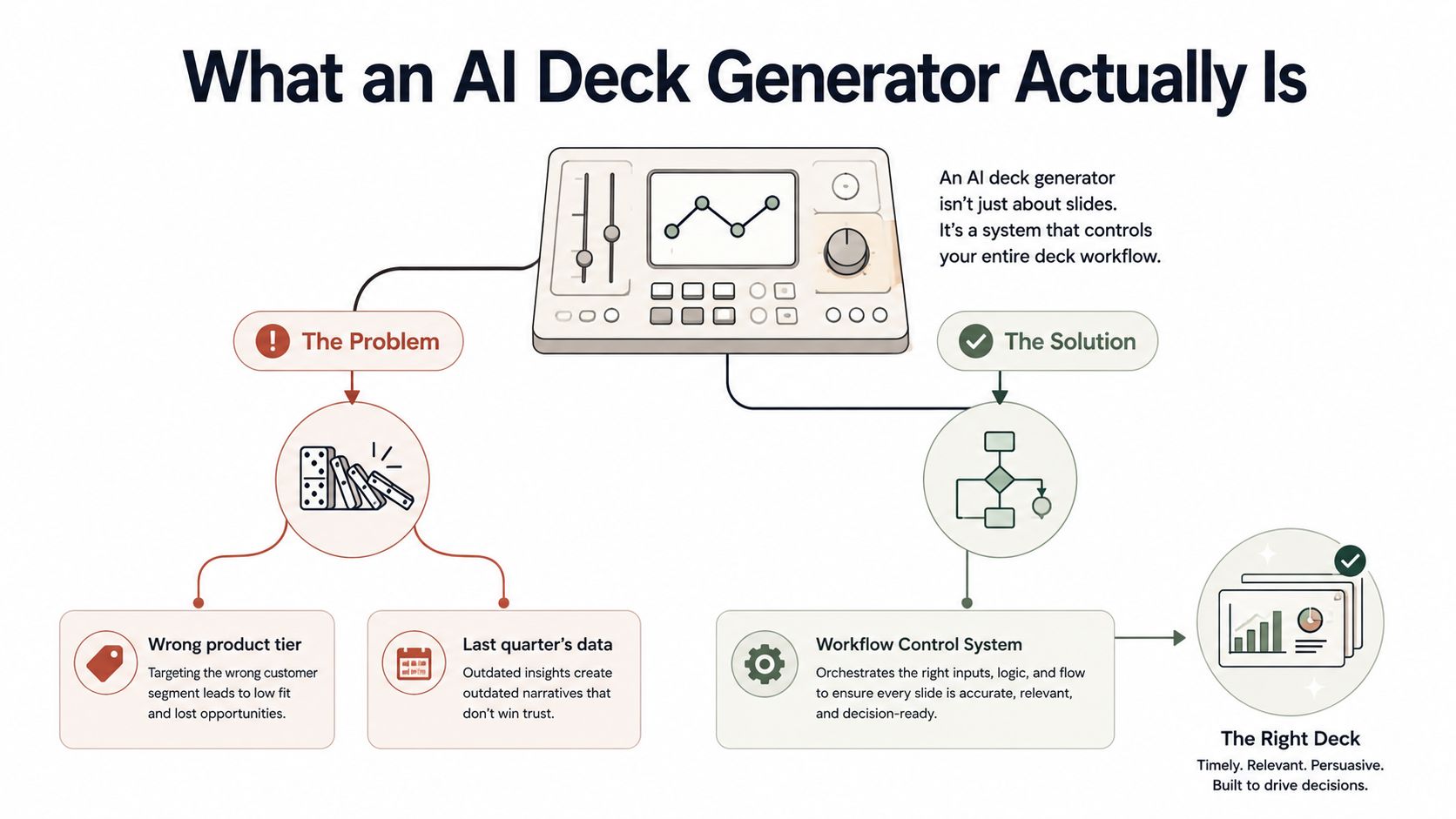
That isn't a slide-typo problem. It is a workflow control problem. An AI deck generator can draft a polished presentation in minutes, but the question that matters is whether your team still controls the source data, brand rules, permissions, versions, and buyer signals once the deck exists.
The category is moving quickly. The AI presentation generation market is forecast to grow from $1.54 billion in 2024 to $1.94 billion in 2025, and to reach $4.79 billion by 2029, according to the AI presentation generation market forecast. Enterprise adoption is following the money. In 2025, more than 78% of Fortune 500 firms reported active trials or deployment of at least one AI presentation tool inside their productivity suites, up from 31% in 2022, as reported in this AI presentation generation market research.
Table of Contents
- What an AI Deck Generator Actually Is
- How an AI Deck Generator Produces a Deck
- The Five Capabilities That Matter to Revenue Teams
- Web-Native Decks vs Static Slide Files
- How to Evaluate an AI Deck Generator Before You Buy
- Real Use Cases Inside Revenue Teams
- ROI Math and a 30-60-90 Rollout Plan
What an AI Deck Generator Actually Is
An AI deck generator is software that turns source material into a presentation without requiring someone to drag every box across a slide editor by hand. The source can include CRM records, product catalogs, approved case studies, account research, intent signals, spreadsheets, or internal documents. The output may be a traditional PPTX file, a PDF, or a browser-based deck delivered through a shareable link.
That distinction matters in a live revenue workflow. A template library gives an AE a set of prebuilt layouts and asks them to supply the content. A generator uses instructions, source material, and structured rules to assemble the narrative, choose slide types, populate the content, and apply a visual system.
The Tuesday-morning failure
In the deal review, the AE needs an account-specific proposal. The sales engineer needs the correct technical architecture. Marketing needs approved positioning and imagery. RevOps needs the pipeline data to match the CRM. A customer success manager may later need the same account context for an expansion conversation.
A file-based workflow leaves each person responsible for copying, checking, and forwarding information. That creates predictable breakpoints: an outdated field gets copied into a new slide, an old logo survives in a template, or a product tier gets selected because the source deck was never updated.
Practical rule: treat every generated deck as a controlled output of business data, not as an isolated design artifact.
The generator's job is therefore broader than writing slide copy. It should connect the right source to the right audience, produce a coherent structure, enforce brand decisions, and make ownership visible when someone edits or shares the result.
Static output or live presentation
Static generators are useful when the recipient requires a downloadable file, when a compliance archive matters, or when the deck must be edited in PowerPoint. Their weakness is that the content stops changing the moment the file is exported.
Link-based systems work differently. A browser-rendered deck can act as a shared presentation surface, with live data, interactive elements, comments, permissions, and engagement signals. In this format the deck is closer to a live, interactive website built with web technologies than to a traditional presentation file, which changes what a team can do with it after it ships.
A traditional template library helps people start consistently. An AI deck generator should help the organization stay consistent while the content changes. That is the working definition revenue teams should use during evaluation.
How an AI Deck Generator Produces a Deck
A reliable generation workflow has four stages: ingest, draft, style, and share. Each stage has a different owner and a different failure mode. If a vendor only demonstrates the final visual output, ask to see the entire chain.
Ingest the account context
Start with a target account in the CRM. Pull the opportunity stage, active products, contacts, recent activities, and approved account notes. Enrich that context with firmographic and intent data, then select the product line that matches the opportunity rather than relying on a generic company presentation.
This step determines whether the system is grounded in current information. A stale CRM field can produce a confident but inaccurate slide. Missing permissions can prevent the generator from seeing the data it needs. Unstructured notes can introduce contradictory claims.
Draft the narrative
The generator then turns the inputs into a slide sequence. For a sales deck, that might include the customer problem, relevant product path, proof, technical fit, commercial details, and next step. A prompt or template can guide the structure, but the content should come from the ingested account context rather than from a static library alone.
The important test isn't whether the first draft looks attractive. It is whether the system preserves the relationship between the source and the claim. Presentation benchmarks now evaluate that relationship directly. UniPPTBench tests generation across four input settings — vague prompts, long documents, multimodal documents, and multi-source inputs — and its companion evaluation protocol, UniPPTEval, scores content accuracy, instruction fulfillment, figure-to-claim alignment, and faithfulness to the source material, not just visual polish. The authors report that a strong score on generic presentation-quality metrics does not necessarily mean the deck fulfills the grounded task it was asked to perform.
Apply the brand system
Styling should happen through controlled brand tokens, including fonts, colors, logo placement, approved imagery, and voice. Marketing should be able to lock the critical decisions without forcing every AE to request a design review.
Manual cleanup is still where many systems break. A generated deck may use an off-brand image, overfill a slide, or apply a logo inconsistently. A one-prompt restyle is useful only when the system can apply it across the deck without changing the underlying claims.
Share, measure, and handle change
Delivery determines whether the deck becomes a controlled asset or another orphaned file. A team may export a PPTX for procurement, send a link to a champion, or route the deck for comments before the customer sees it. A link-based workflow can also record slide-level behavior, including which slides viewers opened and how long they stayed, as described in this overview of presentation tracking.
If the CRM data changes mid-cycle, the team needs a clear policy. Does the shared deck update automatically, require approval, or preserve a locked snapshot? That decision belongs to RevOps and sales leadership, not to an individual seller improvising inside a customer conversation.
For programmatic generation, document the connection between source systems and output. Teams evaluating a technical path can review our guide to REST API integration alongside permissions, refresh behavior, and export requirements.
A practical benchmark should test more than generation speed. One independent comparison measures the median wall-clock time to generate and export a 10-slide deck, running each tool several times and reporting the median, then estimates the manual editing each result still needs before delivery, in its AI presentation speed benchmark.
The Five Capabilities That Matter to Revenue Teams
Revenue teams don't need a platform that wins a design demo and fails in production. Rank capabilities by the point at which they touch a deal, a handoff, or the cost of maintaining content.
Five capability buckets ranked by revenue impact
| Capability | What it enables | Where it earns its keep | Overhype trap |
|---|---|---|---|
| Live data binding | Keeps selected metrics connected to source systems | Pipeline reviews, proposals, QBRs, and pricing discussions that change during an active cycle | Assuming every field should update automatically |
| Interactivity | Adds click-through paths, embedded widgets, and exploratory content | Technical evaluations, executive briefings, and self-guided follow-up | Adding motion without improving buyer understanding |
| API and MCP exposure | Triggers generation from CRM workflows, agents, or internal tools | High-volume production and repeatable account-specific motions | Buying an API that cannot support permissions, errors, or version control |
| Brand and content governance | Locks themes, approved language, imagery, and roles | Any team with multiple sellers, regions, or product lines | Treating a template as governance |
| Native 3D and spatial rendering | Shows products, environments, and models interactively | Product demonstrations, technical walkthroughs, and spatial use cases | Paying for 3D when buyers only need a clear commercial story |
Live data binding ranks first for most revenue organizations. When a deal moves mid-quarter, a manually copied number becomes a review task and a trust risk. Bind only the data that should remain current, and preserve approved snapshots when legal or procurement requires a fixed record.
Interactivity comes next when the buyer needs to explore rather than watch a linear presentation. A technical evaluator may jump directly to architecture, integrations, or security. The right interactive presentation software lets the seller provide those paths without building a separate deck for every audience.
API and MCP access becomes strategically important once generation volume is high enough that manual prompting is itself a bottleneck. The interface should support authentication, structured inputs, failure handling, and traceability. A button that produces a deck is not the same as a dependable production endpoint.
Governance outranks visual novelty. Marketing needs to control what cannot drift, while sellers need room to tailor the account narrative. Native 3D is valuable for product and spatial demonstrations, but it shouldn't decide a purchase for a team whose main problem is stale commercial content.
The wrong buying decision is a platform that is exceptional in one bucket and absent in the other four. Revenue workflows need a connected system, not a showcase feature.
Web-Native Decks vs Static Slide Files
A deal review stalls when finance sees one forecast, the account team sees another, and the customer has a downloaded PDF from last week. The choice between a PPTX and a web-native deck controls who owns the source data, the approved brand, and the current version after the deck stops being a file.
Web-native decks vs static slide files by stakeholder
| Stakeholder | Static slide file | Web-native deck |
|---|---|---|
| Internal executive reviewers | Easy to attach, but versions and numbers can diverge | One canonical link, current content, and view signals |
| Customer champions | Simple to forward, but hard to personalize safely | Shareable link with audience-specific paths and responsive viewing |
| Procurement and legal | Familiar archive format and fixed contents | Controlled access, comments, and exportable compliance copies |
| Technical evaluators | Linear slides can hide detail or create separate variants | Interactive widgets, embedded content, and direct navigation |
| Post-sale handoff teams | Information gets trapped in an attachment or inbox | Shared source that can retain context and update with permissions |
Static files still serve specific workflows. Procurement may require a PDF. An executive may want an attachment. A customer may work where browser access is restricted. Keep those exports available, but do not let them become the operating record.
A web-native deck keeps one controlled version available through a link. An approved edit can reach the next viewer without asking every seller to download a replacement. The deck can sit in CRM notes, support responsive viewing, and allow comments without unrestricted co-editing. It can also offer separate paths for a champion, technical buyer, or executive while keeping the underlying source governed. Teams choosing this format can also review how to make interactive slides before designing the experience.
The operational tradeoff is direct:
- Static files preserve a moment. That supports archives, approvals, offline sharing, and fixed compliance records.
- Web-native decks preserve a relationship. The team can manage access, update selected content, and observe engagement.
- Exports create a boundary. After a recipient downloads or re-exports the deck, later edits and analytics no longer apply to that copy.
Presentation analytics can go beyond opens. Available signals include total opens, unique viewers, per-slide dwell seconds, average reading time, completion percentage, returning visits, and verified email identities, as described in this overview of presentation engagement analytics. Published examples also show that viewing time varies by slide, with an average total deck duration of 3 minutes 21 seconds, including 27 seconds on financial slides, 26 seconds on team slides, and about 8 seconds on competition slides, according to this slide-level investor engagement data.
Set the web link as the primary version and treat exports as controlled exceptions. That policy keeps ownership, updates, and engagement signals attached to the source instead of scattered across inboxes and downloaded files.
How to Evaluate an AI Deck Generator Before You Buy
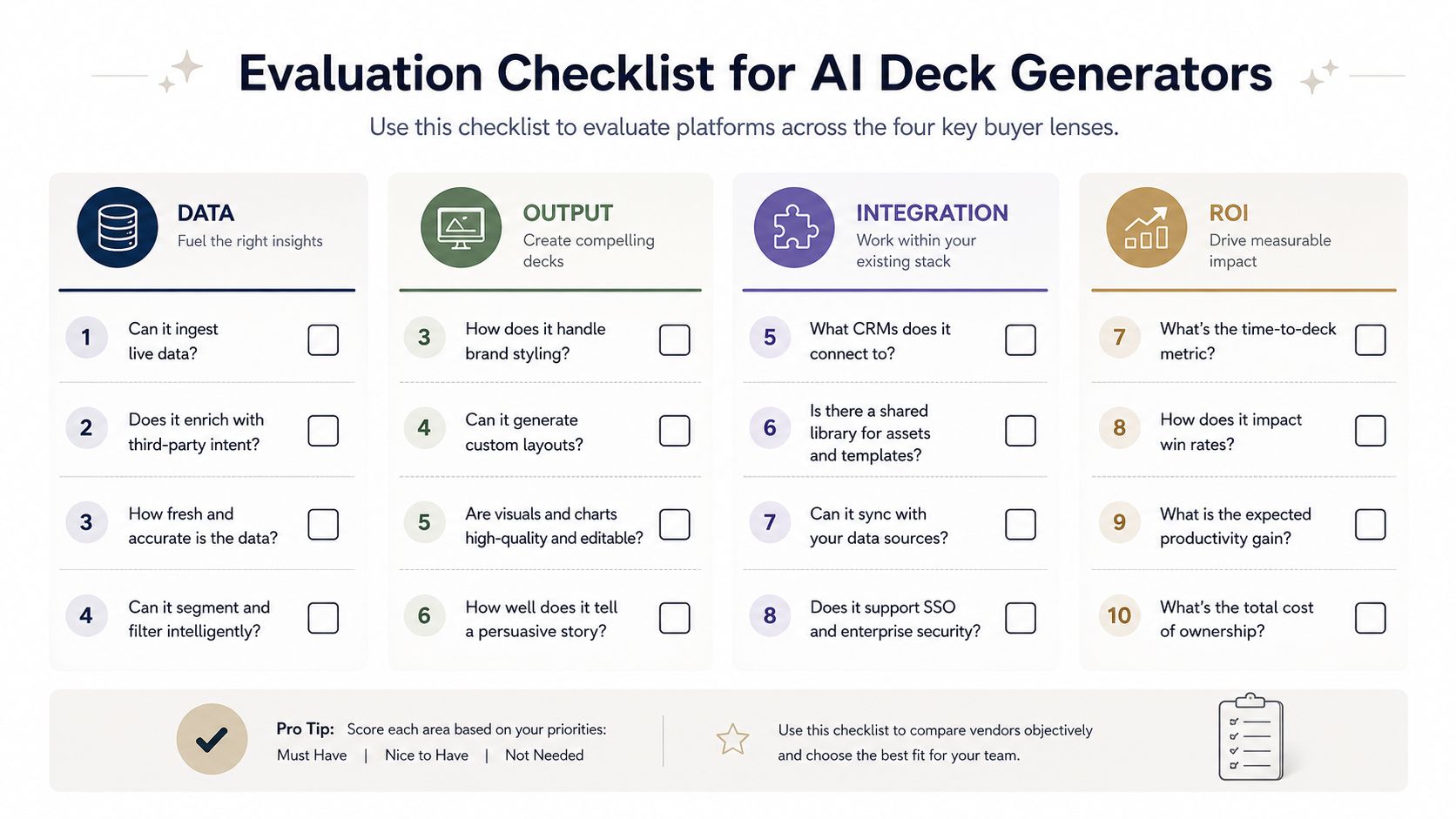
Vendor demos usually show a clean prompt and a polished result. That isn't enough. Make the vendor answer the questions below while using your own data, your brand rules, and one of your real revenue workflows.
Data integrity
- Where does source data live?
- Red flag: "Upload a file whenever you need a refresh."
- Green flag: documented connections to the systems your team already trusts.
- Who refreshes the data, and when?
- Red flag: no visible refresh status or source timestamp.
- Green flag: refresh behavior, ownership, and failure states are clear.
- What happens when a CRM field changes?
- Red flag: the vendor cannot explain whether existing decks update, lock, or fork.
- Green flag: you can choose between live content and approved snapshots.
Brand and governance
- Can marketing lock templates, fonts, imagery, and claims?
- Red flag: every seller can override the theme without an audit trail.
- Green flag: centralized controls with defined exceptions.
- Can AEs tailor a deck without breaking the system?
- Red flag: customization means downloading the file and editing it elsewhere.
- Green flag: sellers can change account context while protected brand elements remain governed.
Distribution and analytics
- Does every deck ship with a trackable link?
- Red flag: analytics require a separate sharing workflow.
- Green flag: link delivery is native, permissioned, and easy to log in the CRM.
- Which events can the system record?
- Red flag: analytics stop at "opened."
- Green flag: slide views, dwell time, completion, returning visits, and viewer identity are available where appropriate.
- Can the team export without losing control?
- Red flag: export fidelity is assumed rather than tested.
- Green flag: the vendor demonstrates PPTX and PDF output, then verifies the result on the desktop software your stakeholders use.
Extensibility
- Is there a real API or MCP interface?
- Red flag: "API" means a private endpoint with no documentation.
- Green flag: documented inputs, authentication, permissions, errors, and versioning.
- Can you connect it to CRM, Outreach, Slack, or internal agents?
- Red flag: integrations depend on manual downloads and uploads.
- Green flag: generation can be triggered from controlled workflows and sends status back to the originating system.
Run the checklist in a 30-minute demo with one real account and one approved template. Score the answer, not the presentation.
Security review
Ask about SOC 2, data residency, SSO, SAML, role permissions, retention, deletion, and whether customer data trains shared models. Security isn't a final procurement checkbox when the generator will process CRM notes, pricing, product plans, or customer documents.
Real Use Cases Inside Revenue Teams
The strongest use cases start with a repeated operational bottleneck. They don't begin with a wish to make slides prettier. The examples below are illustrative workflows, not benchmarked averages.
The AE follow-up
An AE at a mid-market SaaS company has one approved product overview and three buyer personas to address. Instead of rebuilding the deck after every call, the AE uses the account notes and persona context to create customized follow-ups, then sends each version through the team's normal outreach motion.
In this example workflow, second-touch email reply rates rise from 12% to 27%. The important mechanism is not the wording alone. It is the combination of approved content, account-specific evidence, and fast iteration while the conversation is still active.
The presales demonstration
A presales engineer prepares a live demo deck that pulls product screenshots, pricing tiers, and security badges from controlled CRM-linked sources. The engineer no longer has to search old folders for the correct image or check whether a security badge has been replaced.
Demo preparation drops from two hours to twenty minutes, and the team eliminates the stale-screenshot incident that had cost a deal the prior quarter. The change earns its place because it removes preparation work and reduces a specific credibility failure.
The RevOps QBR
A RevOps lead inherits nine regional QBR decks with different layouts, definitions, and update habits. The lead consolidates them into one link-based template that auto-populates from the data warehouse, giving the CRO a single live view of pipeline coverage.
The process saves three analyst-days per cycle. That number justifies the rollout because it connects the deck to a recurring operating rhythm rather than a one-time presentation request.
These examples share the same control pattern. The source is named, the audience is known, the brand system is managed, and the output has an owner. Without those conditions, automation just produces more versions faster.
ROI Math and a 30-60-90 Rollout Plan
Start with a simple model. Estimate the hours saved per deck, multiply that by the fully loaded hourly cost of the person creating it, then add the value of faster follow-up, better reuse, and fewer review cycles.
A representative planning assumption is 2 to 4 hours saved per deck, but treat that as a pilot variable rather than a promised result. Build a baseline from your own workflow, then compare it with the generator after the team has produced several real decks. For personalized follow-ups, track reply rate and progression separately. Do not claim a win-rate effect until your measurement design can distinguish deck quality from deal mix.
Use this formula:
Monthly operational value = decks created × hours saved per deck × fully loaded hourly cost
Then calculate:
Payback period = implementation and subscription cost ÷ monthly operational value
Add brand consistency as a secondary benefit, not as invented revenue. Fewer outdated claims, fewer unauthorized logos, and fewer duplicate approvals can materially improve operating control even when the financial value is difficult to isolate.
Days 1 to 30
Inventory existing decks, source systems, approval paths, and ownership. Select the two highest-volume use cases, such as account follow-ups and QBRs, then run a pilot with 5 to 8 AEs.
Days 31 to 60
Connect the generator to CRM data, configure brand templates, define permissions, and train internal champions. Test stale fields, missing sources, export fidelity, mobile viewing, and link access before expanding the audience.
Days 61 to 90
Expand to the full cohort, and instrument creation time, repair effort, engagement, export usage, and source errors. Document the playbook, assign an owner, and establish a review cadence for templates and data connections.
The rollout killers are predictable: skipping source cleanup, under-investing in template design, and failing to name a single accountable owner. Automation doesn't remove governance work. It makes the absence of governance visible at a larger scale.
Encelade turns research, CRM notes, spreadsheets, and documents into interactive, web-native decks, with live data connections, shared workspaces, comments, roles, API and MCP interfaces, and PDF or PPTX exports. To see whether a controlled, link-based deck workflow fits your revenue team, book a 30-minute demo.