Monday morning on a revenue team usually starts the same way. A sales ops lead opens a queue of stale proposals, marketing is pulling last quarter's numbers into a fresh deck, and a CRO wants something board-ready by lunch. The work isn't hard because the slides are hard. It's hard because the workflow is brittle, versioned in too many places, and held together by memory.
That is the content creation workflow problem for revenue teams. The bottleneck isn't just drafting, it's intake, ownership, governance, live data, and the ugly handoff between “almost ready” and “safe to send.” A deck pipeline only works when it's treated like a governed system, not a pile of files.
Table of Contents
- The Monday Morning Deck Bottleneck
- Defining Roles, Inputs, and Ownership
- Mapping the Five Stages of a Revenue Team Pipeline
- Automating Deck Generation and Live Data
- Enforcing Brand Governance Without Slowing Things Down
- Measuring Engagement and Closing the Loop
- Rolling Out the Workflow in 30 Days
The Monday Morning Deck Bottleneck
The first failure mode is usually invisible. Someone grabs an old proposal, replaces the logo, updates three numbers from a spreadsheet, and sends it around for comments. By the time the CRO sees it, the pricing slide is stale, the proof points are mismatched, and no one remembers which version is approved.
That is exactly where spreadsheet-and-goodwill production falls apart. Revenue teams don't just need faster slide assembly, they need a repeatable content creation workflow that can survive shifting CRM records, moving account priorities, and late-breaking product changes. The historical pattern is familiar, too: content creation has always been a business workflow when it is done well, from Poor Richard's Almanack in 1732 to recurring editorial production like The Locomotive and the Edison Electric Light Company Bulletin, all of which turned publishing into a repeatable commercial process rather than a one-off task, as documented in Content Marketing Institute's history of content marketing.
What changes when the deck pipeline is real
A real pipeline has an intake rule, a draft path, a review gate, a publish step, and a measurement loop. It's not just “make the deck,” it's “who owns this request, what inputs does it need, what changes are allowed, and how do we know the next version is better?”
Practical rule: if a deck can be updated only by the person who remembers where the screenshots live, the workflow already failed.
The promise here is simple. Replace manual slide assembly with a governed, AI-assisted pipeline that revenue teams can run every week, not just when the team is unusually patient. That means treating every deck like an operational asset with a clear source of truth, explicit review points, and distribution that feeds back into the next pitch.
Defining Roles, Inputs, and Ownership
The fastest way to slow a deck pipeline is to let “everyone” own it. In practice, no one owns it, which is why the same request gets touched by sales, marketing, operations, and leadership before it ships. The fix is a role matrix that ties each intake type to one primary owner, one required input set, and one decision right.
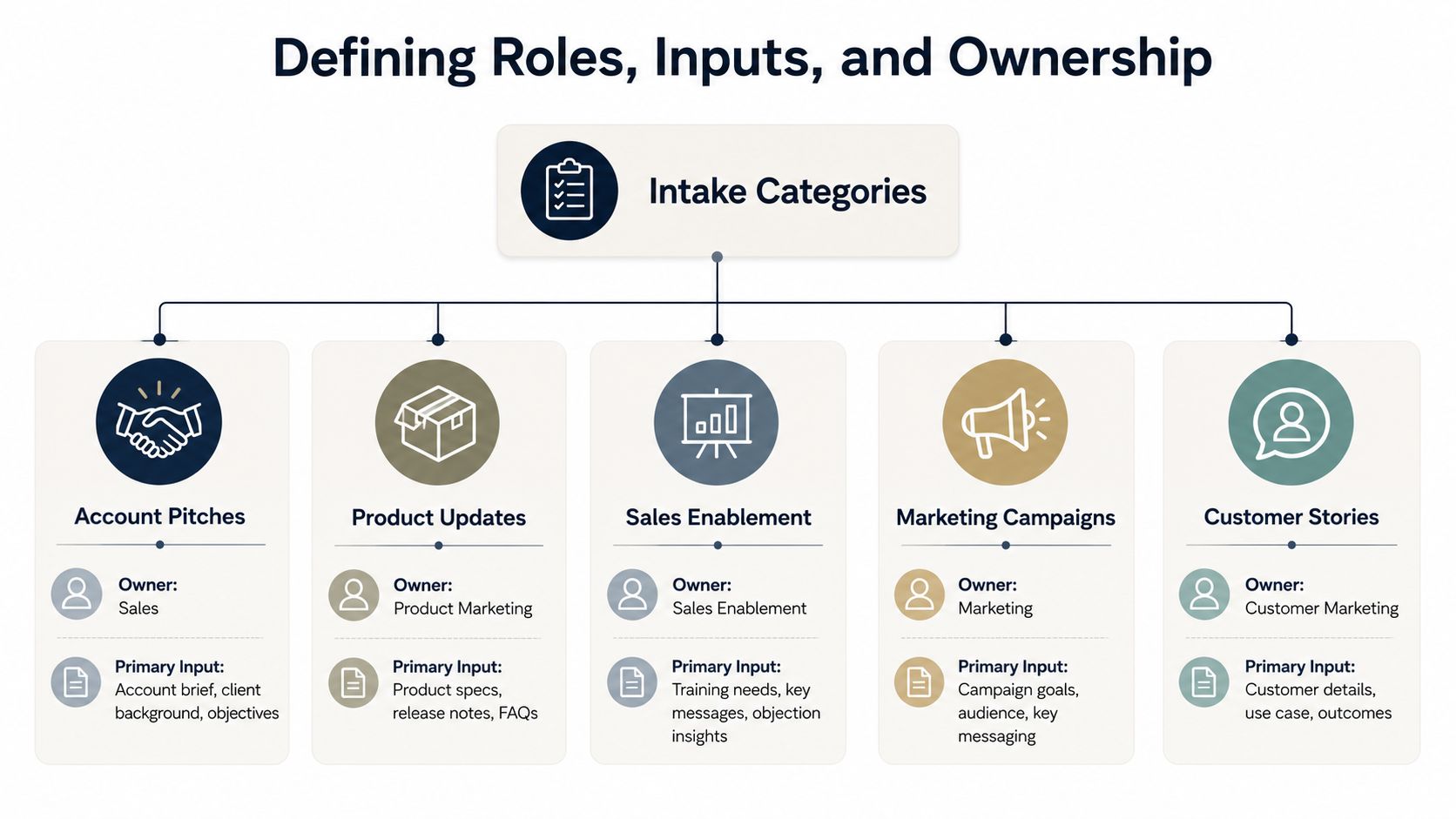
The intake categories that actually show up in revenue work
Account pitches usually belong to the account executive, because the pitch has to mirror opportunity context, deal stage, and buyer objections. The inputs are CRM notes, call recordings, and target persona details, and the AE decides what story the buyer needs to hear.
Renewals belong to the same commercial owner, but the required inputs shift toward usage history, support signals, and commercial terms. Board updates should sit with revenue operations or a designated chief-of-staff style owner, because the job is to reconcile pipeline, forecasts, and performance narratives without letting six people rewrite the same chart.
Enablement training usually belongs to the enablement manager, since they care about consistency, adoption, and how reps will use the material. Post-call follow-ups are often owned by sales engineering or the sales rep who ran the meeting, because the inputs are live objections, technical notes, and the next-step commitment.
Marketing campaigns are different again. A marketing lead should own them because the inputs come from launch plans, target segments, and approved messaging, not just from whoever asked for the slides first. If you need a broader example of internal coordination and shared messaging, the logic lines up with a stronger internal communication strategy like the one outlined in this internal communication strategy guide.
A simple ownership rule
Use one owner, one backup reviewer, one approver. Anything more should be a named exception, not the default.
That rule matters because role-based collaboration controls already exist in modern document systems. Box separates viewer and editor permissions, so viewers can comment while editors can upload, change, rename, and invite collaborators, which is the right shape for workflow discipline (Box collaborator permission levels). ONLYOFFICE and PandaDoc make the same split between comment-only participants and change-making participants. The point isn't software preference, it's that review and editing are not the same job.
Mapping the Five Stages of a Revenue Team Pipeline
A revenue deck pipeline only becomes predictable when every stage has a defined input, output, and quality gate. If research bleeds into drafting, drafting bleeds into review, and review becomes a free-for-all, you don't have a workflow, you have a queue. That is where teams waste time, and it matches a broader pattern in content operations, where only 43% of teams describe their workflows as standardized, automated, and consistently efficient, and only 32% can update content across channels the same day (Quso's content workflow benchmark).
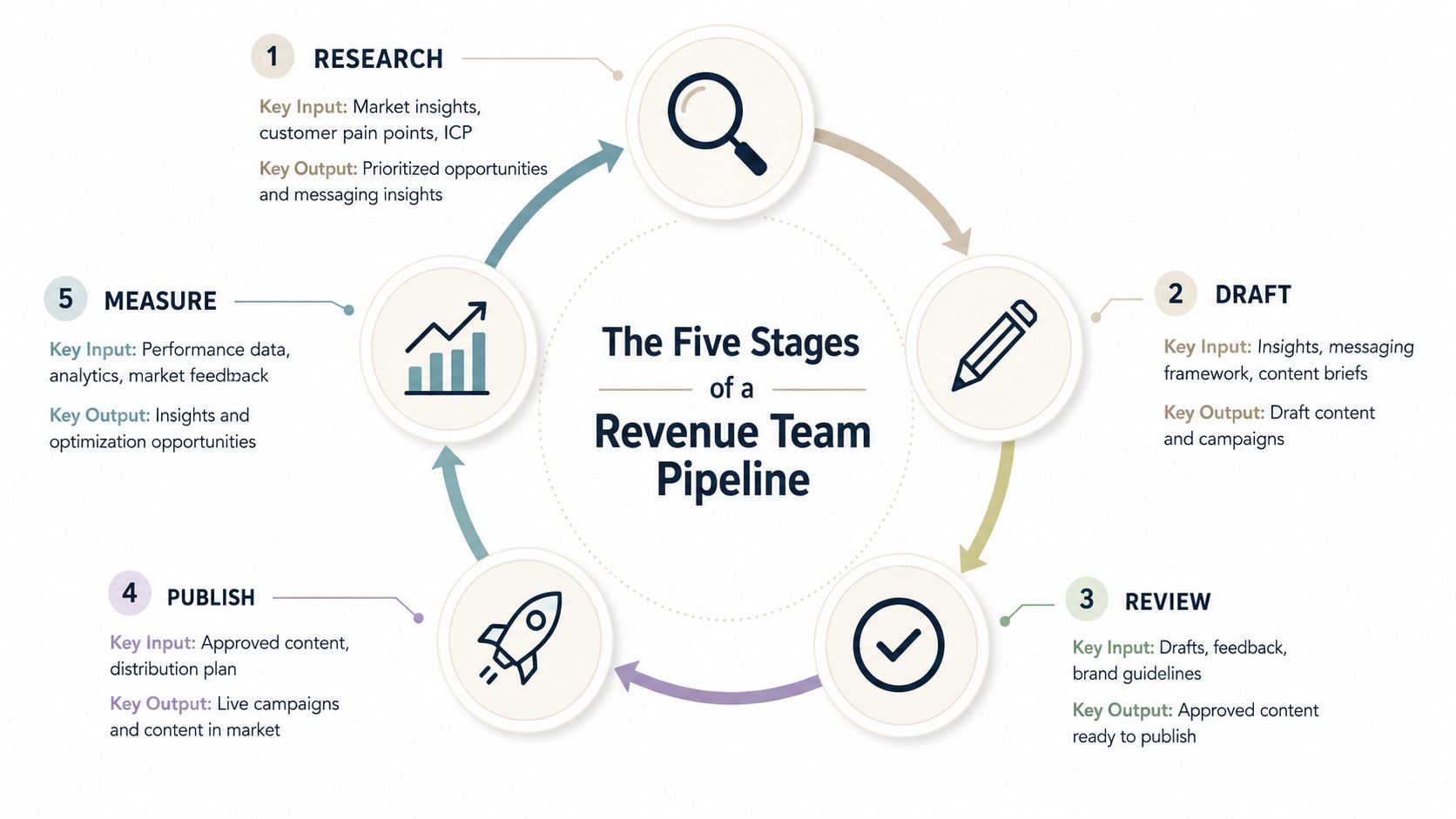
Research and draft are where the time goes
Research is not about finding more facts, it's about narrowing the story. The inputs are CRM context, prior decks, call notes, product docs, and any deal-specific constraints. The output should be a structured outline that already says what the deck is trying to prove.
Drafting should start from that outline, not from an empty slide. The best teams treat the first draft as a shaped artifact, with section order, key claims, and placeholder media already decided. That matters because content teams report that research alone can consume as much as 60–80% of total production time, and the work only gets slower when those decisions happen inside the slide editor instead of before it.
Review, publish, and measure need hard gates
Review should answer three questions, and only three. Is the story accurate, is the brand voice right, and does the deck match the buyer or internal audience. If the answer is unclear, it's not approved.
Publish is the handoff point where the deck becomes shareable and trackable. In a revenue setting, that means the final output should be a link, not a file that forks into email threads. Measure is the last stage only if you treat it as a dead end. It should close the loop by feeding engagement signals into the next draft, not just into a dashboard nobody opens.
A practical example helps. An AE pulls opportunity context from the CRM in the morning, drafts a custom proposal by lunch, sends it through one approval gate, and shares a live link before the follow-up call. That's a working pipeline, because every stage has a known exit criterion.
The handoff is the job. If a stage ends in “someone will fix it later,” the workflow is already leaking time.
Automating Deck Generation and Live Data
The biggest shift in modern deck workflows is that the first draft no longer has to begin in the slide editor. Revenue teams can use CRM notes, spreadsheets, and product docs to generate a usable structure before a human touches layout. That changes the bottleneck from “who knows the shortcuts” to “who knows the deal,” which is a much better place to be.
Encelade's web application, presentation API, and MCP tools fit this model because they let teams turn raw input into a draft without opening a traditional slide workflow first. Its interface and developer options support generating, styling, and sharing interactive, web-native decks, while live connections keep numbers and product references current instead of pasted once and forgotten. For a practical walkthrough of the interactive format, this guide to making interactive slides shows the kind of presentation layer that works well for revenue teams.
Why live data changes the deck economics
Static screenshots are expensive because they age immediately. If your pricing, pipeline, or usage chart is embedded as an image, every update becomes a manual hunt across old files. A live connection to Google Sheets or a REST source removes that recurring cleanup work and keeps the deck aligned with the source record.
That matters even more when the same deck needs multiple versions. A bulk restyle can adapt the same narrative for a vertical, segment, or stage without rebuilding the whole thing. The team isn't just saving time, it's reducing the chance that one version drifts away from the source of truth.
What to automate first
Start with the parts that are repetitive and low judgment. Pulling CRM fields into a draft, syncing spreadsheet values, and mapping product details into an approved template should happen before a rep starts editing by hand.
The practical trade-off is obvious. More automation gives you speed, but only if the source data is trustworthy and the review step still exists. Adoption is already near-universal — 95% of B2B marketers say their organization uses AI-powered applications, according to Content Marketing Institute's 2026 research — but the human gate has not gone away. HubSpot's data shows that only 7% of marketers publish AI-generated content without editing it, while 56% significantly revise it and 38% make minor tweaks. In other words, AI is a production layer, not a replacement for the human review step.
Enforcing Brand Governance Without Slowing Things Down
Governance becomes a problem when the rules are fuzzy. In revenue teams, that usually means one rep is editing a live deck while another is guessing which logo, disclaimer, or claim is still approved. Clear governance keeps the work moving because the guardrails are built into the workflow, not patched on after the fact.
The checklist that keeps decks from drifting
- Brand theme compliance: lock typography, color, and layout rules in the theme so every draft starts from the same visual base.
- Custom logo placement: keep logos and approved marks in fixed positions, so junior contributors don't move them every time they edit a title slide.
- Role-based access permissions: separate viewers, commenters, and editors so people can help without overwriting the working draft.
- Final legal and compliance review: give regulated claims, customer references, and board material one final approval gate before distribution.
That checklist works best when the platform enforces it. Strong permission controls make it harder for the wrong person to restyle or overwrite the file, as Nutrient's overview of document-engine collaboration permissions describes. Comment-driven systems like ONLYOFFICE and PandaDoc keep feedback in the document instead of scattering it across email chains. Version control matters too: auditable iteration and rollback keep a bad edit from quietly becoming the new approved version, which is the discipline our guide to version control for documents covers in depth.
Governance gets faster when the rules are encoded once and reused every time. It gets slower only when every review starts from a blank judgment call.
A board deck is the clearest stress test. The commercial owner writes the story, a reviewer comments in-thread, legal checks the claims, and the approved version ships without a Slack scavenger hunt. That's a cleaner handoff than forwarded email chains. A controlled doc system or a branded deck platform keeps the workflow in one place, so approval logic does not disappear into inbox threads.
Measuring Engagement and Closing the Loop
A deck is not done when it ships. It's done when the team can see what buyers opened, what they skipped, and what should change before the next send. For link-based decks, engagement data shows where the story held attention and where it lost it.
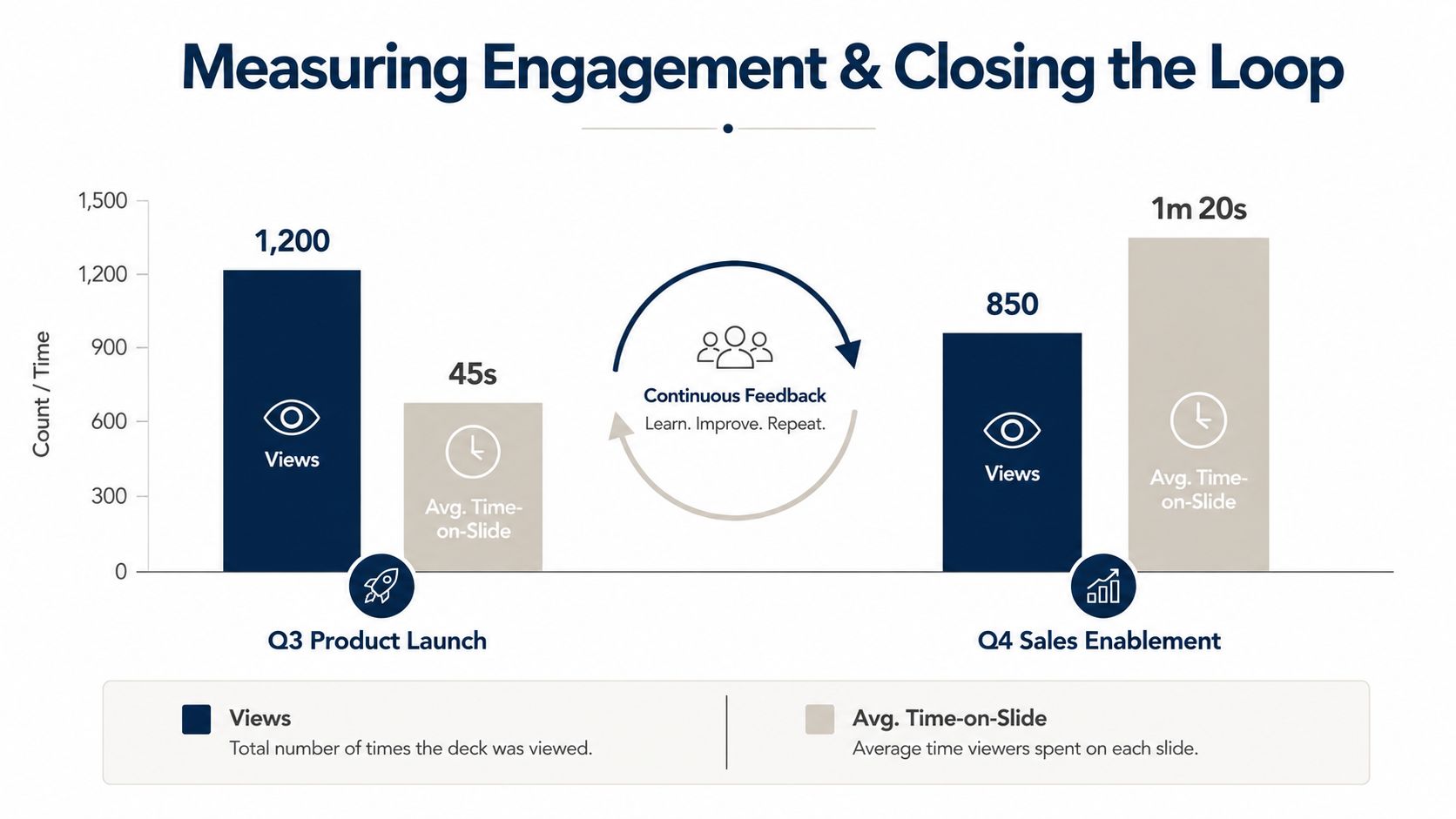
Read the signals, not just the volume
Views show reach, but they do not show which part of the narrative worked. Time on slide is often more useful for a revenue team than raw opens, because it points to the sections that kept attention. If the pricing slide is skipped every time, the problem may be the order of the story, not the price itself.
A sales manager can use that pattern to tighten the next version, shift the follow-up to the pages buyers spent time on, and drop weak sections instead of defending them. The deck becomes input for the next conversation, not a static file in an archive.
Keep the archive, but don't let it own the process
PDF or PPTX exports still have a place when a stakeholder needs an offline copy or compliance wants a frozen record. The working version should stay web-native and shareable so the team can review engagement without waiting for email replies.
Version control matters here as well, because a draft sometimes goes sideways and you need auditable iteration and rollback to recover. Comment-driven review keeps feedback in the file instead of scattering it across threads, which matters when you are comparing buyer behavior across revisions.
The overlooked part of workflow coverage is distribution and post-publish learning. Plenty of teams still sink a disproportionate share of their effort into promotion and performance tracking, and others stall at publishing and distribution altogether. That is the reminder that “create faster” is incomplete advice if the asset still dies after it ships.
Rolling Out the Workflow in 30 Days
A rollout works when it starts small and proves reliability before it tries to prove scale. Teams that attempt to automate everything at once usually end up rebuilding the old process inside new tools, which is a faster way to create confusion. A 30-day plan is enough to make the workflow visible without turning it into a six-month platform project.
| Week | Focus | Exit criterion | Warning sign |
|---|---|---|---|
| Week 1 | Define roles, intake categories, and editorial standards | Every request has one owner, one reviewer, and one approval path | Requests still arrive in chat with no named owner |
| Week 2 | Build a starter library, connect live data, and ship one real account deck | One full deck moves from intake to publish with a tracked shareable link | The team still rebuilds charts by hand |
| Week 3 | Add brand governance, permissions, and engagement reporting | Published decks follow theme rules and generate usage signals | Final decks are emailed as PDFs instead of shared by link |
What success looks like on the ground
The first sign of health is boring, and that's good. Reps stop asking where the latest version lives because the link is the version. Marketing stops re-pulling the same numbers because the live source updates once.
The next sign is better judgment. Reviewers spend less time fixing formatting and more time checking whether the story fits the account or audience. That shift is what people mean when they say they want efficiency.
The goal isn't more decks. The goal is a workflow the team can trust on a bad day.
If the rollout is failing, the warning signs are easy to spot. Decks still move by attachment, owners still debate who approves, and the same charts get remade for every deal. Fix those problems first, because they are workflow problems, not creativity problems.
Encelade helps revenue teams turn CRM notes, spreadsheets, and documents into interactive, web-native decks with live data, governed templates, roles, comments, and shareable links. If you are rebuilding a content creation workflow around governance and feedback instead of file chasing, book a 30-minute demo and see how the pipeline moves from manual assembly to a governed system your team can run.