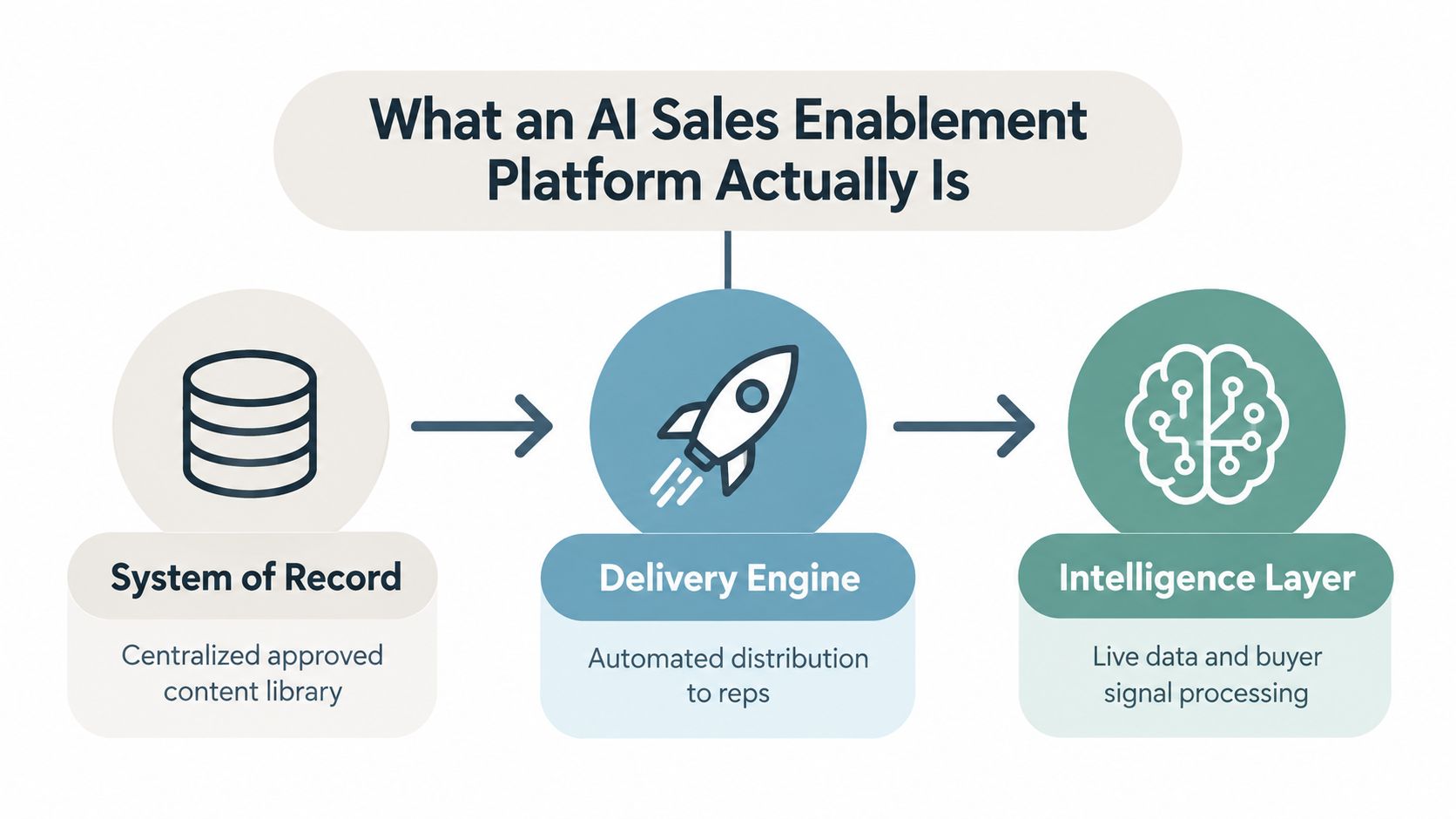
Most advice when it comes to revenue operations platforms focuses on the wrong things. It treats tools like a new pretty dashboard and suggests the alignment of sales, marketing, and customer success. While "sexy," this type of solution doesn't work. The real challenge is understanding how and where the logic is placed; how and where the data is authoritative; and how the platform behaves when the CRM fields, pricing rules, and territories are updated.
Buying RevOps is an architectural decision over a process decision. If a vendor can't demonstrate how they tackle integration depth, identity resolution, and event-driven workflows, all the checklist features tell you nothing. This guide works through that evaluation in the order the decisions actually arrive: what the platform is for, how it should be built, whether it replaces or sits beside your CRM, how to pressure-test a vendor, and what the first 90 days should prove.
Table of Contents
- Why Most RevOps Buying Guides Get the Question Wrong
- What a RevOps Platform Actually Encompasses
- The Framework of Modern RevOps Platforms
- Replacement, Overlay, or Integration?
- How to Assess Vendors on Integration Levels
- RevOps Case Studies
- A 90-Day Implementation Playbook and ROI
Why Most RevOps Buying Guides Get the Question Wrong
When pitching a revenue operations platform, saying too little is more common. These pitches describe RevOps as a unification challenge, then provide a list of tools to improve visibility, automate handoffs, and eliminate reporting silos. This framing conceals the true failure mode. Teams buy software that looks complete. However, when they put the software through the stress of a high-velocity sales environment, the software breaks down.
The failure is treating RevOps as an outer shell
A polished interface doesn't eliminate broken routing, conflicting ownerships, and stale definitions. If the platform reports on bad processes, the reps will stay the integration layer and RevOps will still have to clean up. This is the reason most integrations occur at the process level, rather than the dashboard.
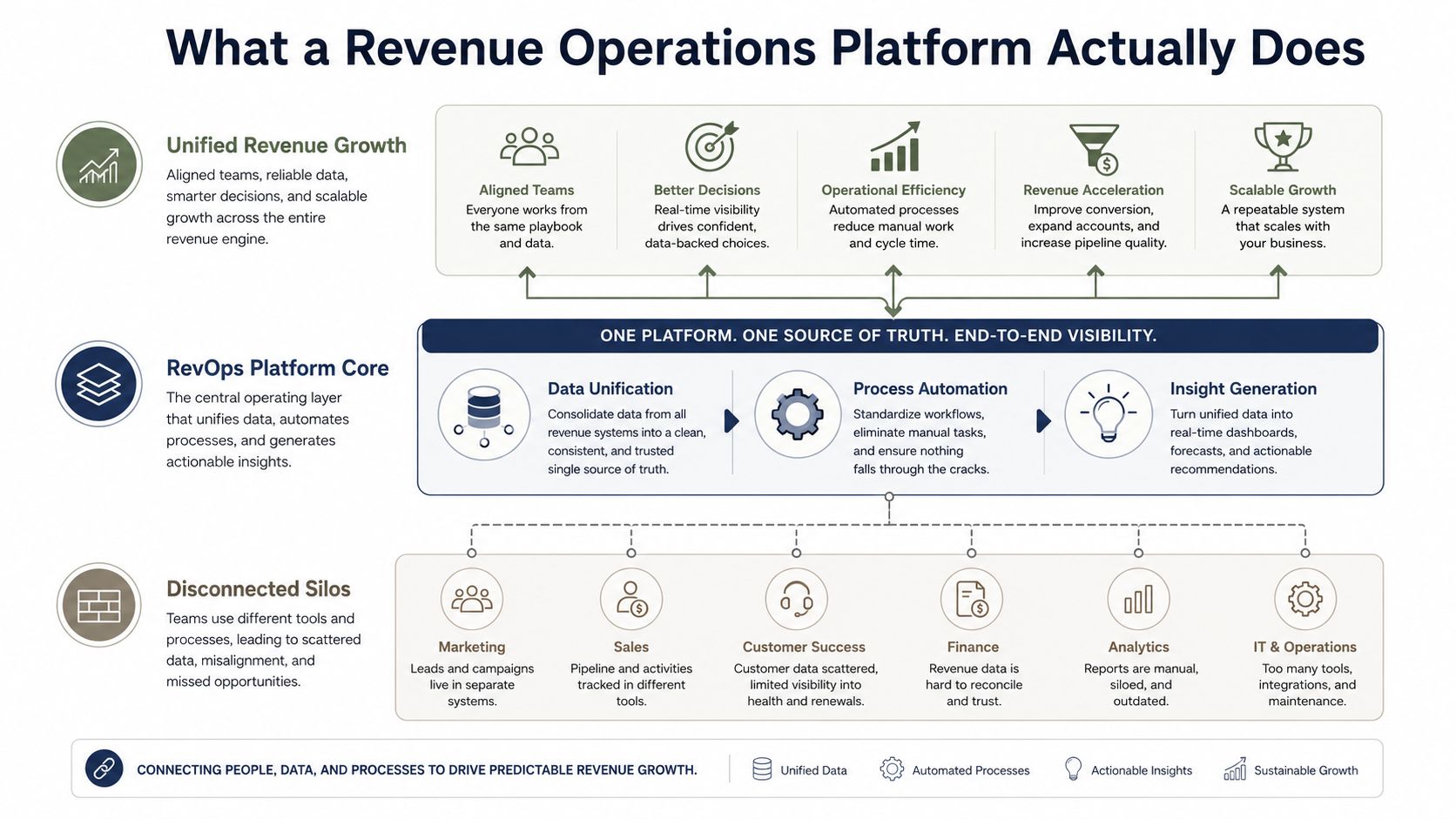
The correct view is architectural. What gets to stay in the CRM, what belongs in the platform, and what should be done via automation rather than manual admin processes should be considered. The CRM remains the commercial system of record, while the revenue operations layer coordinates identity resolution, routing, enrichment, workflow orchestration, and downstream actions.
Practical rule: if a vendor can't explain how they manage field changes, territory changes, or pricing rule changes without disrupting workflows, then they are not prepared for a serious RevOps stack.
The discipline is no longer just a management philosophy with a reporting tool. Salesforce treats RevOps as shared revenue metrics and lifecycle management for the complete revenue flow starting from product development and all the way to cash collection in its revenue operations guide. The organizational chart also points in the same direction. In a 2025 study Salesloft did with Wakefield Research, they found that 73% of companies have a dedicated C-suite role for RevOps. These roles work closely with COOs, CEOs, and CFOs. When a role sits at that level, the tooling that supports that role is infrastructure, not a utility for a supporting department.
A buyer's aim is to separate theater from plumbing. Discount tools that only promise alignment are to be ignored. Seek to purchase platforms that make the revenue system more robust and less prone to break.
What a RevOps Platform Actually Encompasses
A solid revenue operations platform sits between your systems of record and the people who act on them. The platform serves as the intermediary operating layer. The CRM is where accounts, contacts, opportunities, and activities are stored. The platform captures the work done around these records and converts them to routing, enrichment, workflows, and notifications of what should be done next.
The goal is to take signals from various sources and turn them into relevant actions
In his article for Forbes from December 2021, Stephen Diorio describes the emerging category of software for real-time insights, next-best actions, and optimized workflows. While describing a particular vendor offering, he uses these words. Diorio does not define the category as a whole, but the core capability of the vendor offering is the same. Analyze customer data with AI and ML and provide next best actions. The platform is not built to store historical data. It is designed to help employees execute actions when a deal or a customer handoff is still relevant.
Salesforce's classification of operational metrics is also relevant here. In Salesforce's RevOps guide, along with metrics like Annual Recurring Revenue, Churn, Renewal, Customer Lifetime Value, and Days Sales Outstanding, there are cost of customer acquisition, total contract value, and revenue backlog. These metrics are the operating metrics of the platform. If a vendor cannot support those metrics, it is a reporting platform with a broader name.
What stays outside the platform
Core commercial data will continue to remain in CRM systems. Financial data will remain in ERP systems. BI tools will continue to perform advanced analytics. RevOps platforms connect these systems, resolve data inconsistencies, and help initiate the appropriate action when a change occurs. Pushing too much data into the platform will result in the same situation.
AI is helpful in practice when it shortens signals, suggests the optimal action, and starts workflows based on buyer or customer behavior and adjustments. Of course, it only can do that if the system is programmed to capture those signals in a timely fashion. The goal is real-time decision-making. Historical reporting is only input.
The teams that do this correctly stop asking what the system can replace. They ask what should remain in the CRM, and what the system should manage.
The Framework of Modern RevOps Platforms
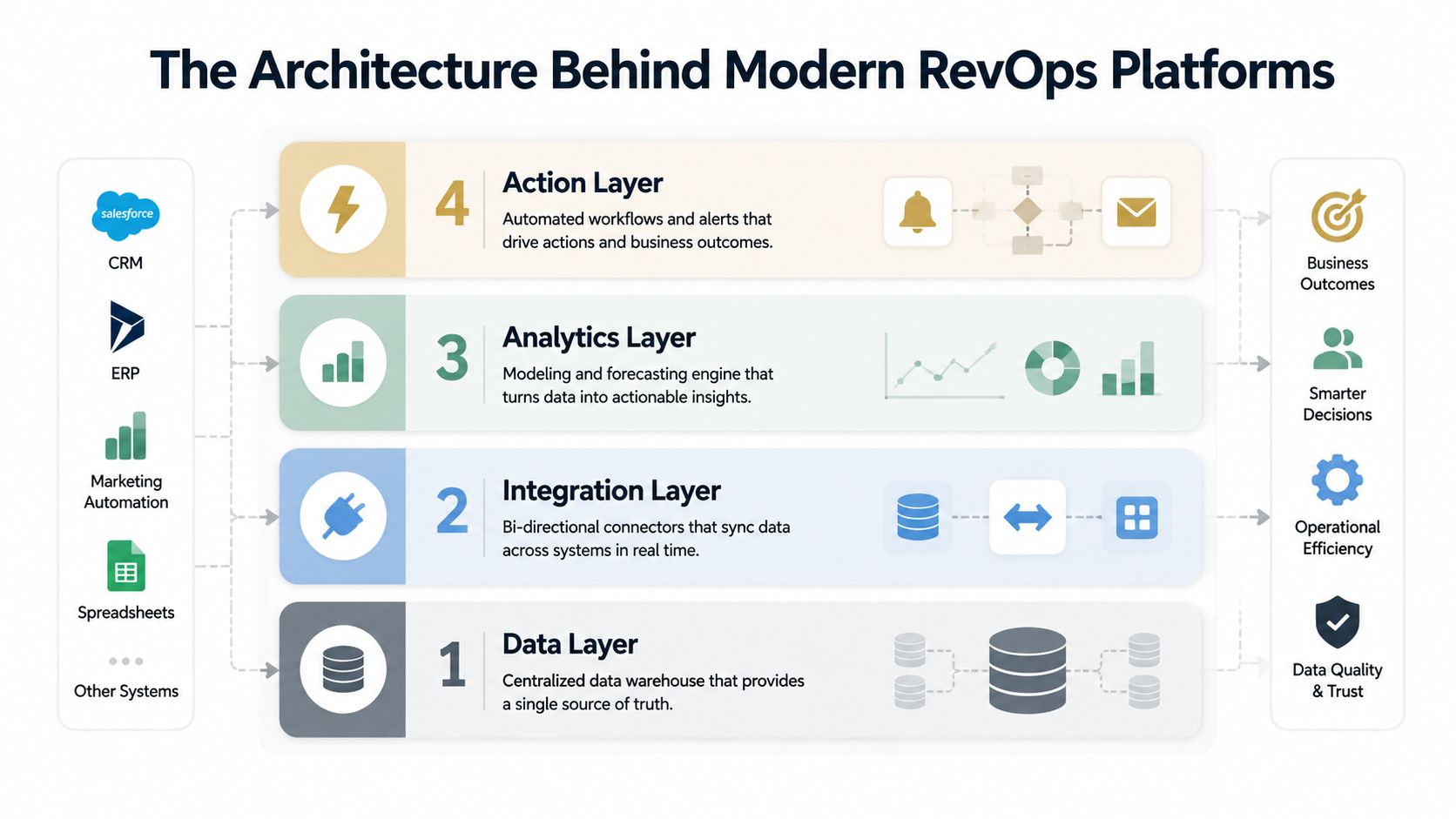
The best designs for modern revenue operations platform systems use layered architecture because layered systems are more adaptable than monoliths. One published example of a reference architecture in a 2025 International Journal of Computing and Engineering paper breaks the system into four autonomous subsystems — Lead Intelligence, Quote-to-Cash Workflow, Integration Middleware, and Security and Compliance — and connects them through event-driven messaging. It enables each of the subsystems to develop independently without negatively impacting the others. It's a single-author paper in a small, open-access journal as opposed to a breakthrough work, but it is a good place to start for a mental model for deconstruction.
Event-driven design trumps point-to-point scripts
Point-to-point scripts are brittle and break when a field in the CRM changes, or when a quoting rule or a territory model changes. Event-driven workflows are superior because each workflow is activated on a state change, and workflows for routing, quoting, and compliance all respond to a business event as opposed to a static dependency.
CX Today has important comments regarding the RevOps technology stack. The building blocks include integration layers, either an iPaaS or native tools with built-in orchestration backbones along with unified identity resolution and workflow orchestration for lead capture, qualification logic, routing, scheduling, and sales engagement sequencing with a CRM being the system of record for accounts, opportunities, and their lifecycle. Without these, attributes corrupt forecasting and reporting through data model inconsistencies and duplicates.
If there's no ownership centralization, reporting becomes a game of numbers. If there is a central ownership, routing and attribution becomes a repeatable process.
The data model also needs to be clear
Qlik's RevOps guidance is more specific than most vendor information. Qlik points out that RevOps data sits in CRMs, ERPs and EPMs, data warehouses, and customer service applications and recommends consolidating the data in a central repository, which usually is a cloud data warehouse. Qlik also recommends a CDC tool to capture and track changes over time as well as stream processing through Apache Kafka or Amazon Kinesis if records need to be moved in an incremental way rather than in a batch way which is typically done at night.
What this means for enterprise stacks
Large B2B cycles span CRM, billing, finance, and customer success systems. A tightly coupled architecture with commercial structures that change will break. A loosely coupled architecture, with REST APIs, webhooks, and managed events will adapt cleanly.
For a closer look at the presentation layer that can sit on top of that architecture, see our walkthrough of building a real-time data dashboard. Instead of focusing on adding extra graphics, the point is to expose live, decision-ready data without rigging every workflow to one specific tool.
Replacement, Overlay, or Integration?
This is the approach that most RevOps purchasing guides tend to avoid. A revenue operations platform can attempt to replace the CRM, sit on top of it as a layer or overlay, or integrate with the existing suite and keep the system of record undisturbed. These options are not merely cosmetic. They greatly influence the shape of the platform, the burden of change management, and how the system fails.
Replacing the CRM sounds tidy, but this is seldom the correct choice
A replacement CRM makes sense only if the existing CRM is so internally fractured that the monetary cost of keeping it is greater than the monetary cost of changing it. Most teams are not in this situation. The CRM already has the records, permissions, data entry, and the downstream connected applications. Replacing it turns a RevOps project into a full commercial system migration, a bigger bet than most vendors will admit to.
The analyst framings here are worth noting because they tend to be conflicting. Gartner's revenue operations best practices encourage the establishment of a centralized data and insights source that integrates data from finance, marketing, customer success and sales, which tends towards a single operating layer. In contrast, Salesforce encourages the integration of revenue data and the integration of the product, sales, and ERP systems, which tends towards a more integrated approach around existing systems. Both are defensible options. The correct answer depends on how valuable your existing stack is to you.
Overlay wins when the CRM is still the record
The right answer depends on how usable your stack is. If the CRM is still the record, overlay wins. You keep the CRM for objects and governance, and RevOps handles identity resolution, orchestration, enrichment, and actioning. You can improve consistency of process without forcing the team to migrate.
Integration is sufficient when the existing stack is coherent
If the existing stack has good CRM hygiene, clear ownership, and a working finance connection, a full platform replacement is unnecessary. In this case, the platform should connect the system, not become the system. This lightens the implementation burden and protects the existing working state of the system.
| Model | Architecture role | Best fit when | Main risk |
|---|---|---|---|
| Replace | New system of record | Current CRM is unsalvageable | Migration cost and adoption drag |
| Overlay | Operating layer above CRM | CRM is stable, workflows are broken | Duplicate logic if governance is weak |
| Integrate | Connector across existing stack | Stack is coherent, gaps are specific | Underbuilding the orchestration layer |
A composable stack makes this decision more important, not less. AI-assisted workflows amplify whatever architecture you have. If the base is messy, AI just moves the mess faster.
How to Assess Vendors on Integration Levels
Most vendor demos are meant to wow non-operators. They feature dashboards, summaries, and a wall of logos. That's not usually important. What matters is whether the platform can handle identity resolution, move data smoothly, reveal event-driven logic, and write actions into the systems your team relies on.
Start with identity and sync, not UI polish
Ask the vendor how they resolve duplicate records, disputed account ownership, and cope with field mapping across all integrated systems. If identity resolution is treated as an afterthought, reports will be noisy and data handoffs will become worse. Identity resolution should be built into the platform, and the vendor should be able to describe how they handle the CRM as the system of record, change reconciliation, and how they ensure there is no conflicting attribution logic.
Next, evaluate the API layer. For a platform to be truly customer-centric, REST APIs, webhooks, and managed event-driven flows should be fully supported and not hidden behind professional services. A platform that relies on brittle one-off scripts will result in a maintenance burden that effectively becomes an automation problem.
Check if workflows trigger from state changes
It is not sufficient to ask if the platform supports automation. Rather, the focus should be on the platform's ability to perform workflows once a record state changes. Can it route a lead, quote a deal, enrich an account, or trigger compliance checks from that event? If the answer is yes, the vendor is thinking like a systems builder. If the answer is that they can set that up for you, assume implementation risk.
A useful contrast is the adjacent category. Our guide to choosing a sales intelligence platform evaluation, we discuss ways to determine whether a technology is providing insight on what is occurring. A RevOps platform should be integrating what is occurring and what is occurring next.
Use enterprise-readiness signals as filters
Keep an eye out for SSO and SAML, white-label output, and a multi-tenant API. These features are a must if you're buying a product to support a major corporate initiative. The absence of these features will end the consideration of a product. The buyer will see the importance of a web-based presentation API over a legacy service.
RevOps Case Studies
Architecture really matters if it becomes a part of the regular work routine. A sales rep working a late-stage deal isn't thinking about the phrase "operating layer." They are thinking the deck and all the numbers match the CRM, and a proposal isn't held up because someone inserted outdated data. Sales teams need live data widgets, not file versions.
Sales teams want to pitch live data
A RevOps team that buys live data widgets will stop burning version control cycles and stay aligned on the narrative with respect to account data. Bug-free presentation widgets provide a seamless live presentation for a proposal versus outdated data that's been downloaded hours ago.
Programmatic creation is needed for enablement teams
There are more sales enablement teams using API and MCP tools to programmatically create onboarding and training decks using CRM and other document inputs. With these tools, teams can assemble core content in varying formats for different audiences, eliminating the need to create training decks from scratch, thereby reducing stale training materials in the org.
Agent builders need trusted endpoints
When agent builders connect REST and MCP endpoints, they can create account-specific decks in automated workflows. This shifts the presentation layer of the system from an afterthought. It empowers ops teams to support the revenue workstream without requiring a team member to click through multiple systems and tools to complete a task.
The standard rule of thumb is this: if a training deck, workflow, or enablement asset can't be created programmatically, the process will be manual. That is the process to avoid.
Automation of more tasks within RevOps will change the landscape of roles in sales and the vendor side as well. Tango provides a good vendor-side example to illustrate what can be expected with the changes.
A 90-Day Implementation Playbook and ROI
The first 90 days should be focused on instrumentation, orchestration, and proof. Don't try to automate every workflow. Automate the highest friction workflows, and evaluate if that improved revenue operations.
Days 1 to 30, instrument the stack
Build a map of systems of record and determine how data is configured in your CRM, your ERP, your billing system, your customer success applications, and your content systems. Define data ownership to prevent the platform from making assumptions. Identity resolution, change data capture, and the REST or webhook services needed to present clean events to end users will be provisioned.
Alignment turns into governance here. If the team can't define who owns fields, stages, and lifecycle rules, the platform will just automate confusion. The data model has to settle before the workflows do.
Days 31 to 60, orchestrate the work
Begin working event-driven instead of time-release workflows. Establish live data connections into positioning artifacts used by the reps so they will no longer have to build customer presentation materials manually. Instead of requiring reps to maintain systems, the platform will be programmed to initiate actions based on changes to system state.
To learn more about automating process workflows, take a look at our AI workflow automation solution.
Days 61 to 90, optimize against the baseline
Measure what changed against the baseline you captured before launch. Track whether routing is cleaner, whether leakage is lower, whether proposals move faster, and whether the revenue team trusts the data more. Keep the evaluation tight, because a platform that can't show operational improvement in 90 days is too expensive.
ROI rule: if the platform is not reducing manual work or increasing employee empowerment, it's not a RevOps platform — it's an additional software solution.
The direction of travel supports the investment. According to BCG's 2025 analysis of AI in revenue operations, the function is moving from prediction to execution. This is the transition from reporting on the revenue process to running it. Operational proof should focus on the execution of the process, rather than broad adoption.
A RevOps stack decides what should happen next. Something still has to put that in front of the customer, and that's where most stacks fall back to static files. Encelade is the presentation layer for that work, turning research, CRM notes, spreadsheets, and documents into web-native decks through an API or MCP connection, so account-specific material stays current instead of drifting the moment it's downloaded. If that's the gap in your revenue workflow, book 30 minutes here and we'll walk through it on a real deck.