A CRM can look full and still cost reps their first hour of the day—cleaning records, guessing who matters, and rewriting outreach around stale information. That is usually the moment a team starts evaluating sales intelligence platforms.
The useful question isn't which demo looks most polished. It's whether the platform helps a team find the right accounts, understand why now, and take the next action without piling on more data work.
Market forecasts differ because researchers define the category differently. Mordor Intelligence, for example, estimates a $4.99 billion market in 2026 and forecasts $9.15 billion by 2031, a 12.89% CAGR. Treat that as one commercial forecast, not a universal market fact.
The direction matters more than the estimate: revenue teams are buying better prospect data, intent signals, and automation—not another static contact database.
What a Sales Intelligence Platform Does for Revenue Teams
A rep may start Monday morning with 300 CRM contacts riddled with poor ICP fits, duplicates, and stale job titles. Cleaning, cross-checking, and guessing before selling is data maintenance—not sales work.
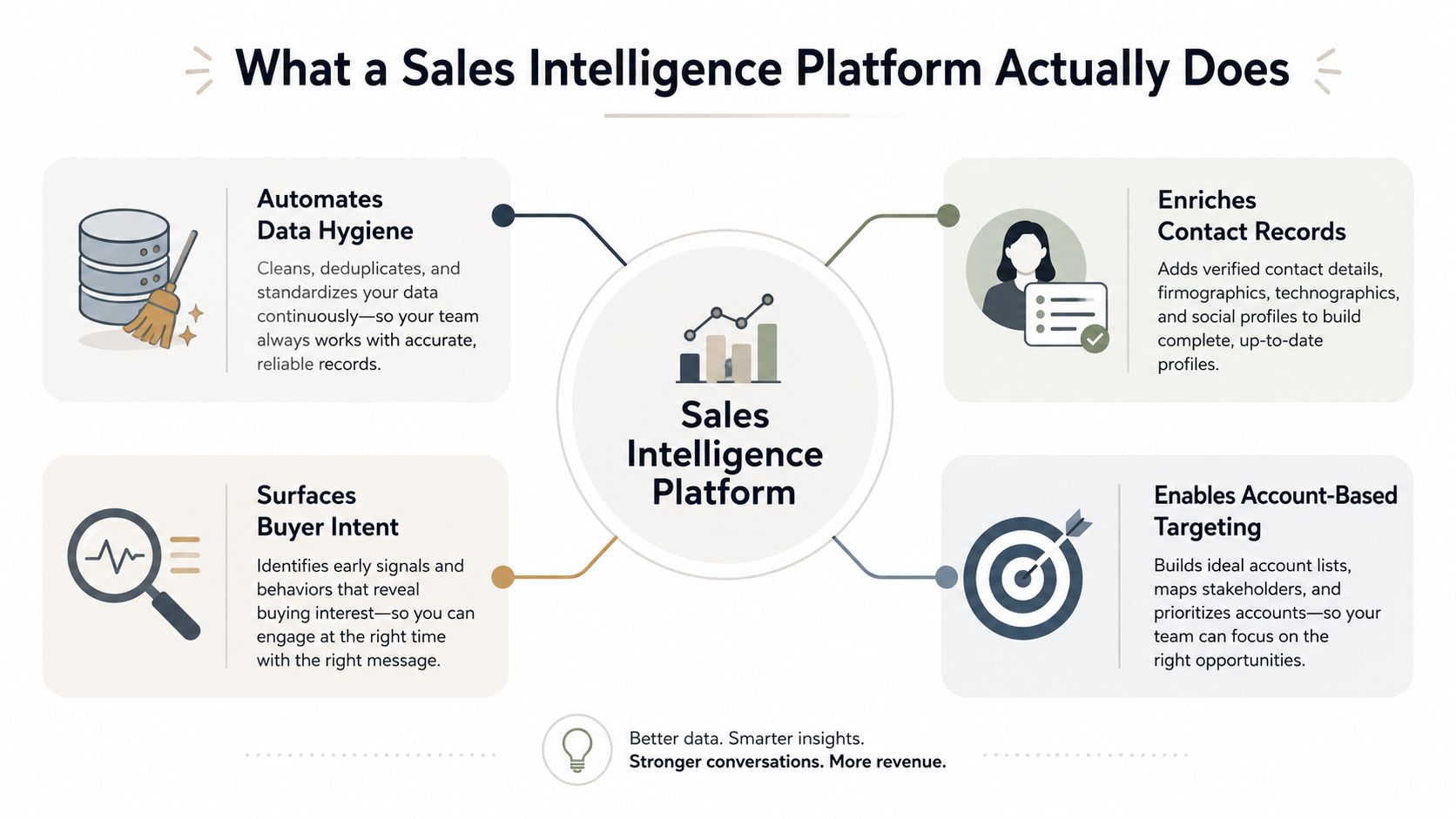
A sales intelligence platform can combine firmographic, technographic, intent, and CRM data to surface the accounts worth attention. Its value isn't the raw record; it's the ranking, context, and timing wrapped around it.
From static lists to live account intelligence
A contact list tells a team who exists. Sales intelligence should explain who is changing, who fits, and which signals make an account worth time right now.
Useful account context shifts as funding news, hiring, technology changes, and CRM updates arrive. The goal is a maintained account view—not a territory plan you rebuild from scratch every Friday.
Practical rule: If a tool can't refresh the account story fast enough to change next week's outreach, it's a database with a nicer interface.
Revenue teams don't need more rows. They need a stronger filter, so the accounts that survive are tied to fit, timing, and an action a rep can actually take.
The output is action, not records
Sales intelligence earns its place when it changes what a rep does next: which account to call, what context to open with, and whether the timing is good enough to matter.
Don't judge a demo on breadth alone. The real test is whether the tool helps a rep stop chasing dead ends and run a tighter account play on context they can trust.
Core Capabilities That Separate a Platform From a Contact List
A real platform is a pipeline, not a pile of data. It ingests records, resolves identities, applies logic, and pushes usable outputs into the tools the team already works in.
Start with entity resolution
Entity resolution matches and links the records that refer to the same organization or person across systems. It hands enrichment, scoring, and activation a single, consistent account identity instead of letting each tool guess on its own.
It matters because fragmented identifiers breed duplicate records, noisy scores, and inconsistent routing. Normalized records make it easier to reuse the same account context across CRM, analytics, and workflows.
The six capabilities that matter
- Data enrichment fills the useful gaps—job title, phone number, company attributes, and technology profile.
- Lead and account scoring ranks accounts by fit, activity, and the signals your team defines.
- Account insights turn scattered signals into a concise brief a rep can use before a call.
- CRM integrations keep the context available in the system where the team works and reports.
- APIs and webhooks let teams send approved events and data to other systems without manual handoffs.
- Refresh and provenance controls show how current a field is and where it came from, so teams can govern the data.
The flow should be easy to explain: raw data becomes normalized accounts, normalized accounts become ranked signals, and ranked signals become actions. If a vendor can't walk you through that flow, ask for a more concrete demonstration.
Think like a GPS, not a spreadsheet
A GPS earns its keep because it recalculates before a driver misses the turn. Sales intelligence should re-route the moment account conditions change, rather than file away a map for later lookup.
Ask whether the product treats new signals, identity matching, routing, and refresh as one connected workflow. A lookup tool answers questions; an operational system helps the team act before the moment passes.
The Five Vendor Categories and Which Motion Each One Serves
There is no single best sales intelligence platform. The market splits into overlapping workflow categories, and each one solves a different bottleneck. Compare them as if they were interchangeable and you usually end up with a bad fit.
Match the category to the job
The five useful categories are contact and company data, intent data, conversation intelligence, sales engagement with data, and ABM or predictive platforms. Treat that as a buying framework, not a rigid vendor taxonomy: many products span more than one category.
| Category | Primary motion | Core data | Best fit |
|---|---|---|---|
| Contact and company data | Find the right people | Contacts and firmographics | Teams that need better prospect lists |
| Intent data | Spot buying interest | Research topics and account activity | Teams that need timing and prioritization |
| Conversation intelligence | Interpret calls and meetings | Transcripts and deal signals | Teams that need coaching and forecast clarity |
| Sales engagement with data | Move from research to outreach | Contacts, sequences, and CRM events | Teams that want prospecting and outreach together |
| ABM or predictive platforms | Rank and orchestrate accounts | Fit, intent, and account scores | Complex sales to known accounts |
If the team can't find the right contacts, start with data. If it has contacts but can't tell when to act, start with intent. If discovery calls don't produce usable CRM context, look at conversation intelligence.
If reps already live inside a sequencing tool, sales engagement with data may be the cleaner answer. If account prioritization across a large market is the bottleneck, weigh ABM or predictive capabilities.
Set that shortlist against the broader workflow question in our guide to sales enablement tools. A platform that can't map to a clear revenue motion tends to create more process than pipeline.
What each category prevents
Data platforms cut down on bad list-building. Intent platforms cut blind timing. Conversation intelligence replaces coaching from memory, sales engagement reduces tool switching, and ABM takes the guesswork out of where to focus accounts.
Pick the category that removes your bottleneck. Everything else is decoration.
A Practical Evaluation Checklist for Choosing a Sales Intelligence Platform
A demo can make weak software look polished. A real rollout is what shows whether the platform lifts outreach quality, keeps data governable, and fits the way your team sells. Evaluate the operation, not just the feature list.
Run the bakeoff like a controlled test
Build one fixed target list that matches your ICP—500 contacts is a practical size for a larger pilot—and hand the same sample to every vendor. Let each vendor swap in its own list and you hide the coverage gaps.
Compare the fields reps actually need every day: match rate, verification or refresh date, confidence or match logic, source attribution, and the vendor's policy for correcting bad records.
Test deliverability only with contacts you're permitted to email, and at a controlled volume. Apollo recommends keeping a total bounce rate below 2% and hard bounces below 1% for well-maintained paid data; even so, bounce rate is only one signal, so check inbox placement too.
Practical rule: If a vendor won't test against your ICP and explain its data-quality methodology, you're being asked to buy blind.
Score each vendor against the way your team actually operates:
- Security and compliance: Ask for evidence of data handling, retention, privacy, and governance controls.
- CRM and warehouse integration: Confirm the systems you rely on connect without bespoke maintenance.
- Automation depth: Check whether approved triggers can drive routing, enrichment, and follow-up.
- API design: Confirm data can move cleanly into systems the vendor doesn't natively support.
- Scalability and pricing: Validate performance and cost for when the pilot becomes a rollout.
Use a business case to frame the decision for finance, security, and field leadership. The choice has to survive procurement and operational scrutiny, not just a champion saying the screens look good.
Ask what happens after the data arrives
Having the records is not enough. Ask how those records get matched, merged, refreshed, corrected, and governed once they land in your CRM. Poor sync logic turns a data purchase into a cleanup project.
Run a maintenance test: append missing fields, validate a sample against trusted sources, inspect the duplicates, and confirm the refresh-and-correction path. A platform that can't explain that loop isn't ready to sit underneath your revenue process.
How Sales, Presales, RevOps, and Agent Builders Use It Day to Day
The same platform should serve different roles without creating competing views of the customer. A tool that serves only one role well tends to stall in rollout, because the rest of the team has no reason to open it.
SDR and AE workflows are about timing
An SDR can lean on intent and job-change signals to decide which account deserves a call. An AE can open the same account view before discovery, so the first five minutes don't sound generic.

The core workflow is simple: the SDR checks the signal, the AE checks the account context, and both pull from the same underlying record. Consistency matters more than a long feature list.
Presales and agent builders need structured outputs
Presales teams can turn account context into reusable, buyer-facing material instead of rebuilding a deck for every opportunity. Live, shareable presentations work well when a story has to adapt to the account and stay current.
Encelade can sit alongside the intelligence stack: it turns research, CRM notes, spreadsheets, and documents into interactive presentations. Its REST API and MCP server also let agents generate and update decks programmatically, with scoped access.
That's the point where intelligence becomes an input to an automated workflow, not just a report someone reads after the moment has passed.
RevOps owns the hygiene layer
RevOps should watch coverage, deduplication, field freshness, and CRM contamination. Routing can't be trusted when accounts are duplicated, and scoring can't be trusted when the account identity is broken.
The repeatable loop is straightforward: append missing fields, verify a representative sample, resolve duplicates, and refresh on an agreed cadence. Teams that do this well turn live data into a short, repeatable set of sales actions.
Adoption Playbook and the Metrics That Prove ROI
Platforms usually fail for plain reasons: adoption is weak, governance is loose, and nobody agreed on what success meant before rollout. Without those decisions, the tool becomes one more tab reps ignore when they're busy.
Use a 90-day rollout that forces evidence
Ninety days is a practical rollout pattern, not a vendor requirement. It gives the team enough time to establish a baseline, prove one workflow, expand deliberately, and measure whether the operating model is holding.
| Stage | What to do | What to watch |
|---|---|---|
| Weeks 1–2 | Baseline the current process | Meeting outcomes and routing quality |
| Weeks 3–4 | Run one team, ICP segment, and workflow | Data accuracy, use, and response quality |
| Weeks 5–8 | Expand scoring and routing | Conversion and duplicate handling |
| Weeks 9–12 | Add approved API and automation workflows | Workflow reliability and CRM hygiene |
Add automation once the pilot is stable. Our guide to AI workflow automation makes the same point: automation should amplify a working process, not paper over a broken one.
Measure outcomes, not busywork
Track the outcomes your revenue team can actually influence: meeting quality, qualified-meeting rate, opportunity conversion, routing accuracy, and research time per account. Agree the definitions before the pilot begins.
Emails sent, records enriched, and dashboard views can be useful health metrics, but none of them prove a platform improved the revenue motion. A big pile of spent enrichment credits isn't a win if the meetings don't improve.
Measure the handoff from signal to meeting, not the volume of activity swirling around the signal.
Review coverage quality, deduplication, and CRM contamination before rollout—not only after a bad month forces a cleanup. That's the difference between a platform that supports RevOps and one that quietly builds hidden debt.
Adoption is a management problem
A rep needs the platform to save time or sharpen a conversation. A manager needs it to change how they coach. RevOps needs it to cut cleanup. The product earns its place when all three groups can see the benefit.
Common Mistakes to Avoid and Your Next Move
Don't treat sales intelligence as a contact database. The value comes from turning reliable signals into action, not from pouring more names into a system nobody already trusts.
Don't ignore freshness and governance, chase a wall of alerts, or lean on activity as the ROI story. Each of those makes the system look busier without improving the quality of the revenue motion.
A simple decision checklist
- Pick one ICP: Start with a focused segment.
- Build a fixed test list: Use real target accounts and the same criteria for every vendor.
- Validate provenance and deliverability: Review how the vendor verifies, refreshes, and corrects data.
- Set a baseline: Define the outcome metrics before the pilot starts.
- Run a bounded rollout: Give one workflow enough time to prove value before scaling it.
Quick FAQ
What's the difference between sales intelligence and a CRM? A CRM manages customer and opportunity relationships. Sales intelligence supplies and refreshes the signals that help teams decide who to contact, and why.
How do I know whether the data is good enough? Test it against your own ICP. Look at provenance, match quality, refresh dates, correction terms, duplicate behavior, and permitted-email bounce results rather than raw database size.
Who should own the rollout? RevOps should own the governance model, while sales leadership owns adoption and the workflow expectations that make the tool worth opening.
Can smaller teams use this well? Yes. Start with one motion, one ICP, and one measurable outcome instead of trying to switch on every feature at once.
When the team is ready to turn research and account context into a buyer-facing story, use a platform that keeps the presentation wired to the live workflow rather than bolting on another manual handoff.
Market forecast source: Mordor Intelligence. Entity-resolution definition: AWS Entity Resolution documentation. Deliverability benchmark: Apollo's paid-data bounce-rate guidance. Accessed July 30, 2026.