The sales engineer is presenting from a spreadsheet updated earlier in the week. The account executive is quoting a different figure from the CRM. The proposal deck contains a third version, copied from an old template before the latest pricing or pipeline change. Nobody intended to mislead the buyer, but the customer sees conflicting numbers and starts questioning every number that follows.
Revenue teams often treat this as a presentation problem. It's usually a data ownership and distribution problem. A single source of truth, or SSOT, gives each critical data element one authoritative home, one agreed definition, and a controlled path into the systems and customer-facing materials that use it. That distinction matters because a shared folder can centralize files without preventing conflicting edits, stale exports, or unapproved local copies.
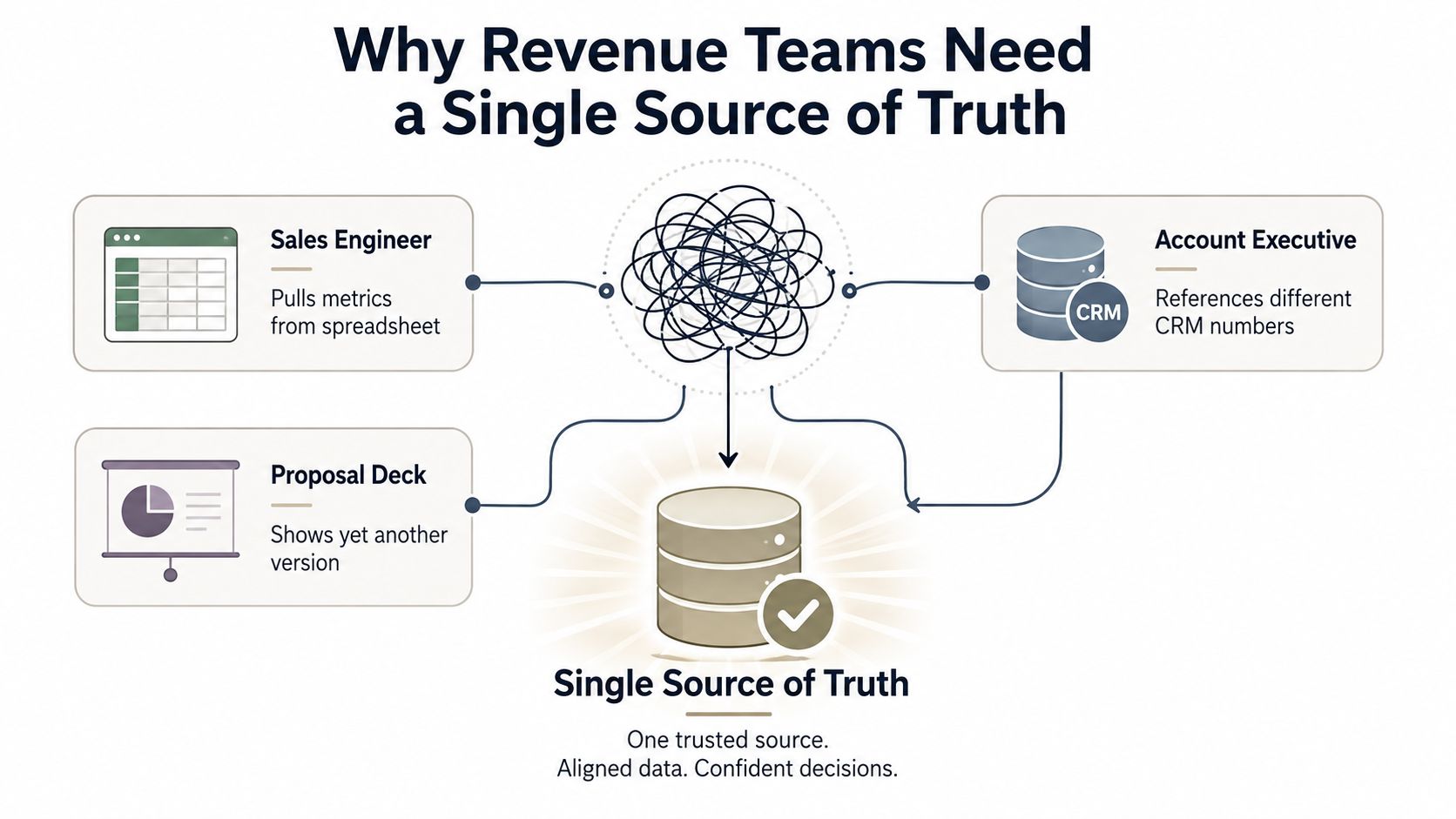
Table of Contents
- Why Revenue Teams Need a Single Source of Truth
- The Core Components of a Working SSOT
- Designing Your SSOT Architecture
- Implementing SSOT in Presentation Workflows
- When SSOT Becomes a Bottleneck
- Building a Sustainable Governance Model
Why Revenue Teams Need a Single Source of Truth
The phrase single source of truth describes a data architecture concept in which each data element is mastered or edited in one place, providing normalization to a canonical form. It is a long-established idea in information science and IT, and it became central to master data management, database normalization, and governed content distribution, as documented in the information-science definition of single source of truth.
For revenue teams, the object being mastered might be an account, opportunity, product, price, customer metric, proof point, or approved claim. The CRM may own the opportunity stage. A CPQ system may own approved pricing. An analytics platform may own product usage. A proposal or presentation layer should consume those records rather than create competing versions.
Practical rule: if a seller can change a business-critical number inside a presentation without changing the authoritative record, your workflow has version drift by design.
That drift creates friction at several points. Sales engineers reconcile technical metrics before a call. AEs ask revenue operations which forecast number is correct. Marketing reviews decks for claims that were approved elsewhere. Managers delay proposals because nobody can confirm whether the content reflects the current account record. The buyer may never see the internal process, but they experience its output as inconsistency.
The business reasons for governance extend beyond sales productivity. A CMSWire summary of governance research lists improved data security at 48%, data quality at 45%, analytics at 35%, regulatory compliance at 34%, and better decision-making at 27% among the leading data governance drivers (CMSWire's overview of data governance priorities). For revenue operations, those priorities translate into cleaner account data, defensible commercial claims, dependable reporting, and fewer manual reconciliations.
Centralization alone isn't enough
Putting every spreadsheet in one folder doesn't make the folder authoritative. A working SSOT specifies who owns each field, which definition applies, what validations run, and how downstream tools access the approved value. It also preserves traceability, so a reviewer can distinguish the current approved figure from a draft, export, or historical snapshot.
The test is simple. Ask a seller where the current expansion opportunity value comes from, ask the sales engineer where the usage metric comes from, then inspect the proposal that reaches the customer. If those answers point to different editable artifacts, your organization doesn't have one source of truth. It has several sources competing to be believed.
The Core Components of a Working SSOT
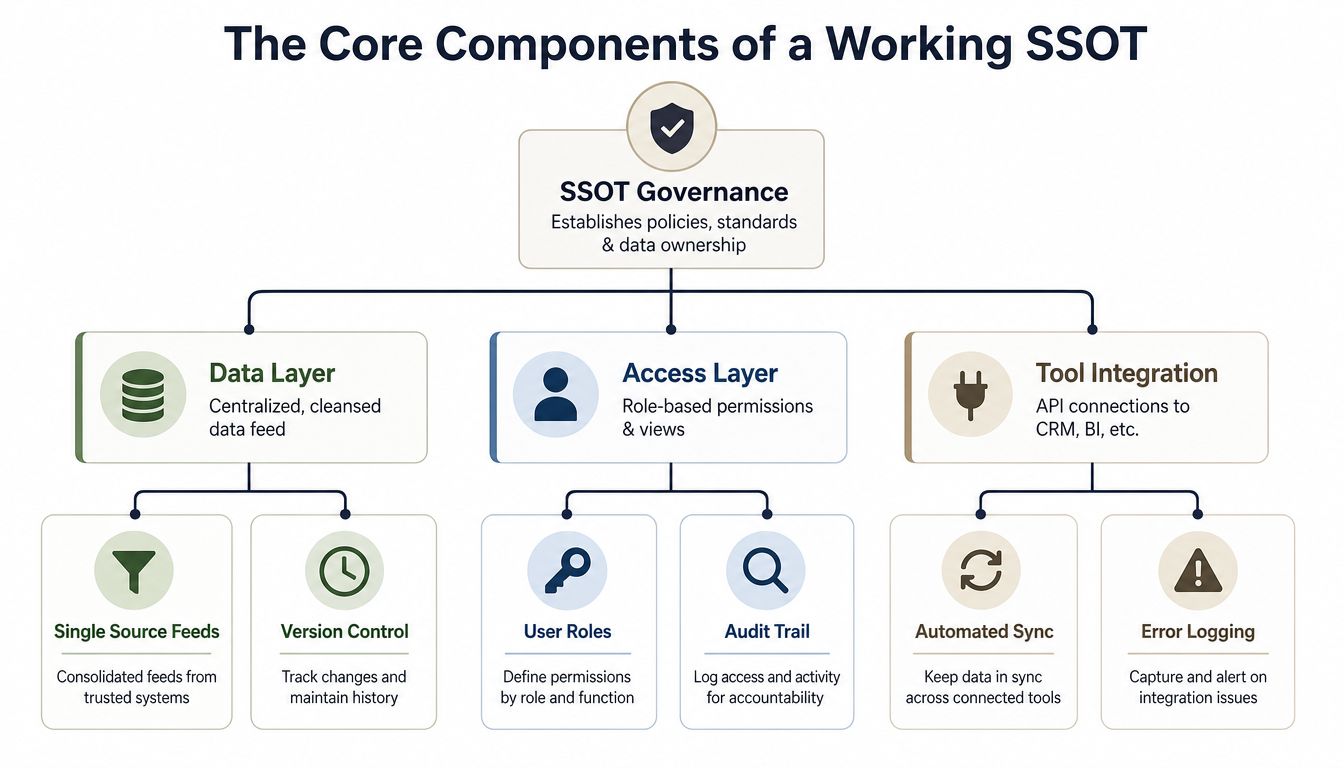
A reliable SSOT combines technical infrastructure with operating rules. A consolidated database without ownership can centralize inaccurate records. A governance policy without usable integrations can force sellers to copy data manually. The strongest pattern pairs authoritative data, explicit stewardship, controlled access, and reliable delivery into downstream tools, as outlined in this technical explanation of SSOT architecture.
Field-level ownership
Start with ownership at the field level, not only the application level. "Sales owns the CRM" is too broad to resolve disputes. A useful model names the owner of account identity, opportunity amount, renewal date, product package, approved discount, usage metric, customer outcome, and external claim.
Ownership should answer three questions:
- Who can edit the field? For example, an opportunity owner may update deal context, while a pricing administrator controls approved commercial terms.
- Who defines the field? Revenue operations may define pipeline stages, while finance defines recognized revenue.
- Who resolves exceptions? A named steward needs authority to settle conflicts instead of sending every question into an unowned group chat.
This prevents a common presentation failure. If the deck shows a customer metric, the presentation author shouldn't decide which spreadsheet cell looks most recent. The metric's owner should define its source, meaning, refresh expectation, and acceptable use.
Canonical definitions and validation
Revenue teams frequently use familiar words that mean different things. "Pipeline," "active customer," "win rate," and "annual value" can each produce disagreement if teams apply different filters or time periods. Canonical definitions turn those terms into governed business objects rather than informal shorthand.
Validation rules then protect the definitions. A customer record may require a unique identifier. A pricing field may reject an unauthorized format. A usage metric may need a freshness check before it appears in a customer deck. Data quality controls should evaluate completeness, consistency, timeliness, uniqueness, validity, and referential integrity. Centralizing bad data only makes the wrong answer easier to distribute; as Databricks's guidance on building a single source of truth notes, duplicating data across systems leaves different teams working from versions that differ in quality and freshness.
Integration and access
The data layer stores or masters the record. The access layer determines what each role can view or change. The integration layer exposes approved values to CRM, business intelligence, document, and presentation tools without encouraging teams to create unmanaged copies.
A revenue team should be able to see the same governed account context in a forecast view, a proposal workflow, and a QBR deck. That doesn't mean every user needs unrestricted access to the underlying repository. Role-based permissions, audit trails, error logging, and automated synchronization help preserve control while keeping the approved information usable.
Designing Your SSOT Architecture
Design starts with business objects, not software logos. List the revenue decisions that regularly stall because people disagree about the underlying information. Then map each object to the system best positioned to master it.
A practical ownership map might look like this:
| Revenue object | Likely authoritative system | Presentation behavior |
|---|---|---|
| Account identity and opportunity status | CRM | Read the current record through a controlled connection |
| Product configuration and commercial terms | CPQ or pricing system | Display approved values, not seller-created calculations |
| Product usage and engagement | Analytics platform | Surface validated metrics with a visible refresh context |
| Approved messaging and customer claims | Governed content repository | Reuse approved language and assets |
| Proposal narrative and layout | Presentation workspace | Allow account-specific composition without changing source data |
The exact systems will vary. What matters is that the team records the decision and communicates it. A revenue operations platform can help coordinate these objects and workflows, but it shouldn't become an accidental master for every domain just because it is convenient. Teams evaluating that broader operating layer can use our revenue operations platform overview as a reference point.
Choose live connections deliberately
Use a live API connection when the data changes frequently, the customer may challenge its accuracy, or the number directly affects a commercial decision. A proposal showing current product usage or approved pricing generally benefits from a live connection or a tightly controlled refresh process.
Use batch synchronization when the data changes less often, the source cannot support live access, or a reviewed snapshot is part of the business process. A quarterly benchmark or an approved historical comparison may need a locked version rather than a continuously changing value.
The decision should consider:
- Update frequency: how often can the underlying value change?
- Business criticality: what happens if the displayed value is wrong?
- Latency tolerance: can the workflow tolerate a delay, or must it reflect the current record?
- Failure behavior: does the presentation show the last validated value, display an error, or block publication?
- Audit needs: can the team prove which source and version supported the customer-facing claim?
Preserve legitimate local context
Not every field belongs in one centralized record. A seller may maintain account-specific meeting notes, while the CRM owns the account identity. A sales engineer may add implementation context to a proposal, while the analytics platform owns the usage metric. The architecture should distinguish between authoritative facts and local interpretation.
That boundary prevents two opposite mistakes. Make every local note a centrally governed field and teams abandon the system because the process is too slow. Let every presentation author redefine a core metric and the organization loses consistency. Centralize what has to stay consistent, and allow controlled flexibility where local context adds value without changing the underlying truth.
Implementing SSOT in Presentation Workflows
Presentations are often the last unmanaged distribution point in a revenue process. CRM data may be governed, dashboards may be validated, and pricing may be controlled, yet the proposal still contains manually copied figures. The fix is to make the deck a consumer of authoritative data, not a second database.
Start with a governed template. Lock brand themes, approved layouts, standard disclosures, and reusable proof points. Then create account-specific zones where the seller can add context, objections, implementation detail, and meeting notes without altering the source definitions behind the metrics.
A platform such as Encelade can connect presentations to Google Sheets and REST APIs, allowing live data to flow into web-native decks. Its browser-based format supports link-based sharing, interactive widgets, shared workspaces, roles, comments, and exports to PDF or PPTX when an offline archive is required. Those capabilities are useful only when the connected sheet or API is itself governed, because a live connection to an uncontrolled spreadsheet distributes bad data faster.
Build the data path before designing the slide
For every dynamic element, write down the source, field, transformation, display rule, and fallback behavior. A revenue card might read the current opportunity value from the CRM. A usage chart might read a validated analytics endpoint. A commercial summary might read approved CPQ output instead of a seller-maintained calculation.
The presentation layer should never redefine a value. Does a chart apply a filter? Label that filter in the data model or the documentation. Is a figure a reviewed snapshot? Show its status and date right in the interface. That gives the presenter a defensible answer when a buyer asks where the number came from.
A real-time data dashboard workflow follows the same principle. The dashboard or deck should expose the governed source, not hide a manual refresh step behind a polished visual.
Interactive widgets earn their keep during a meeting. A presenter can move between account segments, reveal a usage trend, open a device mockup, or explore a map without replacing the underlying data with screenshots. The customer sees a coherent narrative, and the revenue team keeps a consistent data path.
The following demonstration shows how an interactive, web-native presentation can support that workflow:
Replace attachments with controlled links
Email attachments create parallel versions immediately. A recipient downloads one copy, the seller edits another, and a third version appears in a procurement thread. Secure collaboration guidance recommends sharing by link rather than attachment and using minimum access for the relevant documents or folders, as described in this document collaboration guidance.
Link-based delivery gives the team one address to update, one access policy to manage, and one current presentation to reference. It also supports engagement signals such as views and time-on-slide when the presentation platform provides them. Exported files still have a place for formal archives, but they should be treated as deliberate snapshots, not the live operating version.
When SSOT Becomes a Bottleneck
Centralization can create the very behavior it was meant to eliminate. If every small revenue request requires a data team ticket, sellers wait, sales engineers work around the process, and shadow spreadsheets return. Independent coverage of SSOT failure modes notes that concentrating all data in one place can slow teams, create queue-based dependencies, and lose local business context (the critique of strict SSOT models).
The warning signs are operational:
- Requests queue for routine changes: a seller needs a harmless account note changed but must wait for a central administrator.
- Local work disappears: the governed record omits context that a regional or vertical team needs to sell effectively.
- People export by default: users download data because the approved interface is too slow or restrictive.
- Exceptions become invisible: teams maintain side reports that no steward can audit.
- Automated agents lack usable access: an agent can't retrieve governed context through a reliable interface, so it creates or relies on an unapproved copy.
A source of truth should reduce ambiguity, not turn every decision into a central approval queue.
The answer isn't to abandon governance. It's to separate mastering, access, and interpretation. Centralize the facts that require consistency. Delegate low-risk maintenance to trained owners. Offer role-specific views and APIs instead of forcing every user through the same administrative interface.
Revenue teams also need explicit exception policies. A seller may use a temporary planning worksheet for a deal strategy, but that worksheet cannot become the source for customer-facing pricing. A sales engineer may work with a local technical model, but published performance claims should return to the governed repository before appearing in a proposal.
Agentic workflows make this boundary more important. Automated systems need structured definitions, permissions, lineage, and machine-readable interfaces. A human approval model designed for occasional document edits may not fit an agent that needs controlled access to current account context. Build governed pathways for automation rather than assuming agents will behave like another human user.
Building a Sustainable Governance Model
An SSOT survives only when maintenance is part of the operating model. Teams change fields, add integrations, revise pricing, swap out dashboards, and update presentation templates. If documentation and ownership stay frozen, the repository slowly drifts out of step with the business.
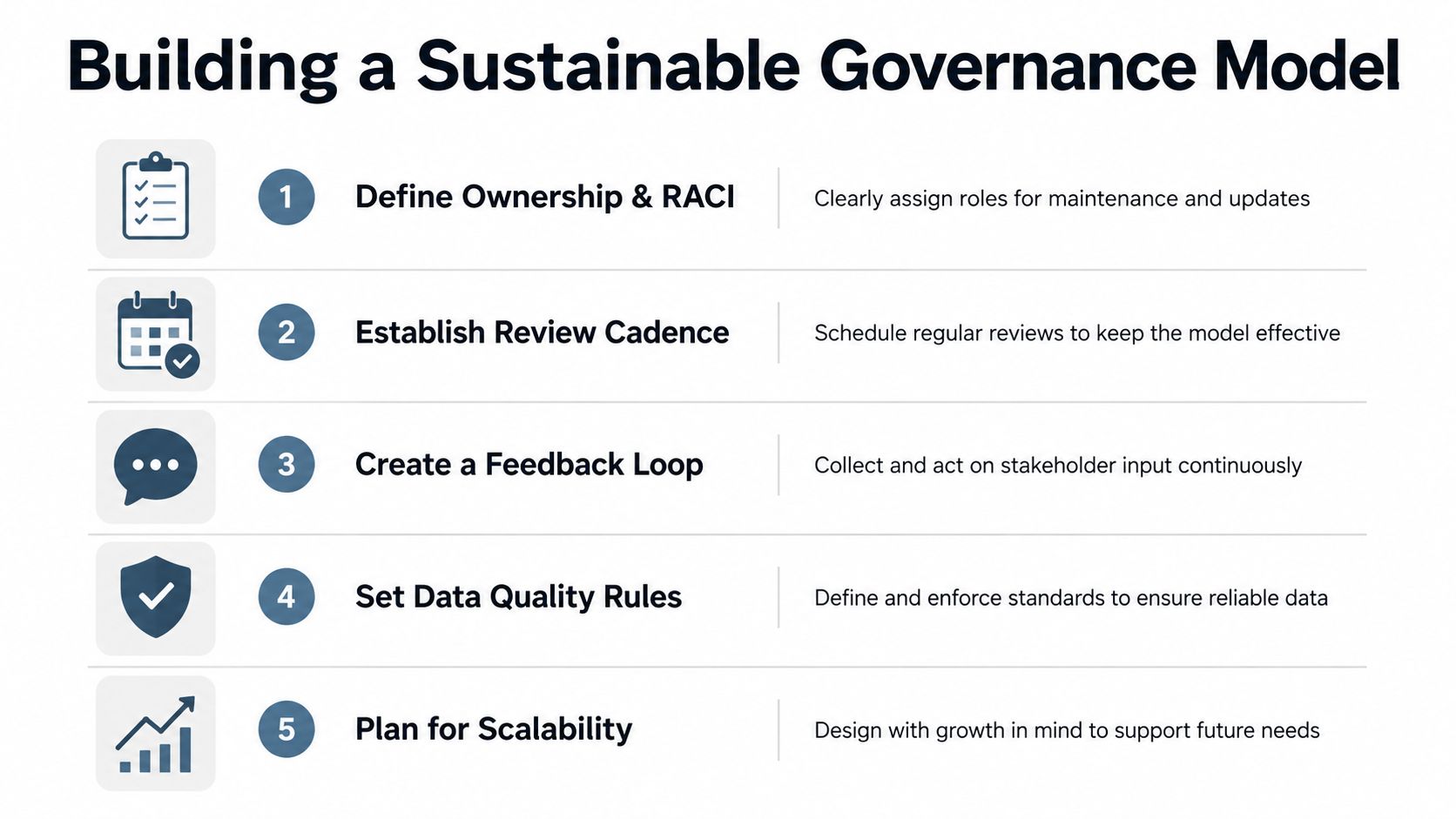
Use a compact governance model with five responsibilities:
- Define ownership and RACI. Name the accountable owner, responsible maintainer, consulted stakeholders, and informed users for each critical data domain.
- Establish a review cadence. Review definitions, permissions, integrations, and validation failures on a schedule appropriate to the domain.
- Create a feedback loop. Give sellers and sales engineers a visible way to report stale fields, missing context, or broken presentation connections.
- Set data quality rules. Validate completeness, consistency, timeliness, uniqueness, validity, and referential integrity before values reach downstream content.
- Plan for scalability. Add domains and tools only when ownership, access, lineage, and failure handling are clear.
Make change traceable
Version control isn't only for code. A governed presentation system should show which template, content block, data definition, and source record supported an approved deck. Consolidated documentation becomes authoritative when it includes traceable version history, access management, and governance that makes the correct version unambiguous, as explained in our guide to version control for documents.
A practical onboarding checklist for every new source should include:
- Source owner: who maintains the system and answers quality questions?
- Data contract: which fields, formats, identifiers, and update expectations apply?
- Definition map: which business terms and metrics does the source provide?
- Integration path: is access live, scheduled, event-based, or manually reviewed?
- Validation behavior: what happens when a value is missing, late, duplicated, or invalid?
- Permission model: who can read, edit, approve, and export the data?
- Downstream inventory: which CRM views, dashboards, proposals, and decks consume it?
- Retirement plan: how will old fields, exports, templates, and links be withdrawn?
Audit existing sources with the same questions. Pay particular attention to customer-facing presentations, since they often carry claims copied from several systems. Remove editable duplicates, point teams to the governed version, and keep approved snapshots only when a business or compliance need requires them.
Governance principle: make the compliant path the easiest path. If sellers need five manual steps to use current data, they'll create a shortcut.
The right SSOT for a revenue organization isn't a single locked database that every team must obey blindly. It's a governed network of authoritative sources, clear ownership, usable interfaces, and presentation workflows that keep customer-facing content aligned with current business data.
Encelade helps revenue teams create interactive, link-based presentations that connect to Google Sheets and REST APIs, use governed templates, and display live data without manual slide refreshes. To see how that keeps proposals and customer-facing decks aligned with your approved sources, book a 30-minute demo.